archwall 把架构画全Every architecture, drawn in full

herdr:编码智能体在后台一直跑herdr: a home where coding agents keep running
agentsterminalruntimeclient-server

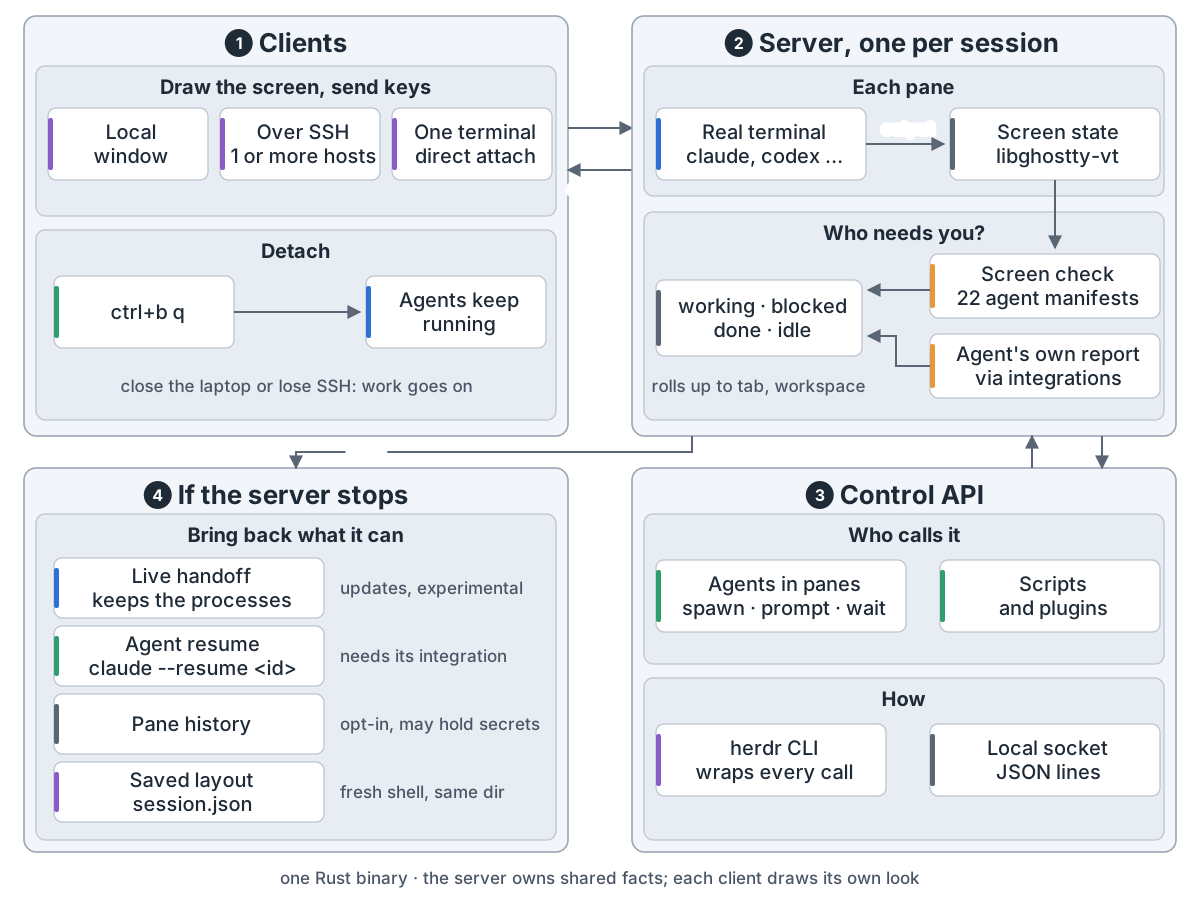
herdr overview: 1 clients: a local window, SSH to one or more hosts, or a direct attach to one terminal; they draw and send keys, and ctrl+b q detaches while agents keep running; 2 one server per session: each pane is a real terminal kept as screen state by libghostty-vt; a screen check (22 manifests) and the agents' own reports decide working, blocked, done or idle; 3 control API: agents in panes, scripts and plugins use the herdr CLI or a local socket to spawn, prompt and wait; 4 if the server stops herdr brings back what it can: live handoff (experimental), agent resume (needs its integration), pane history (opt-in) and the layout in session.json

Claude Code、Codex 跑在终端里,合上电脑或断了 SSH 就没了。开五个,还得找谁在等你。

herdr 是一个 Rust 程序,像 tmux:服务端管终端,客户端只管画。

结构。 一个会话一个服务端。会话装工作区,工作区装标签页,标签页装面板。面板是真终端,智能体是其中被认出的进程。
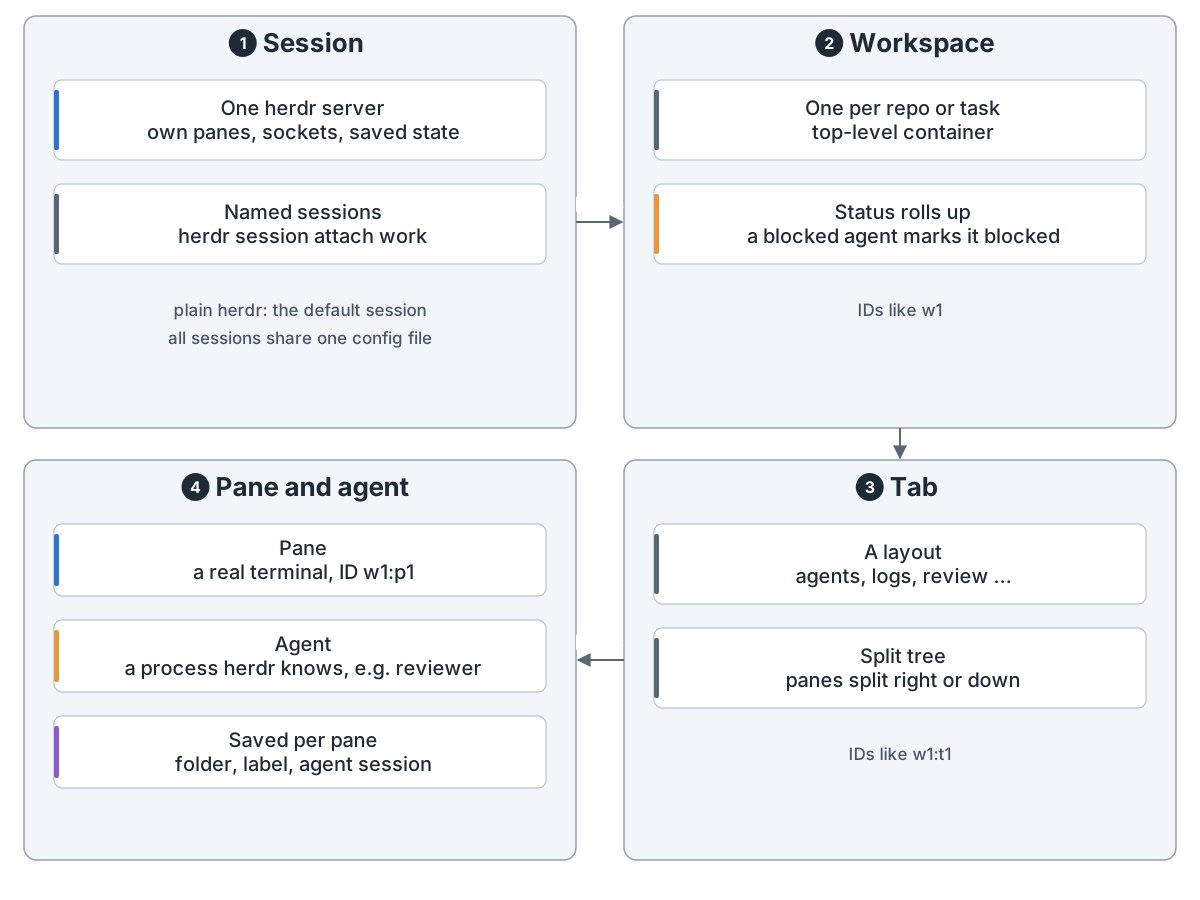
Data model: 1 session: one herdr server with its own panes, sockets and saved state; herdr session attach work opens a named one; all sessions share one config file; 2 workspace: one per repo or task, status rolls up, IDs like w1; 3 tab: a layout kept as a split tree, panes split right or down, IDs like w1:t1; 4 pane and agent: a pane is a real terminal with an ID like w1:p1, an agent is a process herdr recognises and may be named, e.g. reviewer; each pane saves its folder, label and agent session
结构:会话 → 工作区 → 标签页 → 面板,智能体住在面板里

怎么连。 本地窗口、SSH、herdr --remote、多台机器同一窗口,或接一个面板。ctrl+b q 断开,活照干。
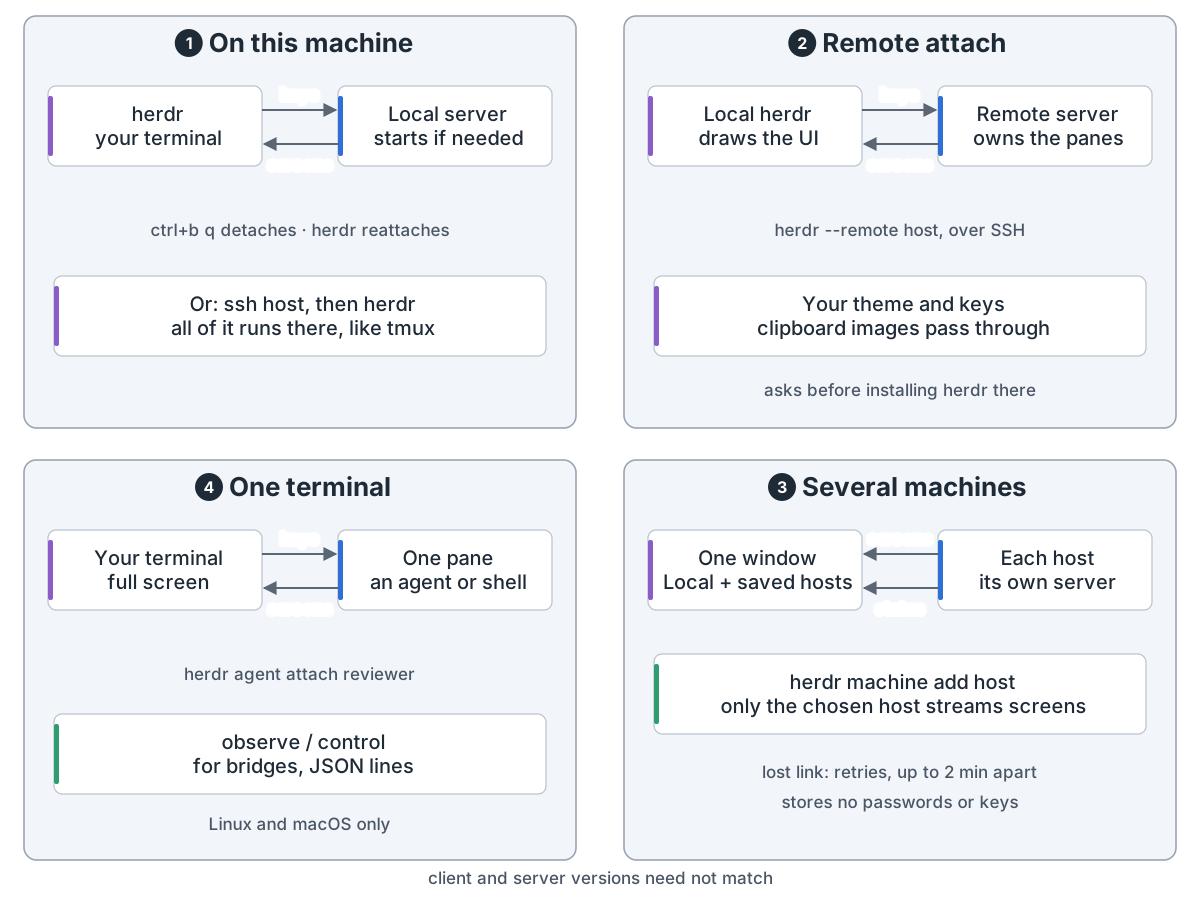
Four ways in: 1 on this machine: herdr starts the server if needed, ctrl+b q detaches and herdr reattaches; or SSH to a host and run herdr there, like tmux; 2 remote attach: herdr --remote host, the remote server owns the panes and sends screens, your local herdr draws the UI with your theme and keys, and it asks before installing herdr there; 3 several machines: herdr machine add puts Local and saved hosts in one window, only the chosen host streams screens and the others send status, lost links retry up to 2 minutes apart, no passwords or keys stored; 4 one terminal: herdr agent attach puts one pane in your terminal, observe and control serve bridges, Linux and macOS only; client and server versions need not match
连法:本机、远程、多台机器、单个终端,服务端都是同一个

主循环。 等输出、按键、接口调用或定时器,更新状态,改动 5 秒后存 session.json,只画有人看的。
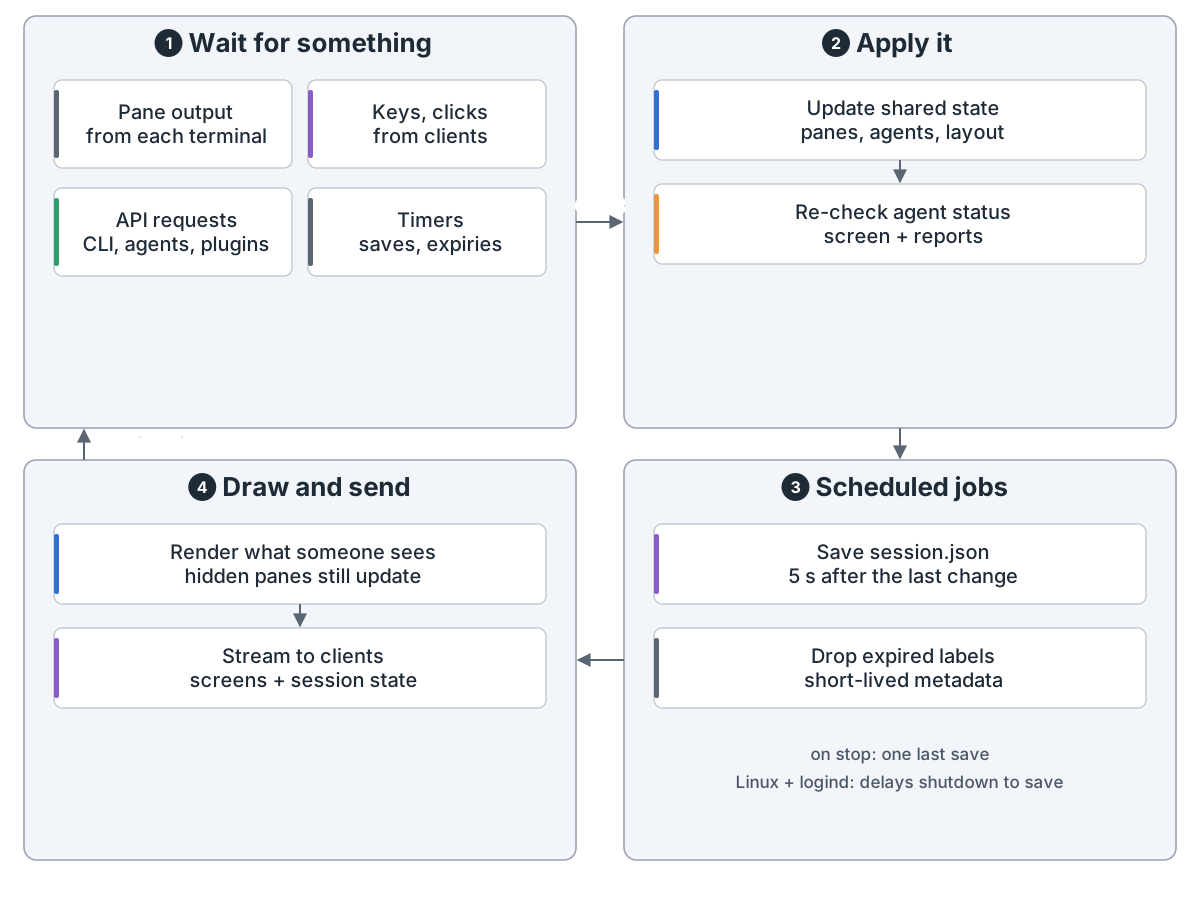
Server loop: 1 wait for something: pane output, keys and clicks from clients, API requests, timers; 2 apply it: update shared state (panes, agents, layout) and re-check agent status; 3 scheduled jobs: save session.json 5 seconds after the last change, drop expired short-lived labels, one last save on stop, and on Linux with logind delay shutdown briefly to save; 4 draw and send: render only what someone sees while hidden panes still update, stream screens and session state to clients, then wait again
主循环:等事件、改状态、按时存档、只画有人看的

谁卡住了。 找到智能体进程,拿屏幕底部对照规则(22 个清单),标出工作中、卡住、完成或空闲。6 个集成和支持 herdr 的智能体自己报状态。
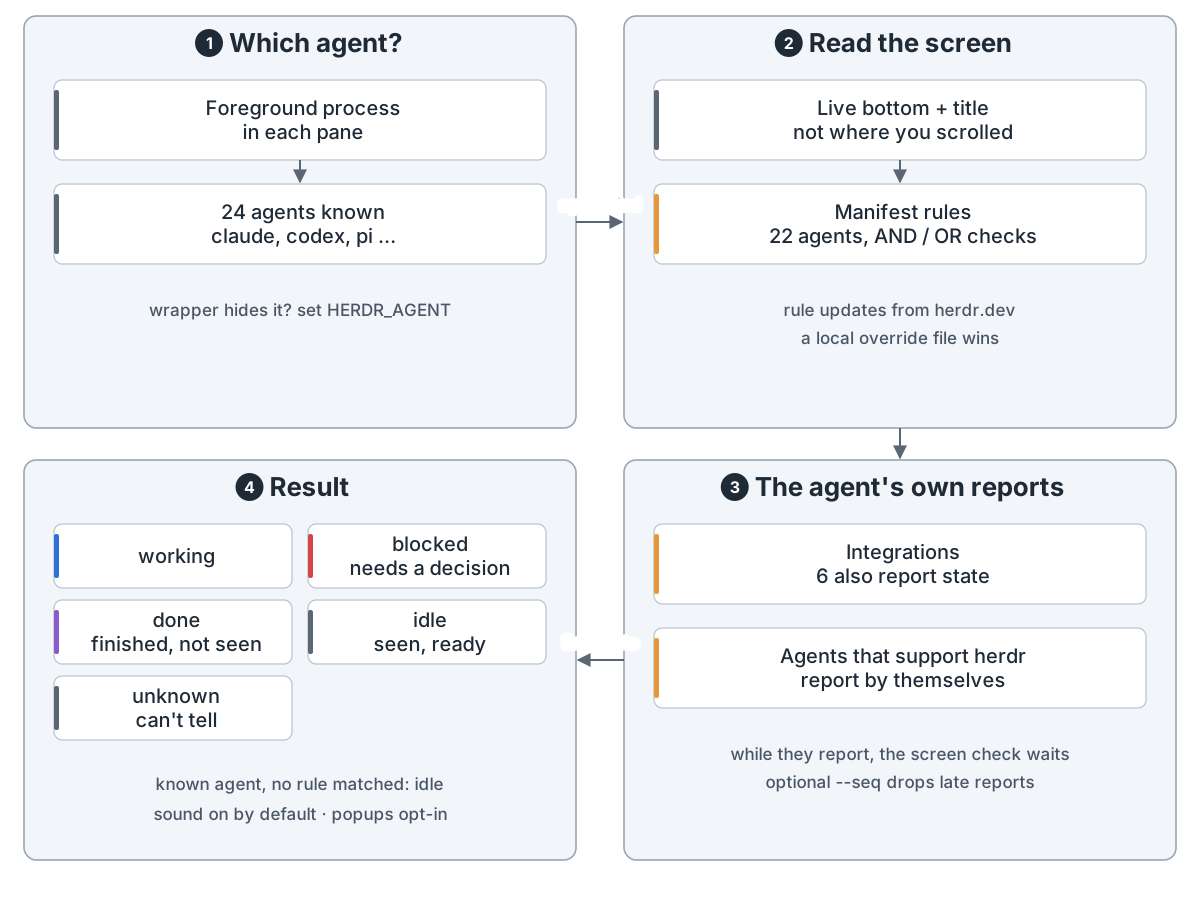
Who needs you: 1 which agent: the foreground process in each pane, 24 agents known such as claude, codex and pi, and HERDR_AGENT names one hidden by a wrapper; 2 read the screen: the live bottom and title, not where you scrolled, checked against manifest rules (22 agents, AND / OR checks), rules update from herdr.dev and a local override file wins; 3 the agent's own reports: 6 integrations also report state, agents that support herdr report by themselves, the screen check waits while they report, and an optional --seq drops late reports; 4 result: working, blocked (needs a decision), done (finished, not seen), idle (seen, ready) or unknown; a known agent with no matching rule shows idle; sound is on by default and popups are opt-in
状态:先认进程,再读屏幕底部,智能体自报时以它为准

互相指挥。 通过 herdr 命令或本地 socket,能开面板、给别的智能体发话、等它完成或卡住。
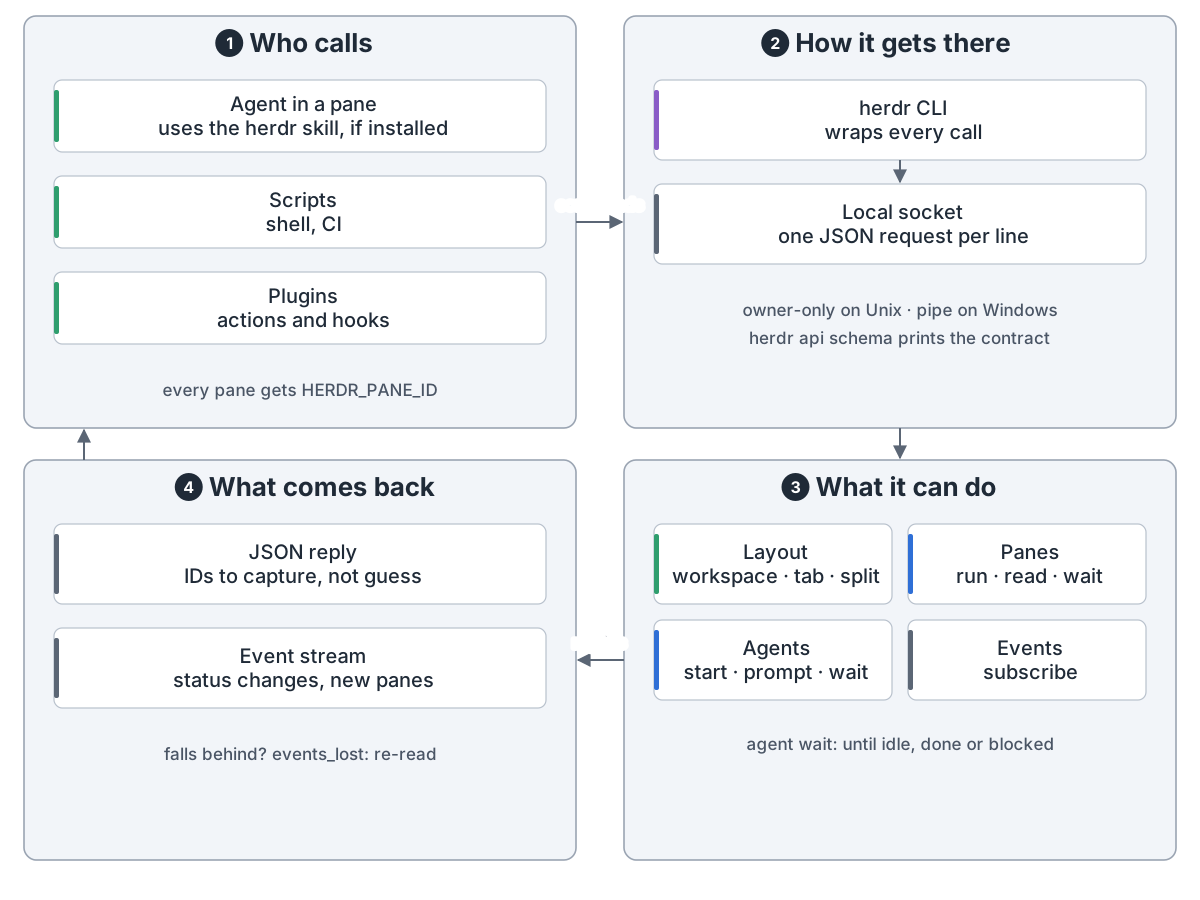
Control API: 1 who calls: an agent in a pane using the herdr skill if installed, scripts, plugins; every pane gets HERDR_PANE_ID; 2 how it gets there: the herdr CLI wraps every call, underneath is a local socket with one JSON request per line, owner-only on Unix and a named pipe on Windows, and herdr api schema prints the contract; 3 what it can do: layout (workspace, tab, split), panes (run, read, wait), agents (start, prompt, wait until idle, done or blocked), event subscriptions; 4 what comes back: a JSON reply with IDs to capture, an event stream of status changes, and events_lost when a reader falls behind, which means re-read
接口:命令行和 socket 是同一套调用,智能体能指挥智能体

herdr integration install 要手动装,写进智能体配置,报会话 ID。插件以你的身份运行,没有沙箱。
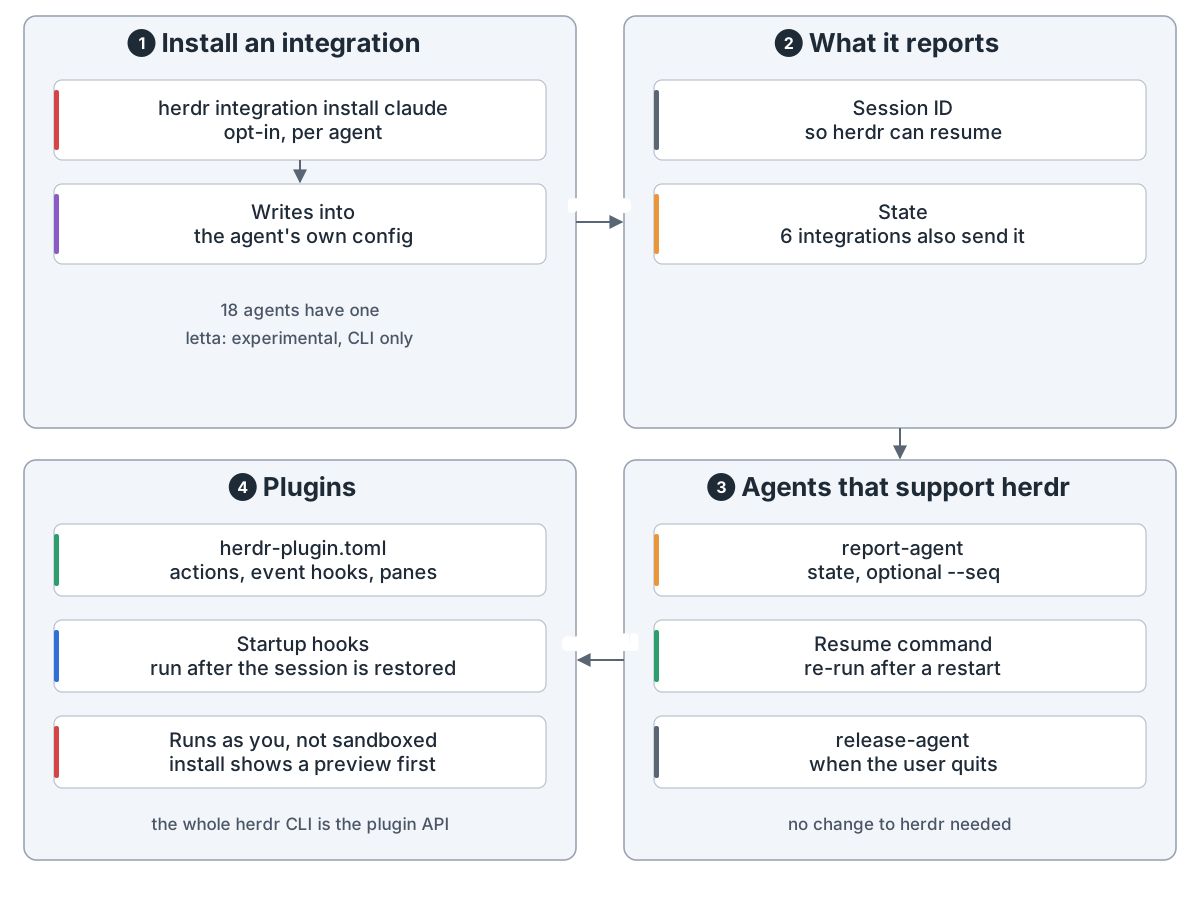
Extending herdr: 1 install an integration: herdr integration install claude, opt-in per agent, writes into the agent's own config; 18 agents have one, and letta is experimental and CLI-only; 2 what it reports: the session ID so herdr can resume, and state for 6 integrations; 3 agents that support herdr make the same calls themselves: report-agent with state and an optional --seq, the resume command, release-agent when the user quits, with no change to herdr; 4 plugins: herdr-plugin.toml declares actions, event hooks and panes, startup hooks run after the session is restored, plugins run as you with no sandbox and install shows a preview first; the whole herdr CLI is the plugin API
扩展:集成和插件都是手动装的,插件没有沙箱

服务端停了,进程就没了。布局回来,换新 shell;报过会话的智能体接着聊;面板历史要自己开。herdr update --handoff 保住进程,尚属实验。
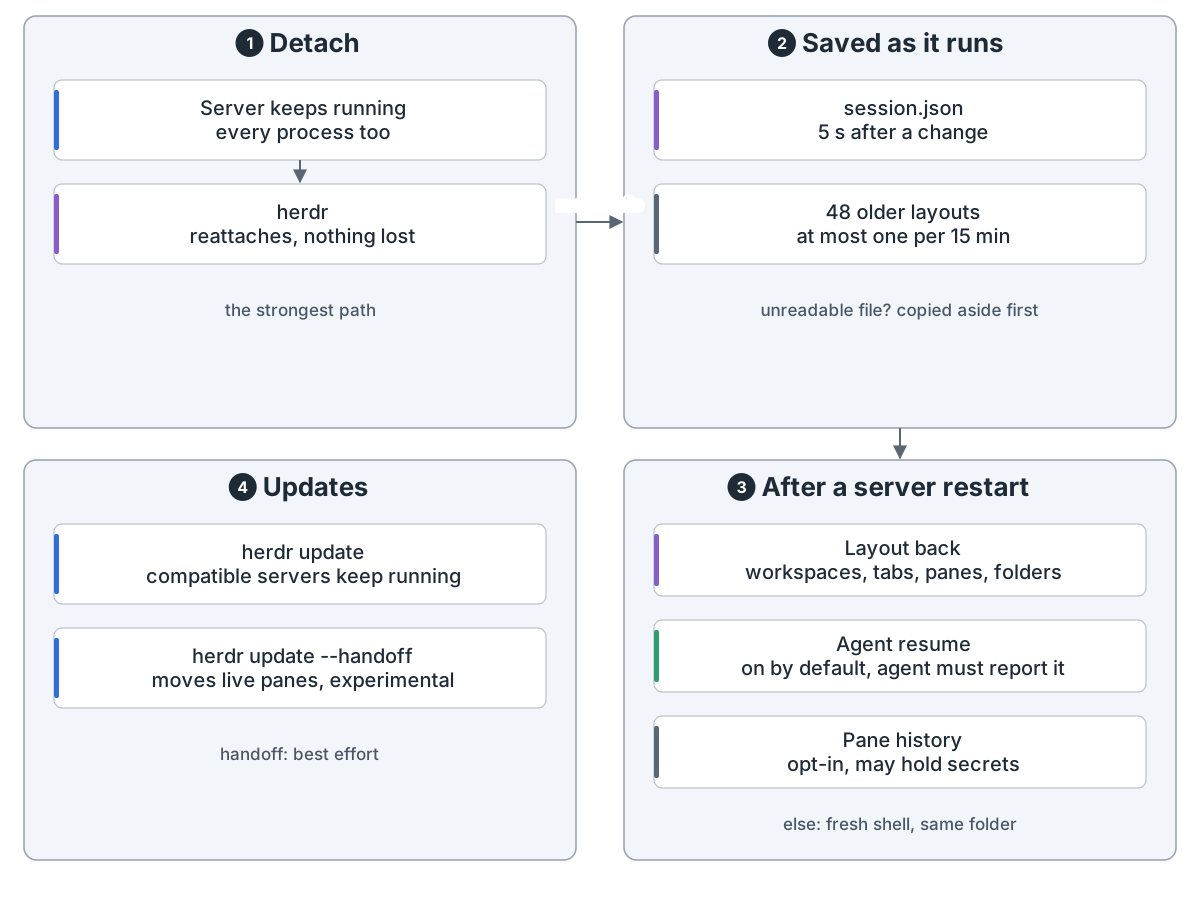
What survives: 1 detach: the server and every process keep running, herdr reattaches and nothing is lost, the strongest path; 2 saved as it runs: session.json 5 seconds after a change, plus up to 48 older layouts at most one per 15 minutes, and an unreadable file is copied aside first; 3 after a server restart: the layout comes back (workspaces, tabs, panes, folders), agent resume is on by default but the agent must have reported its session, pane history is opt-in and may hold secrets, other panes get a fresh shell in the same folder; 4 updates: plain herdr update keeps compatible servers running, herdr update --handoff moves live panes to the new server, experimental and best effort
恢复:断开什么都不丢;服务端停了,只能找回布局和会话

You run Claude Code, Codex and the rest in terminals. Close the laptop or drop SSH and they die. Run five at once and you keep hunting for the one that's waiting on you.

herdr is one Rust binary, split like tmux: a server owns the terminals, clients just draw.

Structure. One server per session. A session holds workspaces, a workspace holds tabs, a tab holds panes. A pane is a real terminal. An agent is a process recognised in a pane.

Data model: 1 session: one herdr server with its own panes, sockets and saved state; herdr session attach work opens a named one; all sessions share one config file; 2 workspace: one per repo or task, status rolls up, IDs like w1; 3 tab: a layout kept as a split tree, panes split right or down, IDs like w1:t1; 4 pane and agent: a pane is a real terminal with an ID like w1:p1, an agent is a process herdr recognises and may be named, e.g. reviewer; each pane saves its folder, label and agent session
Structure: session, workspace, tab, pane; the agent lives in a pane

Ways in. A local window, SSH, herdr --remote, several machines in one window, or just one pane. ctrl+b q detaches and the work keeps going.

Four ways in: 1 on this machine: herdr starts the server if needed, ctrl+b q detaches and herdr reattaches; or SSH to a host and run herdr there, like tmux; 2 remote attach: herdr --remote host, the remote server owns the panes and sends screens, your local herdr draws the UI with your theme and keys, and it asks before installing herdr there; 3 several machines: herdr machine add puts Local and saved hosts in one window, only the chosen host streams screens and the others send status, lost links retry up to 2 minutes apart, no passwords or keys stored; 4 one terminal: herdr agent attach puts one pane in your terminal, observe and control serve bridges, Linux and macOS only; client and server versions need not match
Ways in: local, remote, several machines or one terminal, all talking to a server

The loop. Wait for output, keys, API calls or timers. Update the state, save session.json 5 seconds after a change, and draw only what someone is looking at.

Server loop: 1 wait for something: pane output, keys and clicks from clients, API requests, timers; 2 apply it: update shared state (panes, agents, layout) and re-check agent status; 3 scheduled jobs: save session.json 5 seconds after the last change, drop expired short-lived labels, one last save on stop, and on Linux with logind delay shutdown briefly to save; 4 draw and send: render only what someone sees while hidden panes still update, stream screens and session state to clients, then wait again
The loop: wait, update, save on time, draw only what is watched

Who's stuck. herdr finds the agent's process and reads the bottom of its screen against per-agent rules (22 manifests). It marks the pane working, blocked, done or idle. Six integrations, and agents built for herdr, report their own state.

Who needs you: 1 which agent: the foreground process in each pane, 24 agents known such as claude, codex and pi, and HERDR_AGENT names one hidden by a wrapper; 2 read the screen: the live bottom and title, not where you scrolled, checked against manifest rules (22 agents, AND / OR checks), rules update from herdr.dev and a local override file wins; 3 the agent's own reports: 6 integrations also report state, agents that support herdr report by themselves, the screen check waits while they report, and an optional --seq drops late reports; 4 result: working, blocked (needs a decision), done (finished, not seen), idle (seen, ready) or unknown; a known agent with no matching rule shows idle; sound is on by default and popups are opt-in
Status: find the process, read the bottom of the screen, and trust the agent's own report when it sends one

Agents driving agents. Through the herdr CLI or a local socket, an agent can open panes, prompt another agent and wait until it's done or blocked.

Control API: 1 who calls: an agent in a pane using the herdr skill if installed, scripts, plugins; every pane gets HERDR_PANE_ID; 2 how it gets there: the herdr CLI wraps every call, underneath is a local socket with one JSON request per line, owner-only on Unix and a named pipe on Windows, and herdr api schema prints the contract; 3 what it can do: layout (workspace, tab, split), panes (run, read, wait), agents (start, prompt, wait until idle, done or blocked), event subscriptions; 4 what comes back: a JSON reply with IDs to capture, an event stream of status changes, and events_lost when a reader falls behind, which means re-read
API: the CLI and the socket are the same calls, so agents can drive agents

herdr integration install is opt-in. It writes into the agent's config and reports the session ID. Plugins run as you, with no sandbox.

Extending herdr: 1 install an integration: herdr integration install claude, opt-in per agent, writes into the agent's own config; 18 agents have one, and letta is experimental and CLI-only; 2 what it reports: the session ID so herdr can resume, and state for 6 integrations; 3 agents that support herdr make the same calls themselves: report-agent with state and an optional --seq, the resume command, release-agent when the user quits, with no change to herdr; 4 plugins: herdr-plugin.toml declares actions, event hooks and panes, startup hooks run after the session is restored, plugins run as you with no sandbox and install shows a preview first; the whole herdr CLI is the plugin API
Extending: integrations and plugins are opt-in, and plugins are not sandboxed

If the server stops, the processes are gone. The layout comes back with fresh shells. Agents that reported a session resume it. Pane history is opt-in. herdr update --handoff keeps processes alive, but it is experimental.

What survives: 1 detach: the server and every process keep running, herdr reattaches and nothing is lost, the strongest path; 2 saved as it runs: session.json 5 seconds after a change, plus up to 48 older layouts at most one per 15 minutes, and an unreadable file is copied aside first; 3 after a server restart: the layout comes back (workspaces, tabs, panes, folders), agent resume is on by default but the agent must have reported its session, pane history is opt-in and may hold secrets, other panes get a fresh shell in the same folder; 4 updates: plain herdr update keeps compatible servers running, herdr update --handoff moves live panes to the new server, experimental and best effort
Restore: detaching loses nothing; after a stop, herdr rebuilds the layout and resumes reported sessions

来源Source: github.com

← 全部架构← All architectures