archwall 把架构画全Every architecture, drawn in full
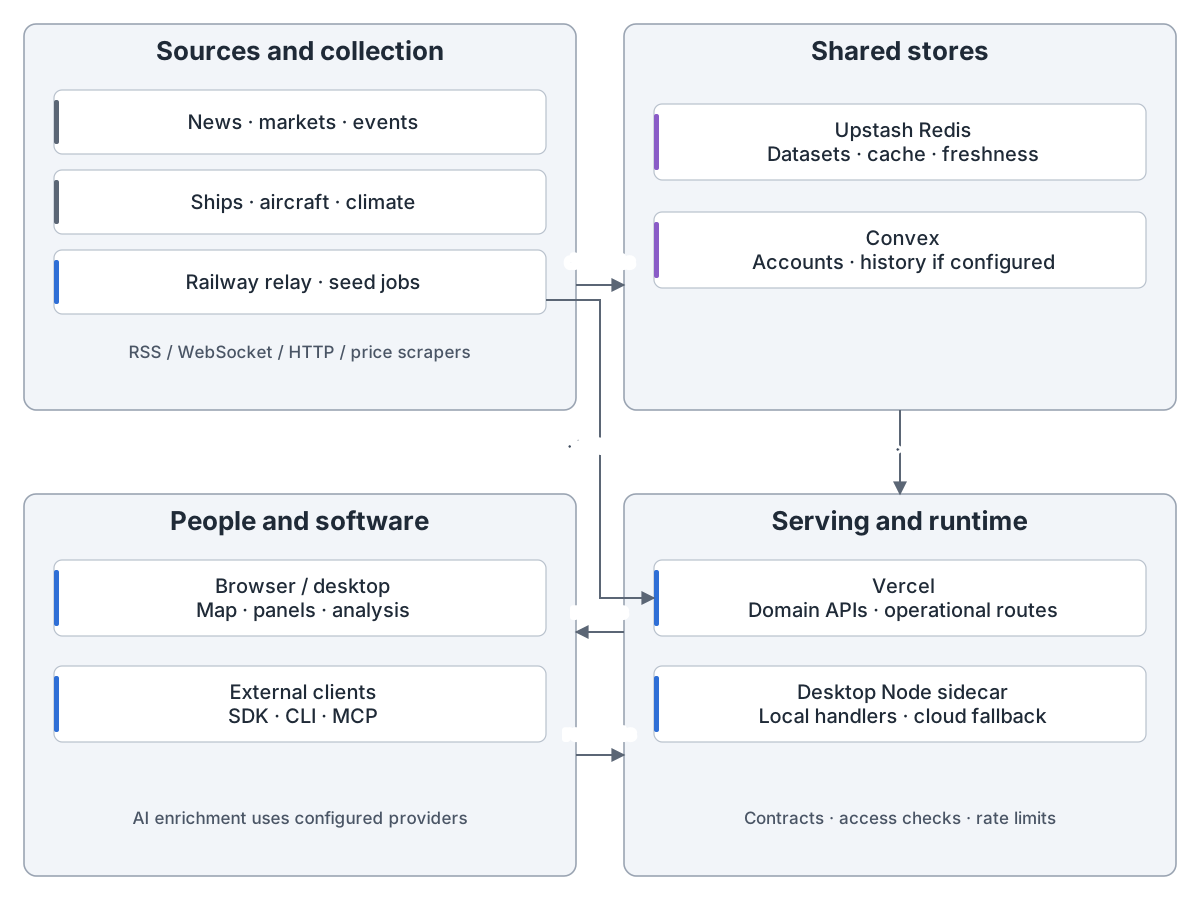
World Monitor: from sources to a shared picture: External news, markets, conflict, climate, ships and aircraft feed Railway relay and seed jobs. Upstash Redis holds shared datasets and freshness metadata; Convex holds account state and, when configured, intelligence history. Vercel APIs and the desktop Node sidecar serve the browser or desktop maps, panels and analysis, and API, CLI, SDK and MCP consumers. When WS_RELAY_URL is set, relay vessel snapshots also reach Vercel APIs directly. Configured AI providers enrich intelligence. The remaining figures explain ingestion, gateway, quote reads, queued jobs, browser, intelligence, accounts, desktop and operations.
World Monitor:从全球数据到同一张态势图World Monitor: from global feeds to a shared picture
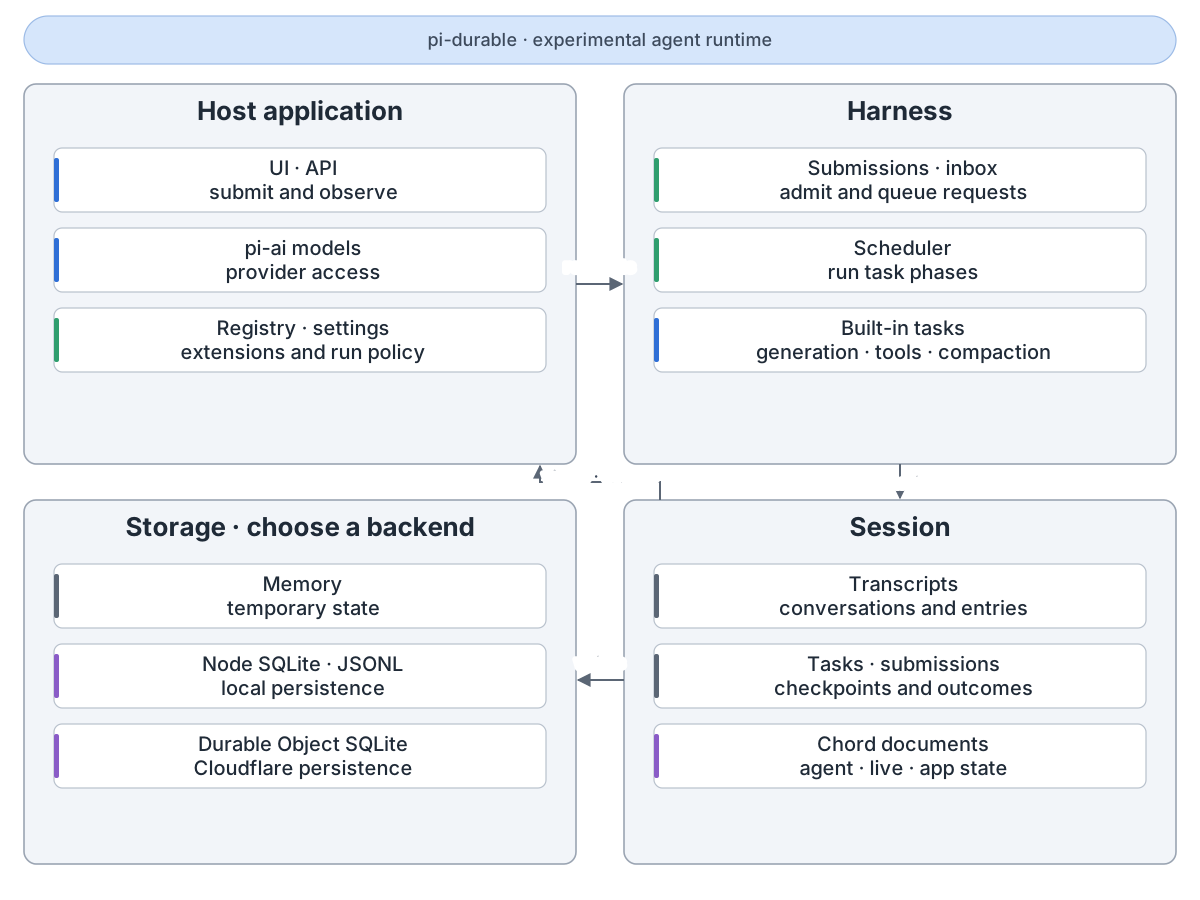
pi-durable: the parts: The host supplies an application UI, models, extensions and settings. Harness admits input and schedules generation, tool and compaction tasks. Session atomically commits transcripts, task checkpoints, submissions and Chord documents to a selected storage backend. Committed changes feed conversation views and agent events back to the host. Storage choices are memory, Node SQLite, JSONL and Cloudflare Durable Object SQLite. This package is experimental.
pi-durable:先把智能体进度存好再显示pi-durable: store agent progress before showing it
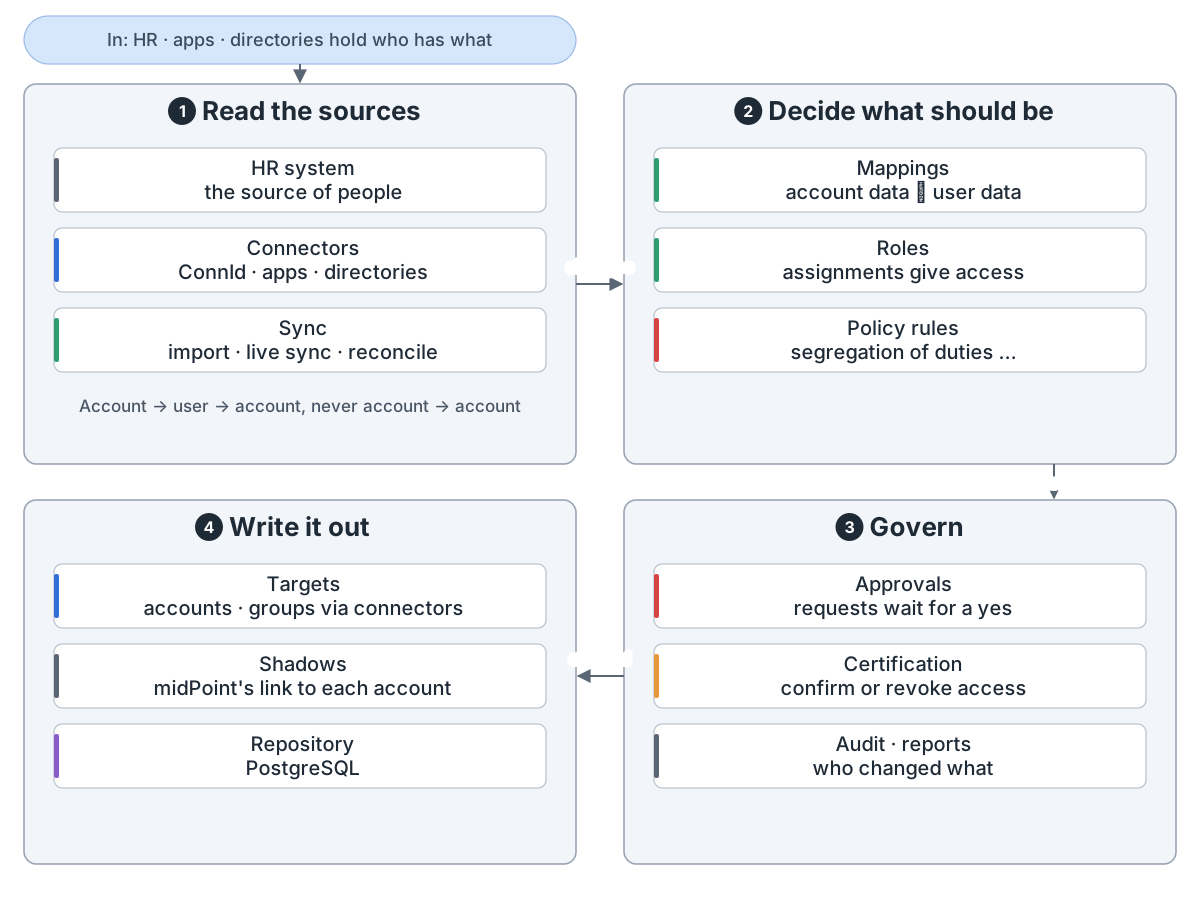
midPoint overview: In: HR, apps and directories each hold part of who works here and what they may use. 1 Read the sources: connectors read the HR system, apps and directories; import, live sync and reconciliation bring changes in. Every account is linked to a user, never account to account. 2 Decide what should be: mappings turn account data into user data and back, roles give access, policy rules such as segregation of duties check it. 3 Govern: requests wait for approval, certification campaigns ask people to confirm or revoke access, and the audit trail and reports record it all. 4 Write it out: connectors create, change and delete accounts and groups on the targets; midPoint keeps a shadow that links to each account and stores its objects in a PostgreSQL repository.
midPoint:开源身份治理系统怎么管谁能用什么midPoint: how an open-source identity governance system manages who gets what
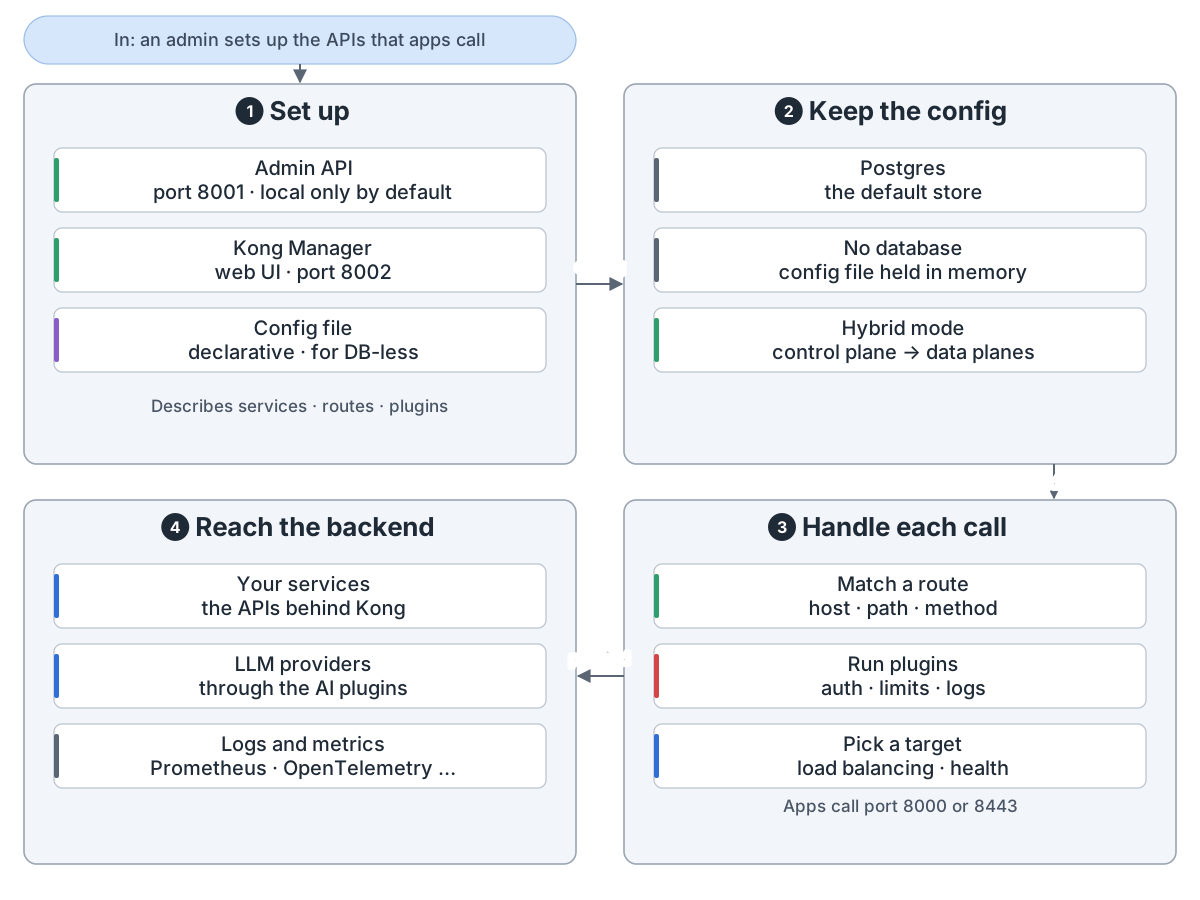
Kong Gateway overview: In: an admin describes the APIs, then apps and AI clients call them through Kong. 1 Set up: the Admin API on port 8001, Kong Manager on port 8002, or a declarative config file describe services, routes, plugins and upstreams. 2 Keep the config: in Postgres, or with no database from a config file held in memory, or in hybrid mode where a control plane pushes it to data planes. 3 Handle each call: apps call port 8000 or 8443; Kong matches a route, runs the plugins for it, such as auth, rate limits and logging, and picks a healthy target. 4 Reach the backend: your services, LLM providers through the AI plugins, and logs and metrics tools.
Kong Gateway:一个 API 网关怎么处理每一次调用Kong Gateway: how an API gateway handles each call
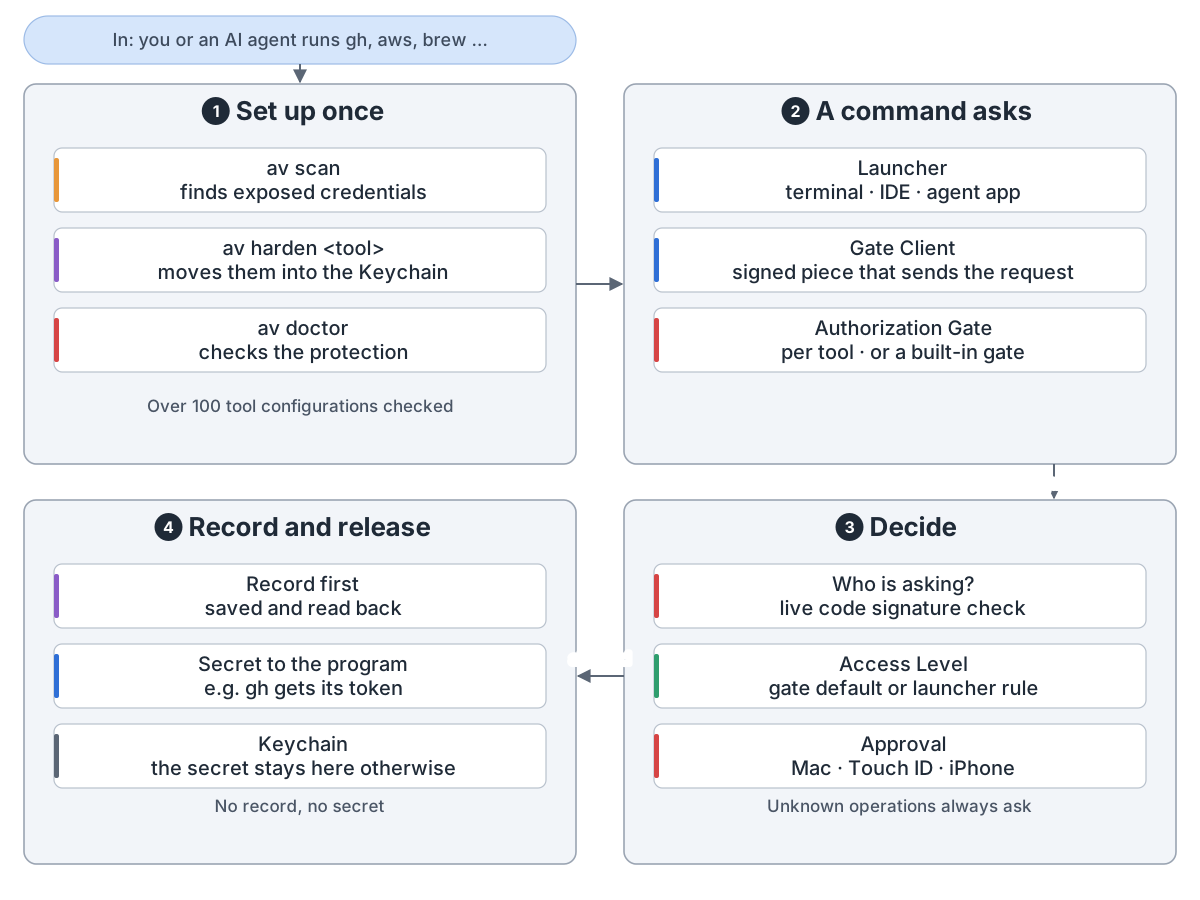
Automic Vault overview: In: you, a terminal or an AI agent runs a tool such as gh, aws or brew on a Mac. 1 Set up once: av scan checks over 100 developer-tool configurations for exposed credentials, av harden moves a supported tool's credentials into the macOS Keychain and changes how the tool asks for them, and av doctor checks that protection. 2 A command asks: the Launcher (a terminal, IDE or agent app) starts the tool, a signed Automic Vault Gate Client sends the request, and the Authorization Gate for that request, the tool's own or a built-in one, receives it on the Mac. 3 Decide: the Mac checks the Launcher's live code signature, applies the gate's default Access Level or a rule for that Launcher, and asks for Approval on the Mac, with Touch ID or on an iPhone when policy cannot allow it; unknown operations always need Approval. 4 Record and release: an Authorization Record is saved and read back first, then the secret goes to the program that needs it; with no record there is no secret.
Automic Vault:让 AI 智能体用你的凭据前,先过一道闸Automic Vault: a gate between AI agents and your credentials
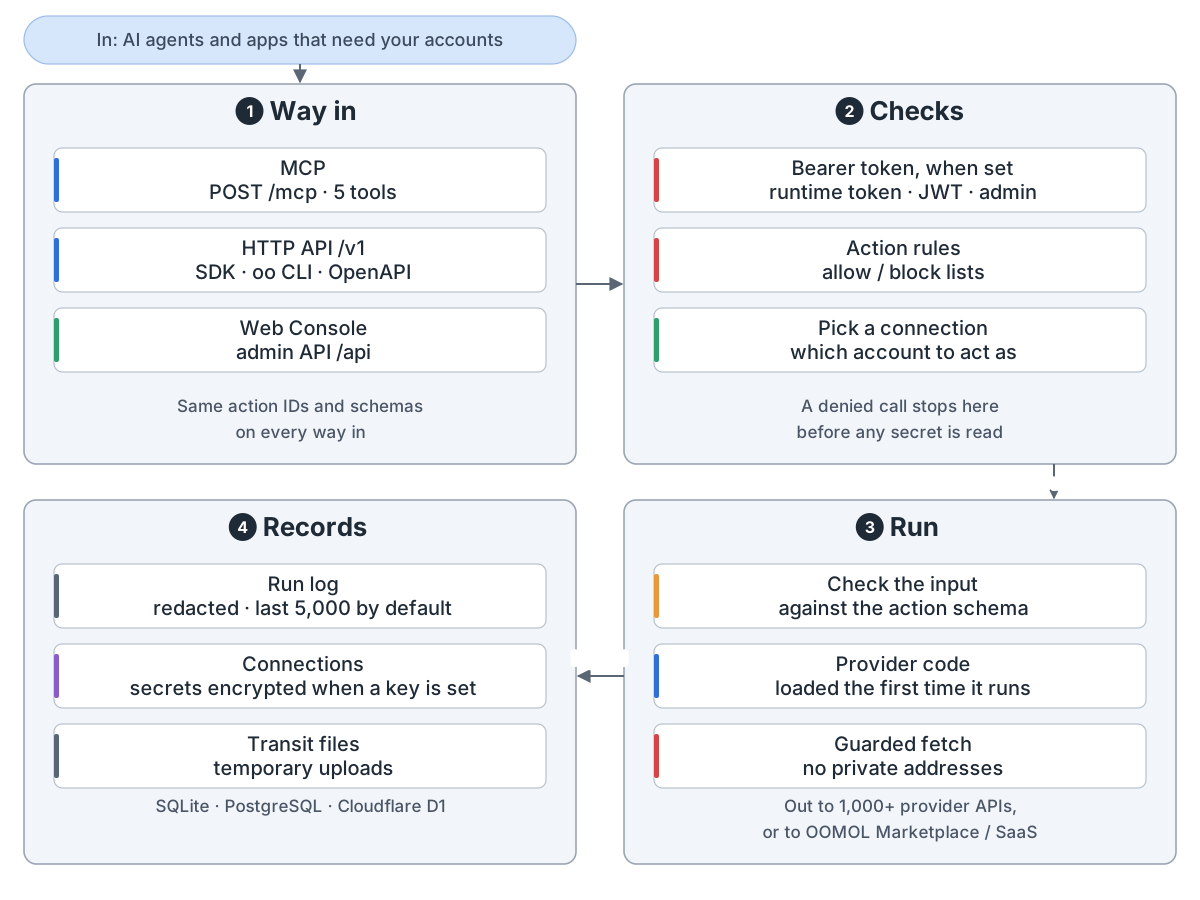
OpenConnector overview: in come AI agents and apps that need your accounts; 1 way in: MCP (POST /mcp, 5 tools), the HTTP API /v1 (SDK, oo CLI, OpenAPI) and the Web Console (admin API /api), with the same action IDs and schemas on every way in; 2 checks: a bearer token when one is set (runtime token, JWT or admin), allow and block rules per action, and which account to act as; a denied call stops before any secret is read; 3 run: the input is checked against the action schema, the provider's code loads the first time it runs, and requests go through a guarded fetch with no private addresses, out to 1,000+ provider APIs or to OOMOL Marketplace / SaaS; 4 records: a redacted run log (last 5,000 by default), connections with their secrets (encrypted when a key is set) and temporary transit files, in SQLite, PostgreSQL or Cloudflare D1
OpenConnector:AI 智能体连你的应用,只连一次,不碰密钥OpenConnector: agents use your apps without seeing your keys
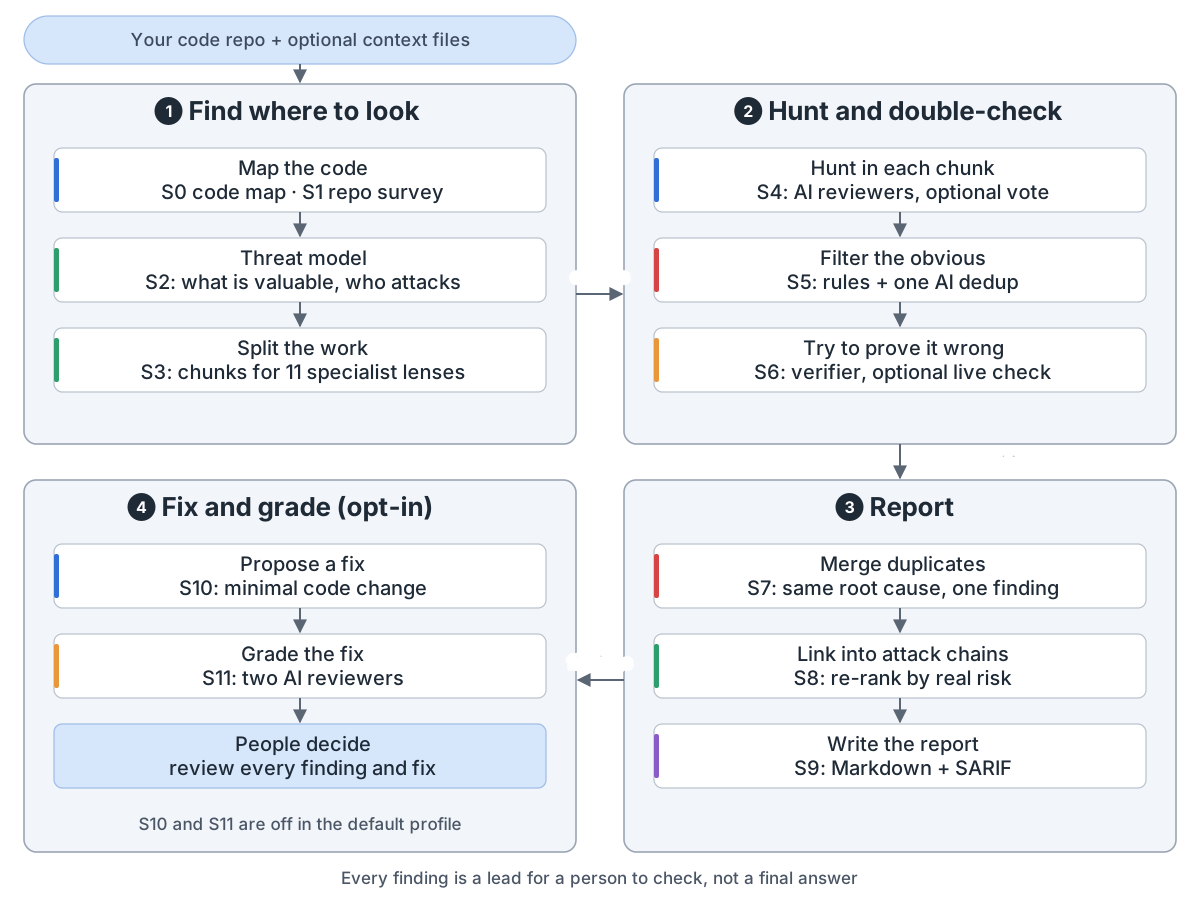
VVAH overview: input is your code repo plus optional context files; 1 find where to look: S0 code map and S1 repo survey, S2 threat model, S3 chunks for 11 specialist lenses; 2 hunt and double-check: S4 AI reviewers per chunk with optional voting, S5 rule filter then one AI dedup, S6 a verifier tries to prove each finding wrong, with an optional live check; 3 report: S7 merges duplicates, S8 links attack chains and re-ranks, S9 writes Markdown and SARIF; 4 fix and grade, off by default: S10 proposes a minimal fix, S11 two AI reviewers grade it, and people review every finding and fix
VVAH:用 AI 找漏洞、复核、修复、打分VVAH: AI that finds security bugs, checks them, fixes and grades
peerreview overview: you run /peerreview [repo], with optional flags --chat and --dry-run; 1 set up: a charter (private, temporary, from your docs), pick the peer (another vendor: Claude Code ↔ Codex), a review branch (baseline commit first); if the docs conflict or say nothing, stop and ask; 2 rounds until done: the HOST reviews, runs the gate and writes findings, the PEER co-edits files and never commits, behind a git guard and a round deadline, the HOST re-checks the real diff and reruns the gate, then commits the round, since the HOST owns git; 3 stop only when every check passes with no findings left, the PEER says CONVERGED to a read-only, neutral prompt, and at least 1 peer round ran, with no upper cap; a round with no progress stops and reports; NOT CONVERGED goes back for another round; 4 hand over: one squashed commit in a pull request on evolve/<slug>, a converged tag where the next review starts, and an honest report of each check, the peer tier and leftovers; never called perfect; lessons from a run go to /peerreview-evolve, which keeps or drops them
peerreview:两家厂商的 AI 一起审一个仓库,直到都说可以peerreview: two AI vendors review one repo until both say it's done
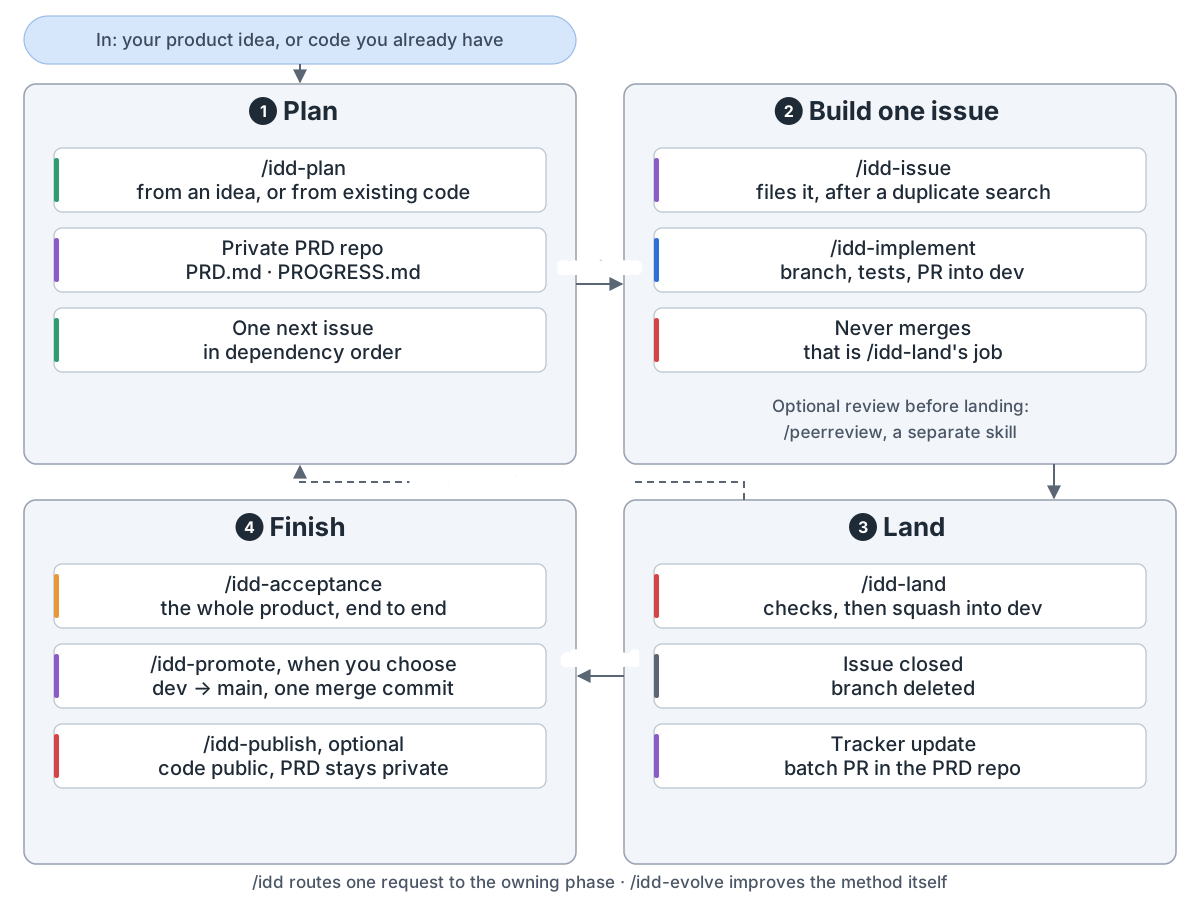
idd-skills overview: in comes your product idea, or code you already have; 1 plan: /idd-plan, from an idea or from existing code, writes into a private PRD repo with PRD.md and PROGRESS.md, and picks one next issue in dependency order; 2 build one issue: /idd-issue files it after a duplicate search, /idd-implement makes a branch, tests and a PR into dev, and never merges, which is /idd-land's job; an optional review before landing comes from /peerreview, a separate skill; 3 land: /idd-land checks, then squashes into dev, the issue is closed and the branch deleted, and the tracker update goes into a batch PR in the PRD repo; a dashed arrow goes back to plan for the next round, and /idd-auto loops on its own; 4 finish, once all have landed: /idd-acceptance tests the whole product end to end, /idd-promote moves dev to main with one merge commit when you choose, and the optional /idd-publish makes the code public while the PRD stays private; /idd routes one request to the phase that owns it, and /idd-evolve improves the method itself
idd-skills:AI 一次做一个 GitHub issue,把产品做出来idd-skills: AI builds your product one GitHub issue at a time
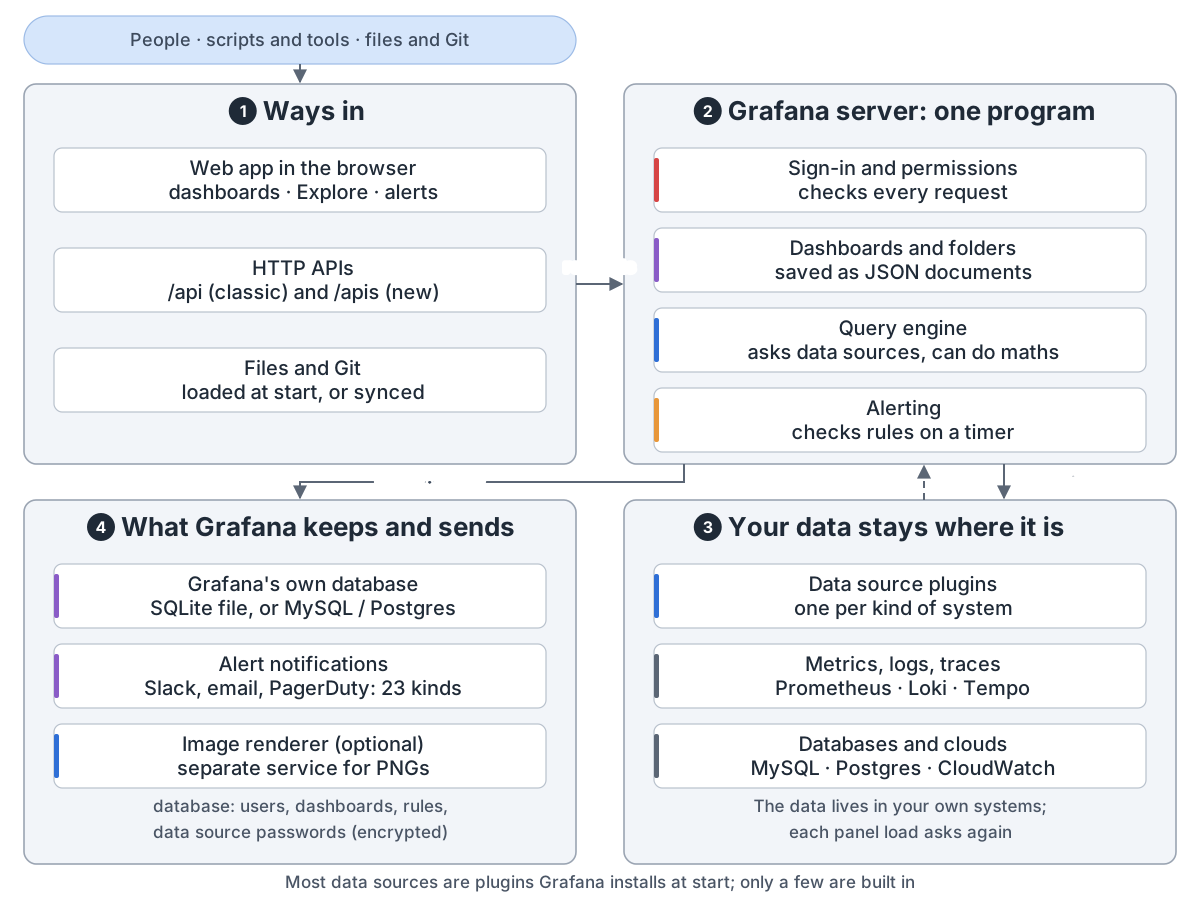
Grafana overview: people, scripts and tools, files and Git come in; 1 ways in: the web app (dashboards, Explore, alerts), the HTTP APIs (classic /api and new /apis), files loaded at start or synced from Git; 2 the Grafana server is one program: sign-in and permissions check every request, dashboards and folders are saved as JSON documents, the query engine asks data sources and can do maths, alerting checks rules on a timer; 3 your data stays where it is: data source plugins, one per kind of system, reach metrics, logs and traces (Prometheus, Loki, Tempo) and databases and clouds (MySQL, Postgres, CloudWatch); your data lives in your own systems, and each panel load asks again; 4 what Grafana keeps and sends: its own database (a SQLite file by default, or MySQL / Postgres, holding users, dashboards, rules and encrypted data source passwords), alert notifications to 23 kinds of contact point such as Slack, email and PagerDuty, and an optional image renderer that runs as a separate service; most data sources are plugins Grafana installs at start, only a few are built in
Grafana:数据在你的系统里,图表现查现画Grafana: charts and alerts on data that lives in your systems
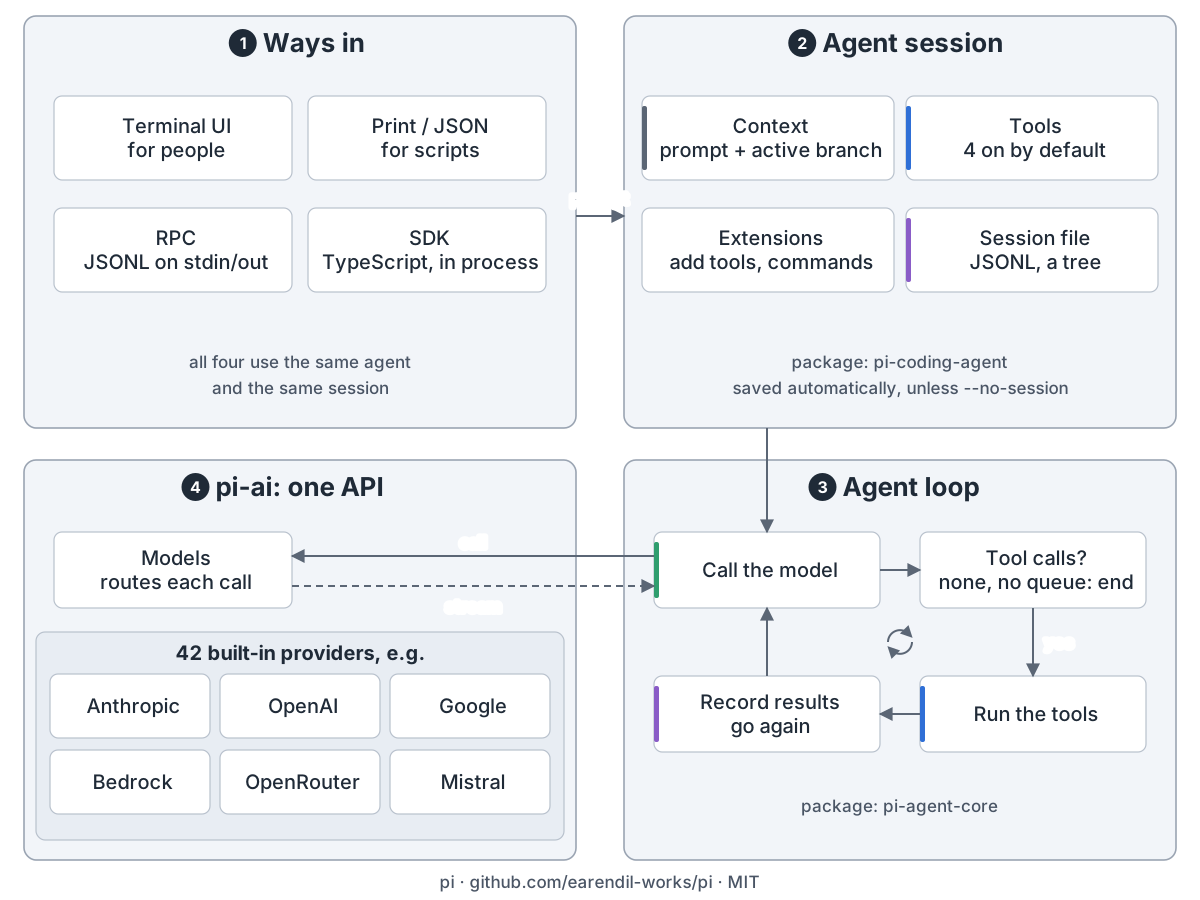
Pi overview: 1 four ways in (terminal UI, print/JSON, RPC, SDK) share one agent and session; 2 the agent session (pi-coding-agent): context from the prompt and active branch, 4 tools on by default, extensions add tools and commands, the session saved as a JSONL tree; 3 the loop (pi-agent-core): call the model, run any tool calls, record the results and go again, or end when nothing is queued; 4 pi-ai routes each call to one of 42 built-in providers and streams the answer back
pi:一个可以自己改造的极简编程智能体pi: a minimal coding agent you make your own
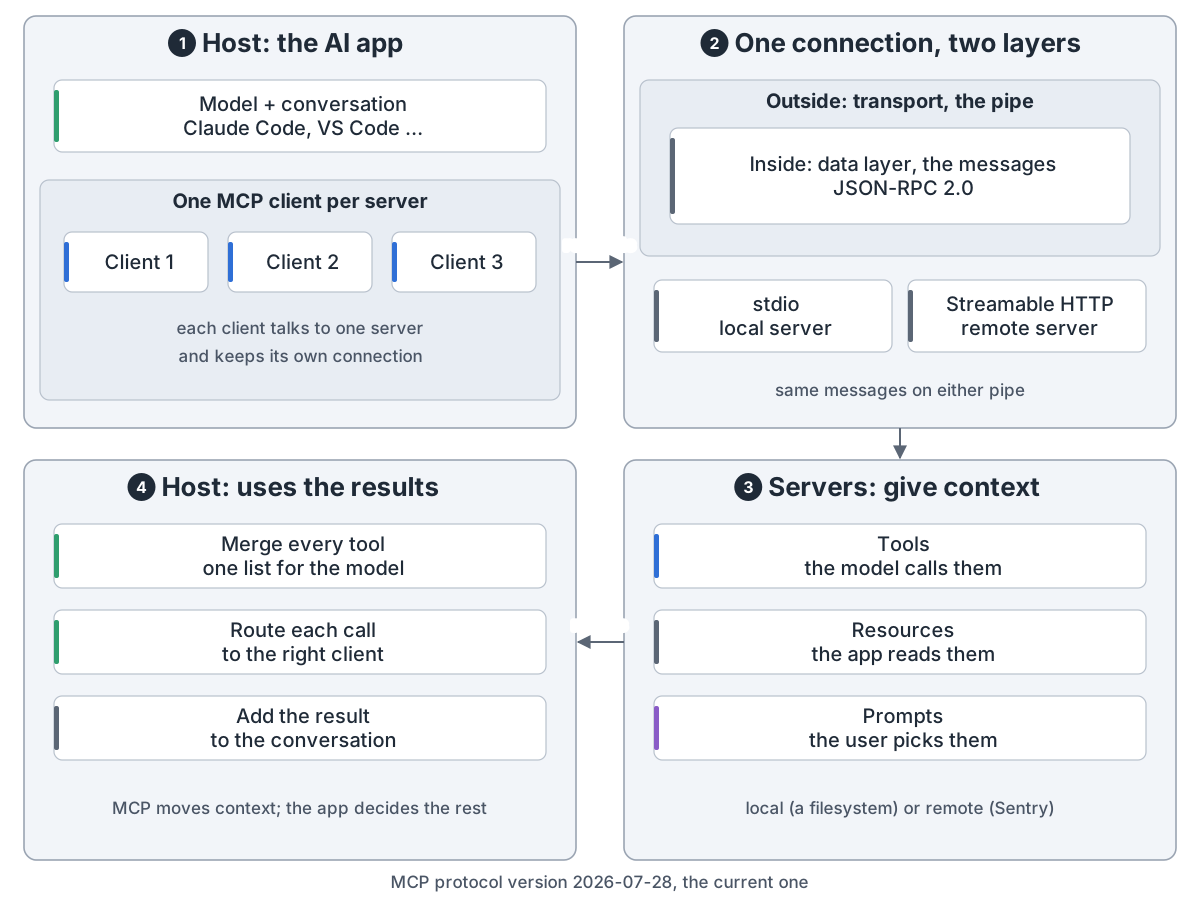
MCP overview: 1 the host is the AI app (such as Claude Code or VS Code); it keeps the model and the conversation and makes one MCP client per server; 2 each connection has two layers, the transport outside is the pipe (stdio locally, Streamable HTTP remotely) and the data layer inside is the messages (JSON-RPC 2.0), the same on either pipe; 3 servers give context: tools the model calls, resources the app reads, prompts the user picks, local (a filesystem) or remote (Sentry); 4 the host merges every tool into one list for the model, routes each call to the right client and adds the result to the conversation
MCP:AI 应用怎么接上外部工具和数据MCP: how AI apps plug into tools and data
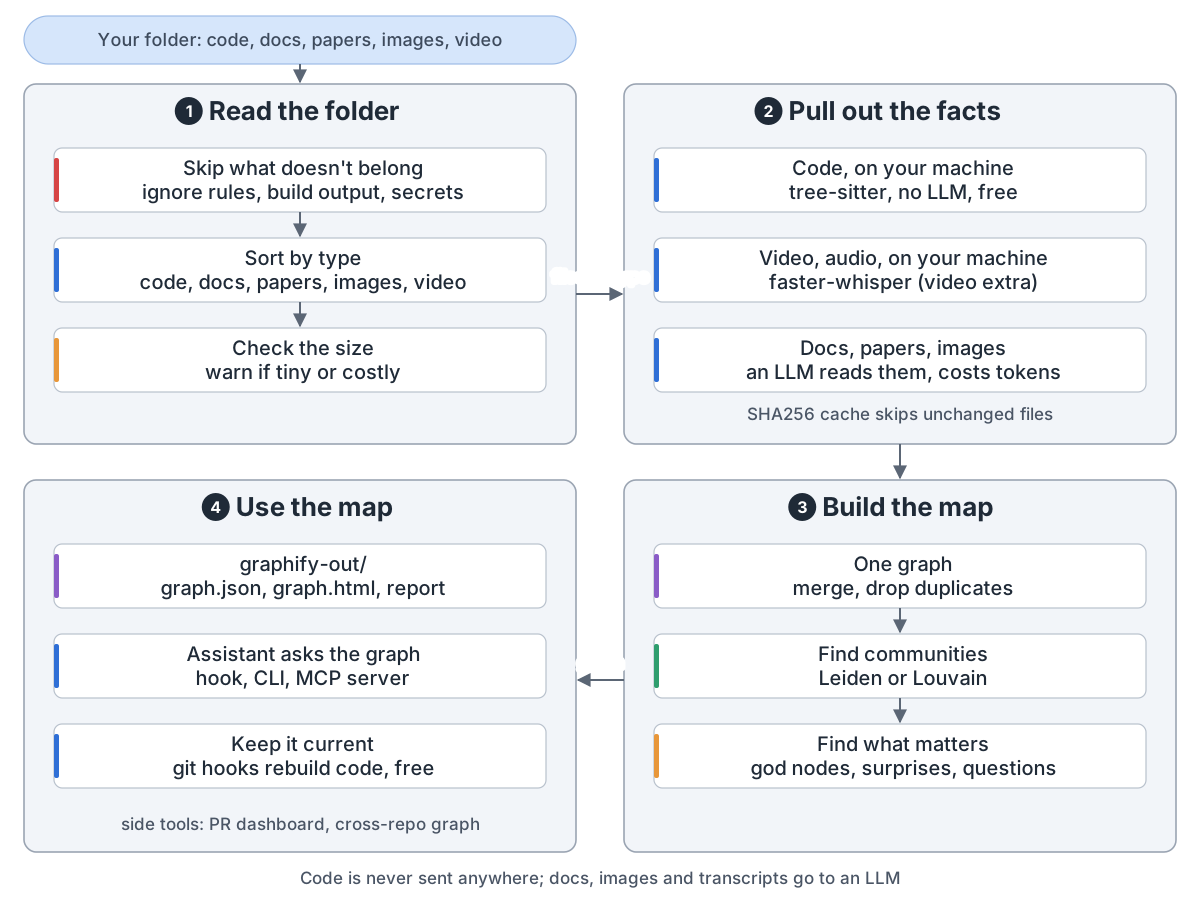
graphify overview: input is a folder of code, docs, papers, images and video; 1 read the folder: skip ignored files, build output and secrets, sort by type, warn if tiny or costly; 2 pull out the facts: code on your machine with tree-sitter, no LLM, free; video and audio on your machine with faster-whisper (video extra); docs, papers and images read by an LLM, which costs tokens; a SHA256 cache skips unchanged files; 3 build the map: one graph with duplicates dropped, communities with Leiden or Louvain, god nodes, surprises and questions; 4 use the map: graph.json, graph.html and the report in graphify-out, the assistant asks the graph through a hook, the CLI or an MCP server, git hooks rebuild the code part for free; side tools: PR dashboard, cross-repo graph; code is never sent anywhere
graphify:把整个项目变成一张可查询的知识图graphify: turn a whole project into a graph you can query
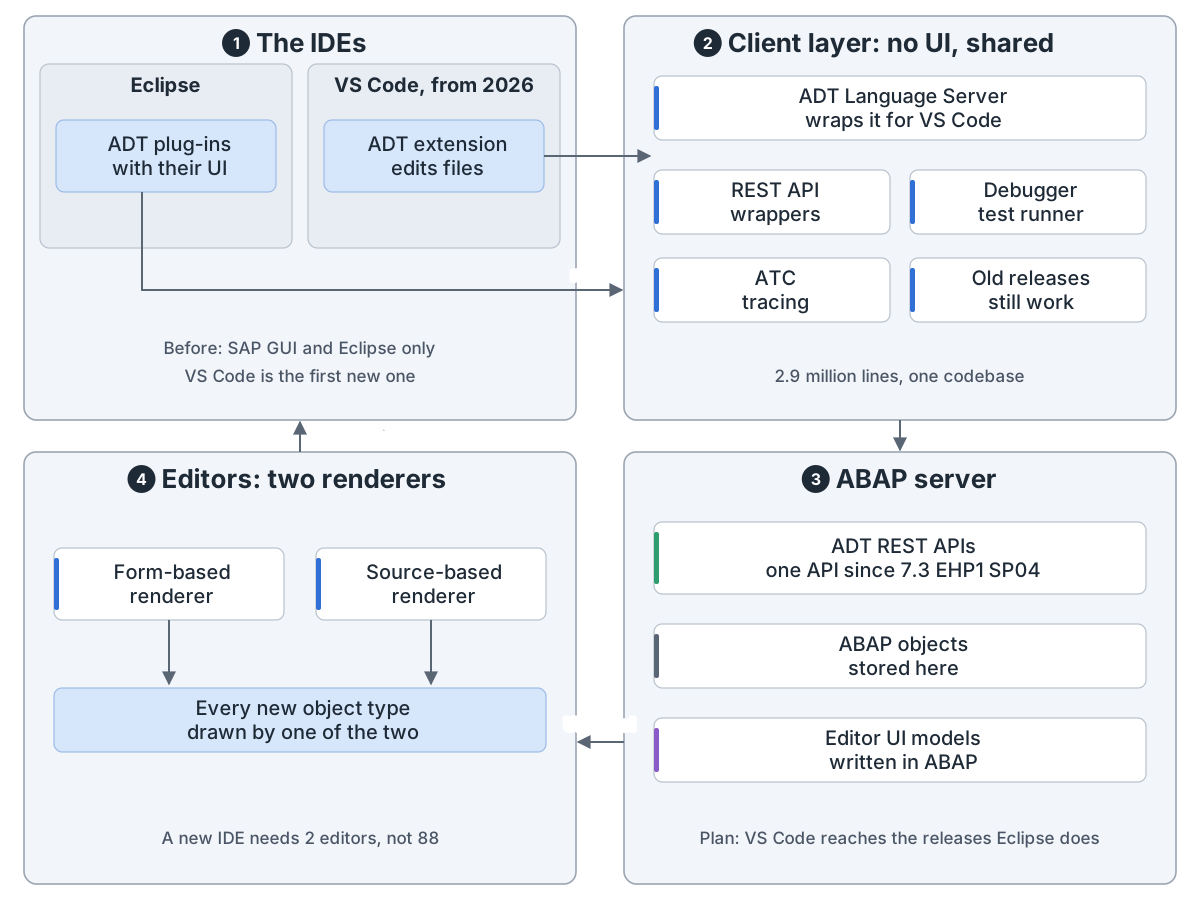
ADT overview: 1 the IDEs: Eclipse runs the ADT plug-ins with their UI, VS Code from 2026 runs an ADT extension that edits files; 2 the shared client layer with no UI: REST API wrappers, debugger and test runner, ATC and tracing, support for old releases, 2.9 million lines, run directly by Eclipse and reached by VS Code over LSP through the ADT Language Server; 3 over RFC or HTTP to the ABAP server: one ADT REST API since 7.3 EHP1 SP04, ABAP objects stored there, editor UI models written in ABAP; 4 two renderers on the client, form-based and source-based, draw every new object type, so a new IDE needs 2 editors, not 88
ABAP Development Tools:一套客户端代码,接 Eclipse 也接 VS CodeABAP Development Tools: one client codebase for Eclipse and VS Code
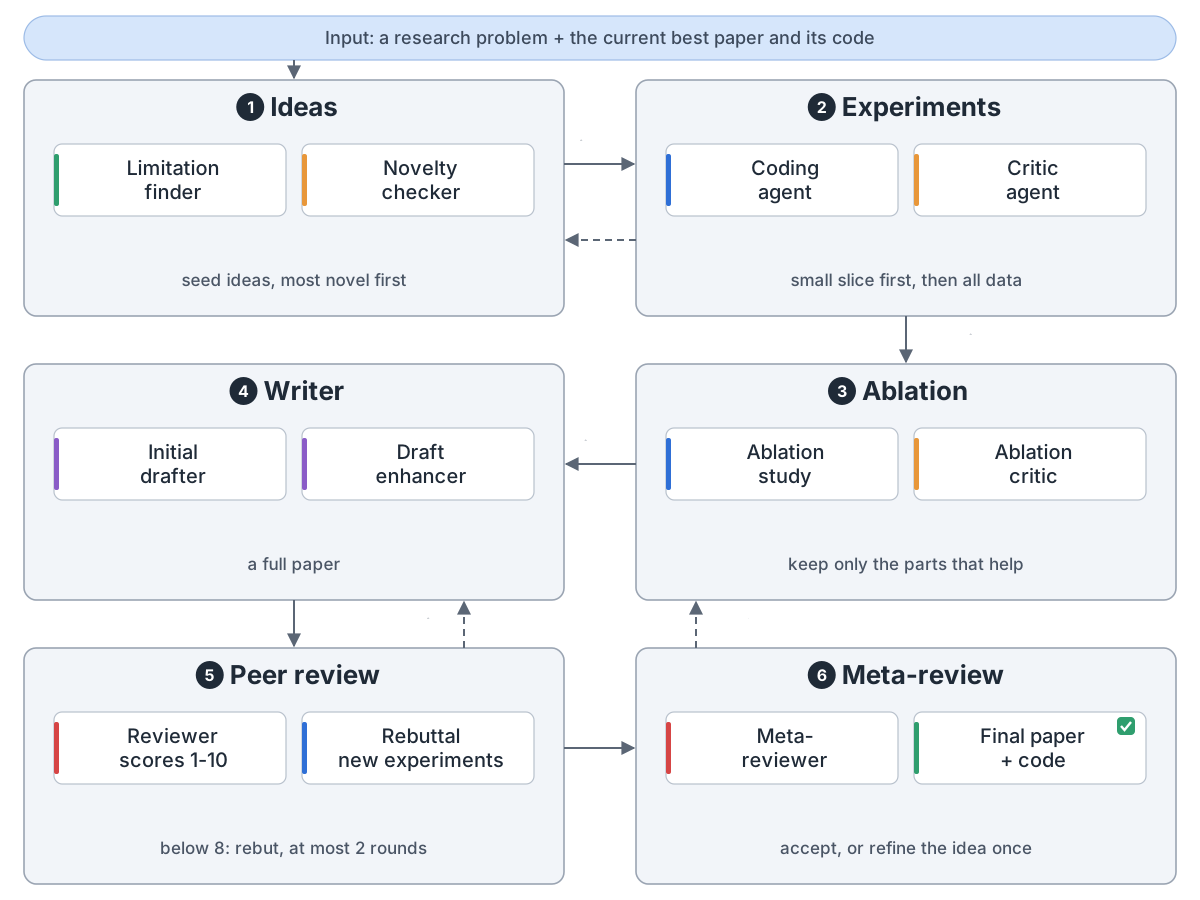
ScientistTwo overview: input is a research problem plus the current best paper and its code; 1 ideas: find limitations, check novelty; 2 experiments: a coding agent and a critic test on a small slice, then all data, and results feed back to the ideas; 3 ablation: keep only the parts that help; 4 writer: draft and improve; 5 peer review: an AI reviewer scores 1 to 10, below 8 a rebuttal runs new experiments, at most 2 rounds, and the draft goes back to the writer; 6 meta-review: accept gives the final paper and code, or the idea goes back to step 3 once
ScientistTwo:从想法到论文,自己跑一圈ScientistTwo: idea to paper, all on its own
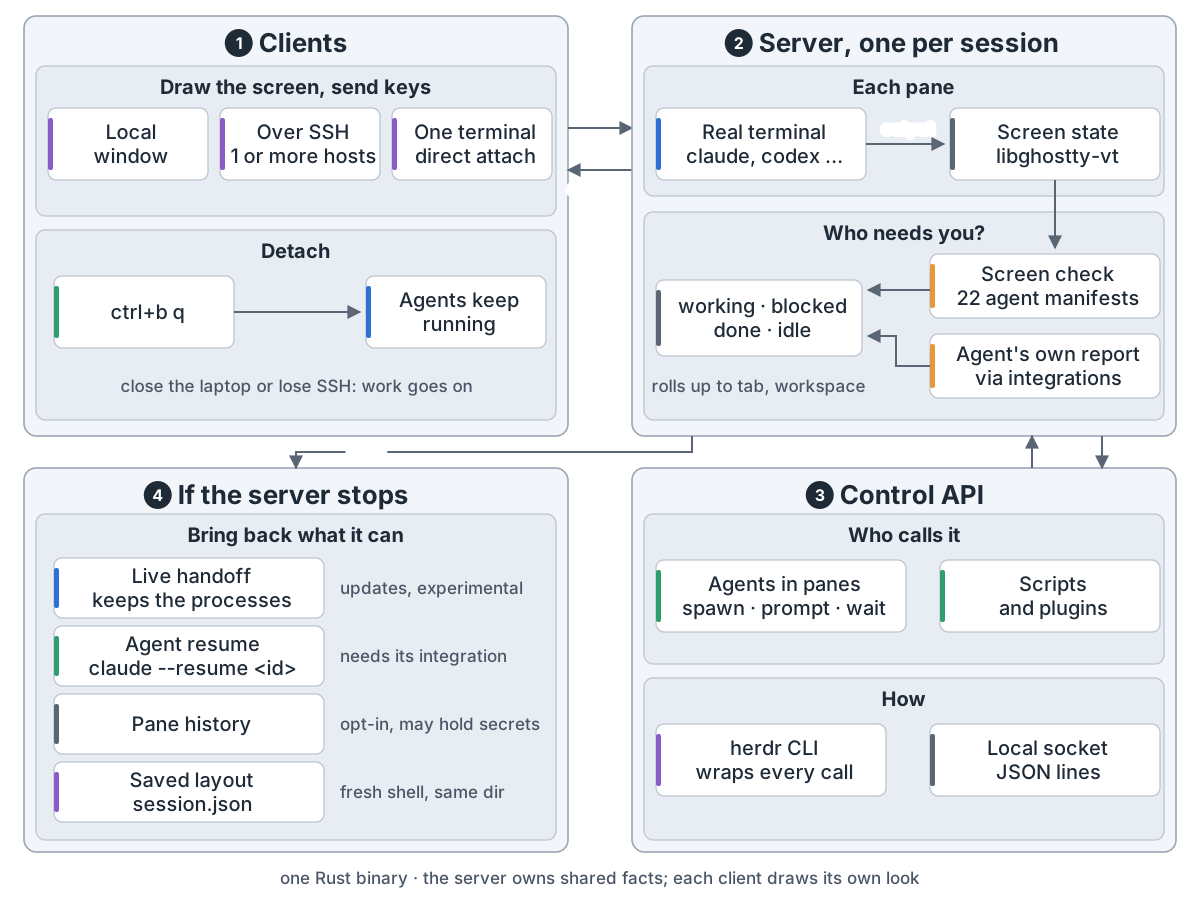
herdr overview: 1 clients: a local window, SSH to one or more hosts, or a direct attach to one terminal; they draw and send keys, and ctrl+b q detaches while agents keep running; 2 one server per session: each pane is a real terminal kept as screen state by libghostty-vt; a screen check (22 manifests) and the agents' own reports decide working, blocked, done or idle; 3 control API: agents in panes, scripts and plugins use the herdr CLI or a local socket to spawn, prompt and wait; 4 if the server stops herdr brings back what it can: live handoff (experimental), agent resume (needs its integration), pane history (opt-in) and the layout in session.json
herdr:编码智能体在后台一直跑herdr: a home where coding agents keep running
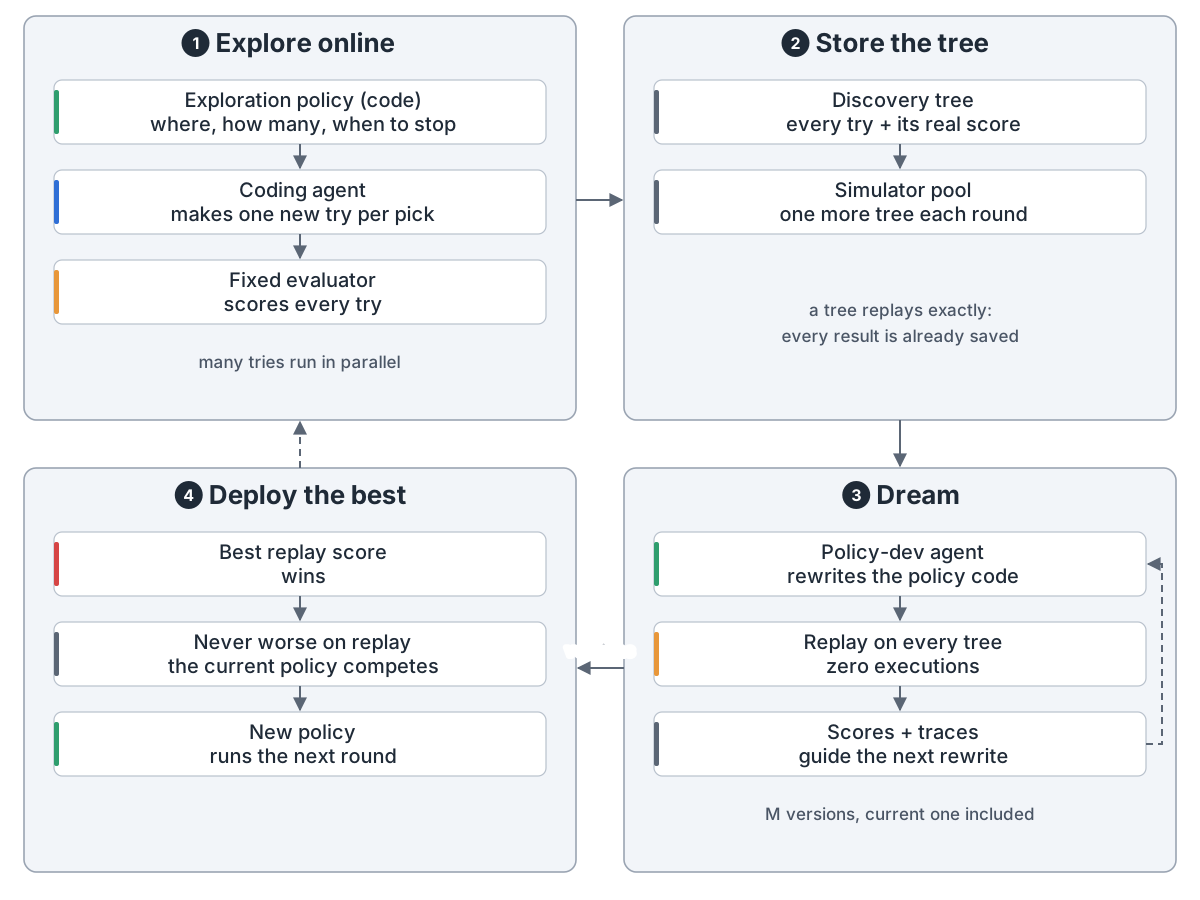
Dream-RSI overview: 1 explore online: the exploration policy, which is code, decides where, how many and when to stop, a coding agent makes one try per pick, a fixed evaluator scores every try; 2 store the tree: every try and its real score go into a simulator pool that grows by one tree a round, and replay reruns nothing; 3 dream: a policy-development agent rewrites the policy code, each version is replayed on every tree at zero executions, and scores and traces guide the next rewrite, M versions with the current one included; 4 deploy the best: the best replay score wins, never worse on replay than the current policy, and the new policy runs the next round
Dream-RSI:拿旧记录当模拟器,在梦里改策略Dream-RSI: dream on old runs to explore better