archwall 把架构画全Every architecture, drawn in full

graphify:把整个项目变成一张可查询的知识图graphify: turn a whole project into a graph you can query
knowledge-graphcoding-agenttree-sitterllm

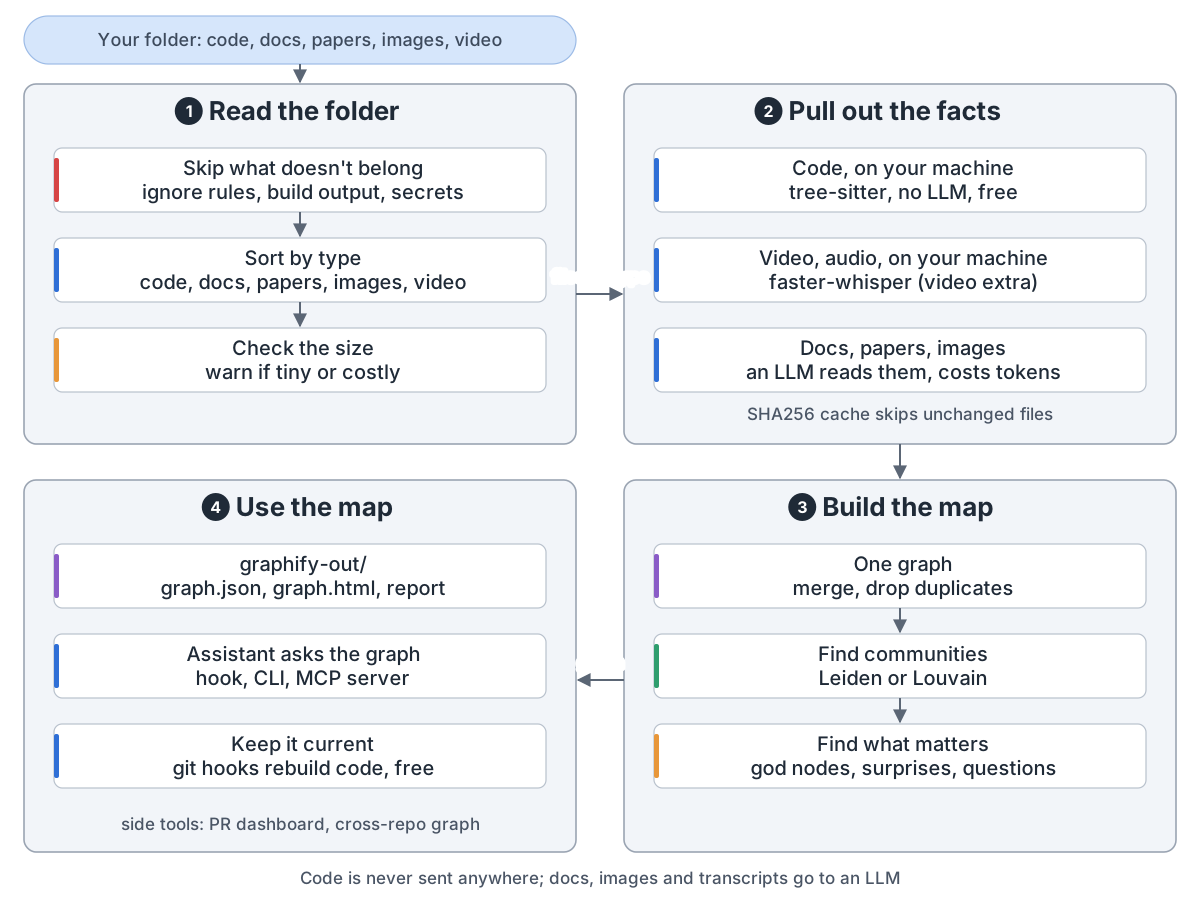
graphify overview: input is a folder of code, docs, papers, images and video; 1 read the folder: skip ignored files, build output and secrets, sort by type, warn if tiny or costly; 2 pull out the facts: code on your machine with tree-sitter, no LLM, free; video and audio on your machine with faster-whisper (video extra); docs, papers and images read by an LLM, which costs tokens; a SHA256 cache skips unchanged files; 3 build the map: one graph with duplicates dropped, communities with Leiden or Louvain, god nodes, surprises and questions; 4 use the map: graph.json, graph.html and the report in graphify-out, the assistant asks the graph through a hook, the CLI or an MCP server, git hooks rebuild the code part for free; side tools: PR dashboard, cross-repo graph; code is never sent anywhere

graphify 把文件夹里的代码、文档、论文、图片和视频变成一张知识图。助手查图,不再 grep。它是技能(/graphify .),底层是 Python 库。

1. 读文件夹。 detect() 跳过忽略的文件、构建产物和密钥,再按类型分。
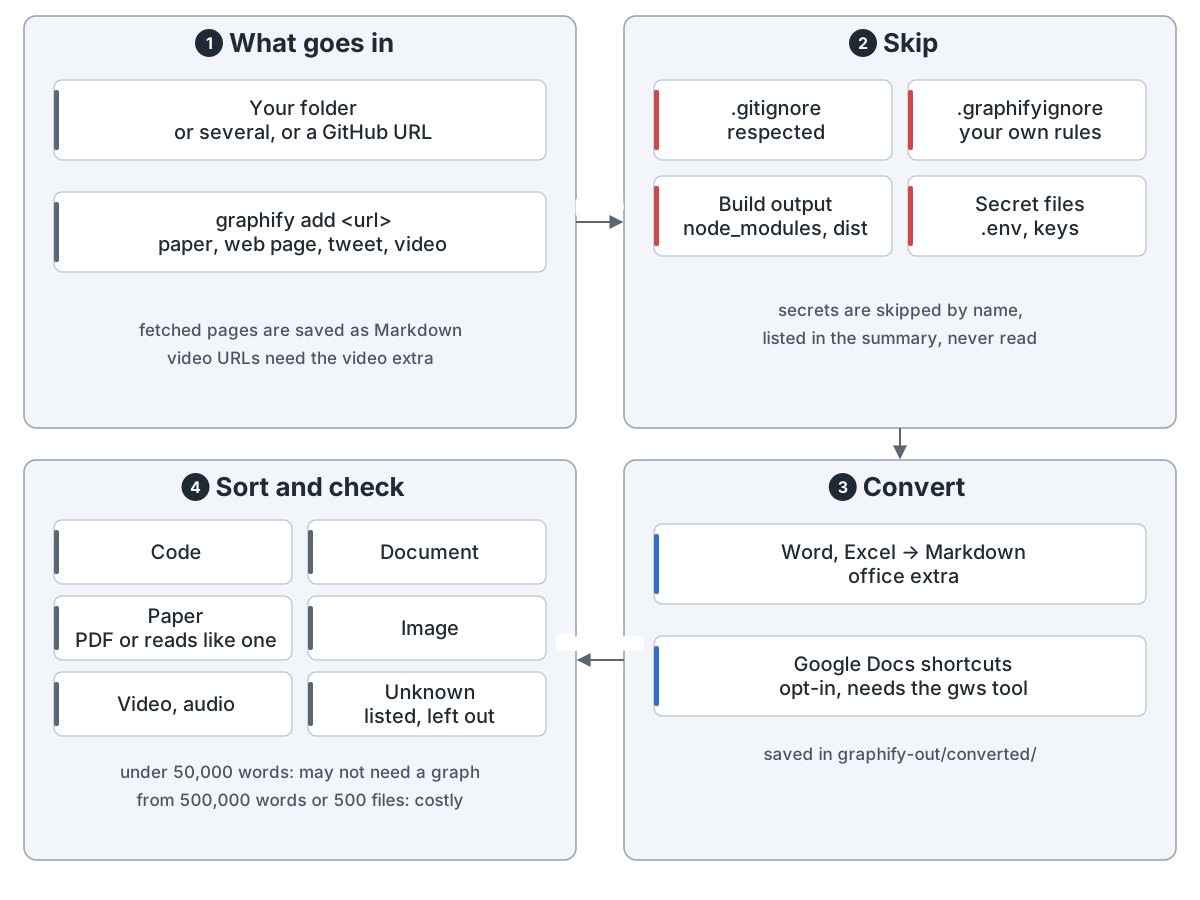
Step 1, read the folder: 1 what goes in: your folder (or several, or a GitHub URL) and anything fetched with graphify add: a paper, web page, tweet or video; fetched pages are saved as Markdown, video URLs need the video extra; 2 skip: .gitignore is respected, .graphifyignore adds your rules, build output such as node_modules and dist is skipped, secret files such as .env and keys are skipped by name, listed and never read; 3 convert: Word and Excel to Markdown (office extra), Google Docs shortcuts opt-in with the gws tool, saved in graphify-out/converted; 4 sort and check: code, document, paper, image, video and audio, unknown files listed and left out; PDF text extraction (word counts, headless runs) needs the pdf extra; under 50,000 words you may not need a graph, from 500,000 words or 500 files it gets costly
第 1 步:先挑出该读的文件,密钥不碰

2. 抽事实。 代码用 tree-sitter 在本机解析,不用 LLM,不花钱。第二遍连起跨文件调用。
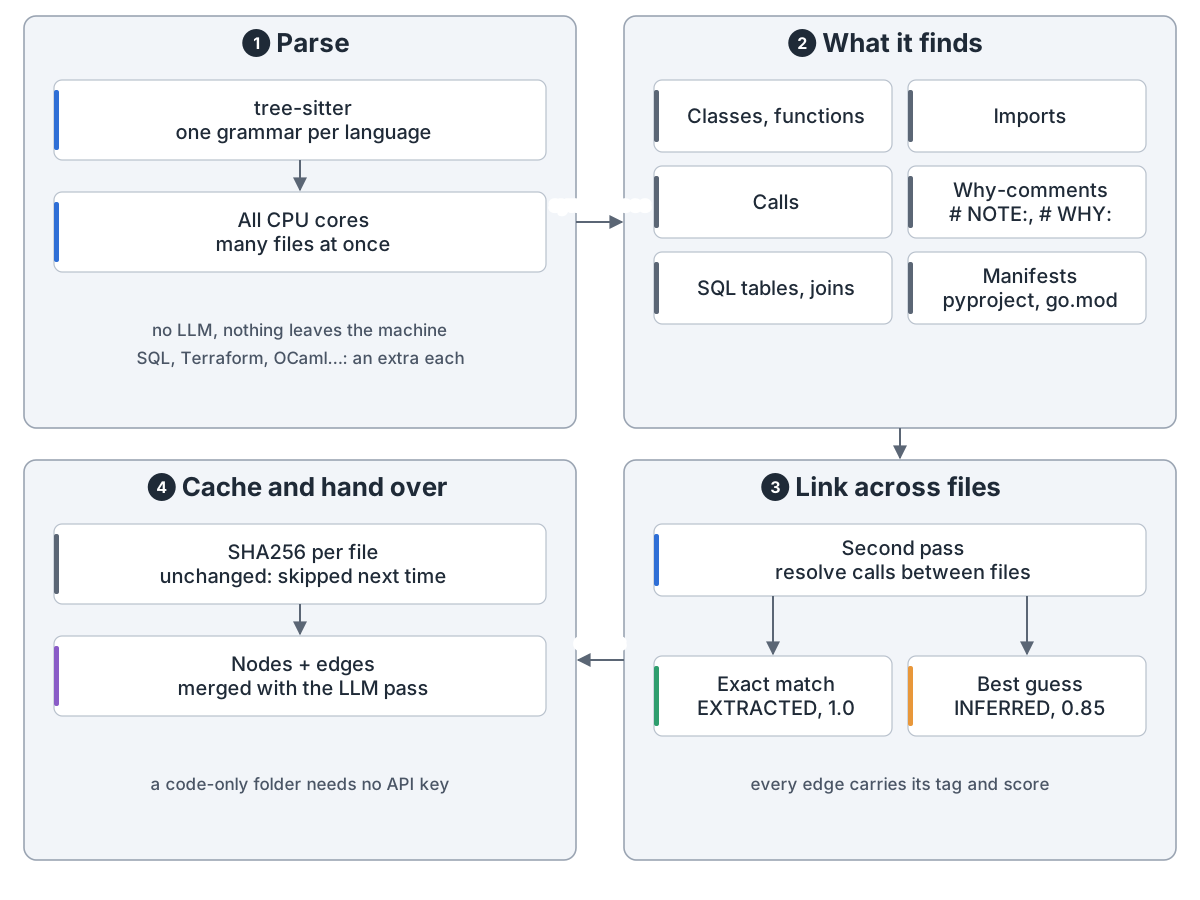
Step 2, code: 1 parse: tree-sitter, one grammar per language, on all CPU cores, no LLM, nothing leaves the machine, SQL, Terraform, OCaml and some others need an extra each; 2 what it finds: classes and functions, imports, calls, comments that explain why (# NOTE:, # WHY:), SQL tables and joins, package manifests; 3 link across files: a second pass resolves calls between files, an exact match is EXTRACTED 1.0, a best guess by name is INFERRED 0.85; 4 cache and hand over: a SHA256 per file so unchanged files are skipped next time, nodes and edges merged with the LLM pass; a code-only folder needs no API key
代码这一遍全在本机,免费

音视频在本机转写(video 包)。文档、论文、图片和转写稿分批并行交给 LLM,只有这遍花 token。SHA256 缓存跳过没变的文件。
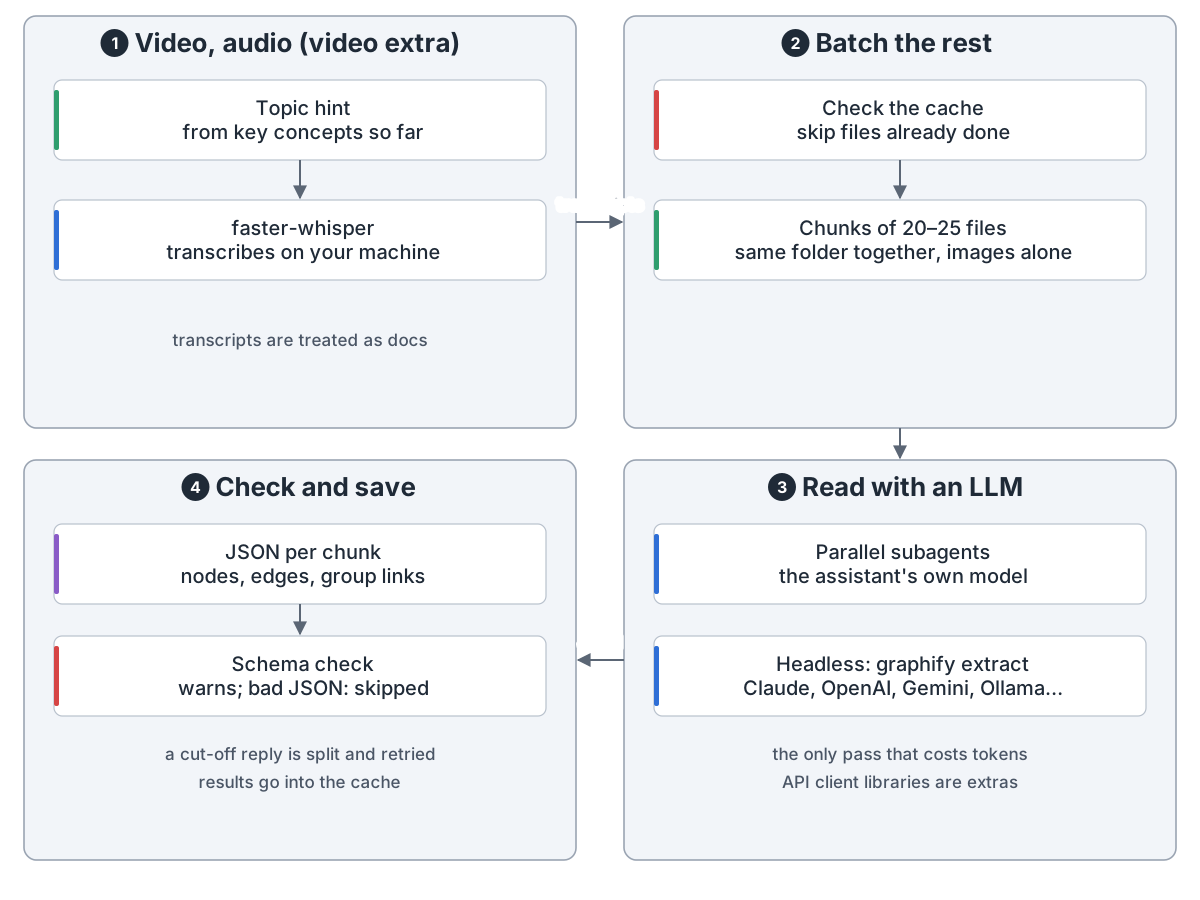
Step 2, docs and media: 1 video and audio (video extra): a one-line topic hint from the key concepts found so far, then faster-whisper transcribes on your machine, transcripts are treated as docs; 2 batch the rest: check the cache and skip files already done, then chunks of 20 to 25 files, same folder together, each image alone; 3 read with an LLM: parallel subagents on the assistant's own model, or headless graphify extract with Claude, OpenAI, Gemini, Ollama and others, whose client libraries are extras; the only pass that costs tokens; 4 check and save: JSON per chunk with nodes, edges and group links, a schema check warns about a bad chunk and a chunk whose JSON will not parse is skipped, a cut-off reply is split and retried, results go into the cache
只有这一遍花 token,分批并行,做过的不再做

每条边标明把握:EXTRACTED(原文写明)、INFERRED(带分推断)或 AMBIGUOUS(待人核对)。
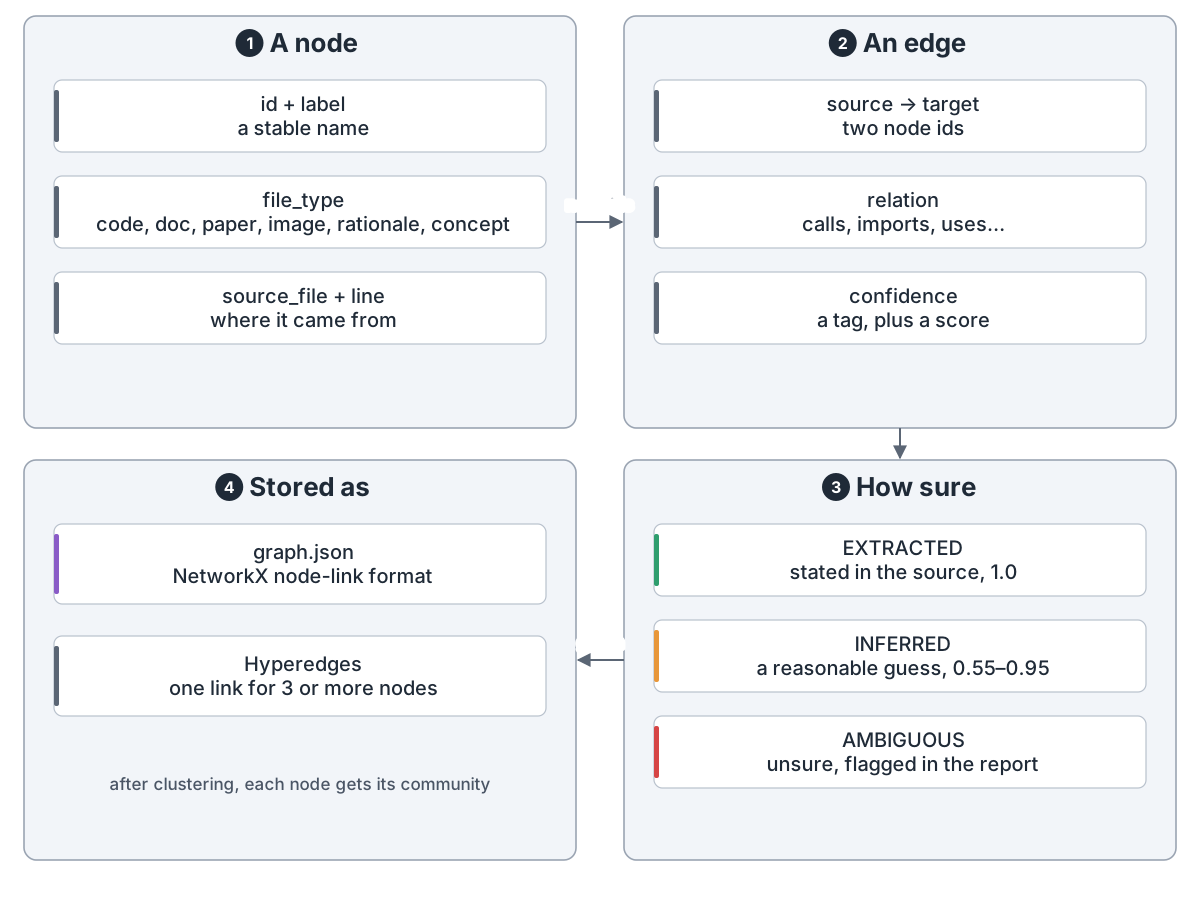
What the graph holds: 1 a node: id and label, a file type (code, document, paper, image, rationale, concept), source file and line; 2 an edge: source and target node, a relation such as calls, imports or uses, a confidence tag plus a score; 3 how sure: EXTRACTED is stated in the source, 1.0; INFERRED is a reasonable guess, 0.55 to 0.95; AMBIGUOUS is unsure and flagged in the report; 4 stored as graph.json in NetworkX node-link format; hyperedges link 3 or more nodes; after clustering each node gets its community
每条边都说明它有多大把握

3. 建图。 合成一张 NetworkX 图并去重。Leiden(leiden 包,否则 Louvain)按连接分社区,不用嵌入和向量库。报告列出核心节点、意外连接和可问的问题。
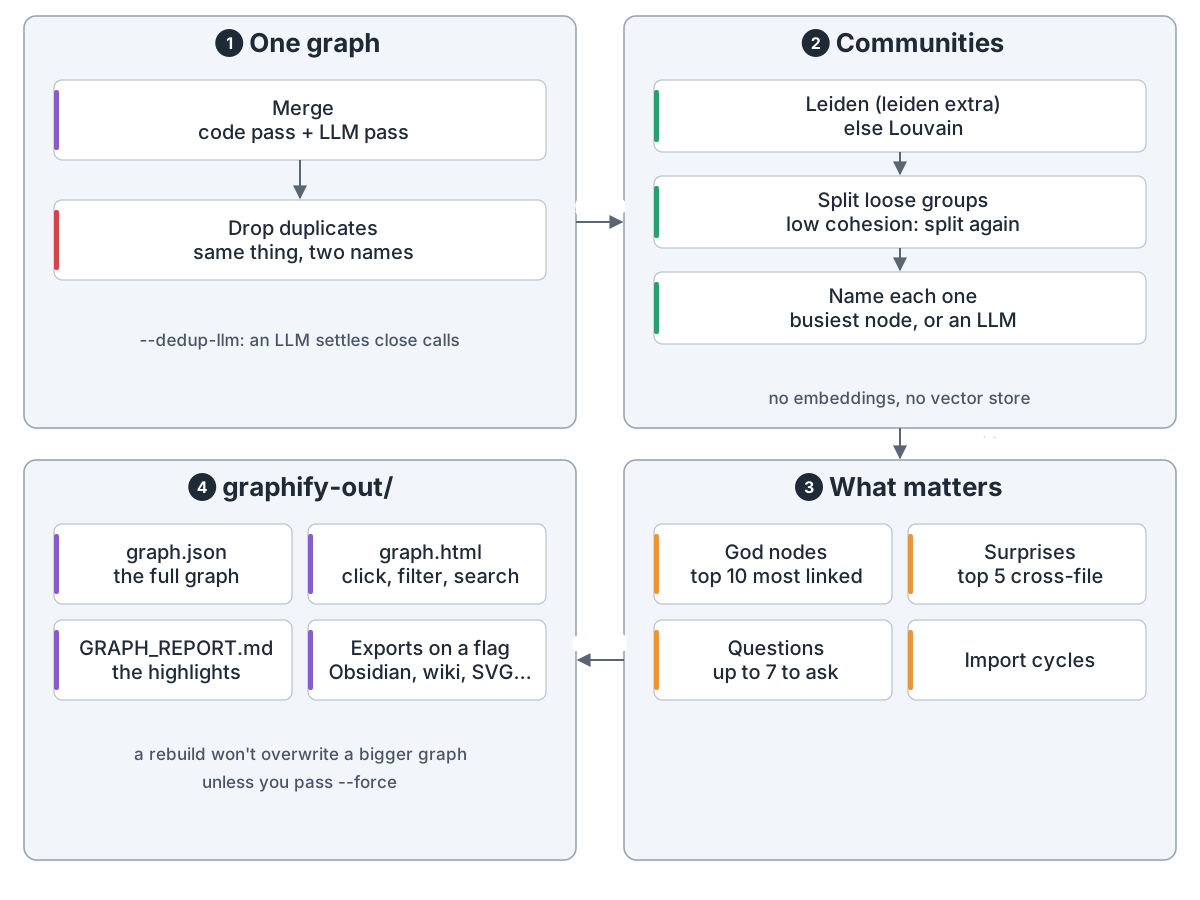
Step 3, build the map: 1 one graph: merge the code pass and the LLM pass, drop the same thing under two names, --dedup-llm lets an LLM settle close calls; 2 communities: Leiden (leiden extra, else Louvain), loose groups split again, each named after its busiest node or by an LLM, no embeddings, no vector store; 3 what matters: top 10 god nodes, top 5 cross-file surprises, up to 7 suggested questions, import cycles; 4 graphify-out: graph.json, graph.html, GRAPH_REPORT.md, exports such as Obsidian, wiki and SVG only on a flag; a rebuild won't overwrite a bigger graph unless you pass --force
合成一张图,分好社区,挑出值得看的

4. 用起来。 graphify claude install 加 CLAUDE.md 说明和钩子,助手搜索或读文件前先被提醒用 graphify query。命令行或 MCP 服务端(mcp 包)回一小块子图。
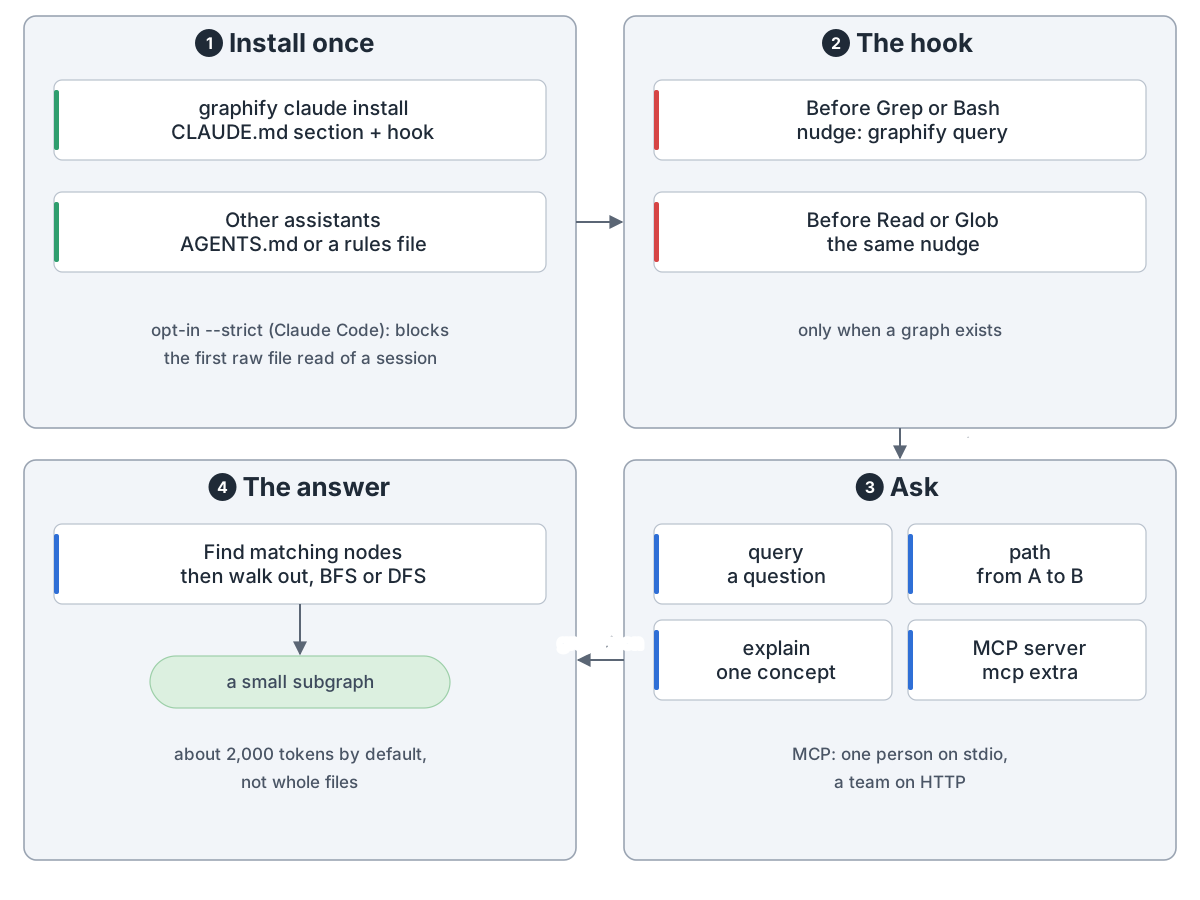
Step 4, the assistant asks the graph first: 1 install once: graphify claude install writes a CLAUDE.md section and a hook, other assistants get AGENTS.md or a rules file; opt-in --strict on Claude Code blocks the first raw file read of a session; 2 the hook: before Grep or Bash and before Read or Glob it nudges toward graphify query, only when a graph exists; 3 ask: query a question, path from A to B, explain one concept, or the MCP server (mcp extra), stdio for one person, HTTP for a team; 4 the answer: find matching nodes, walk out breadth- or depth-first, return a small subgraph of about 2,000 tokens by default, not whole files
助手先问图,拿回一小块,而不是整个文件

graphify hook install 让提交和切分支免费重建代码部分。git pull 后跑 graphify update .。
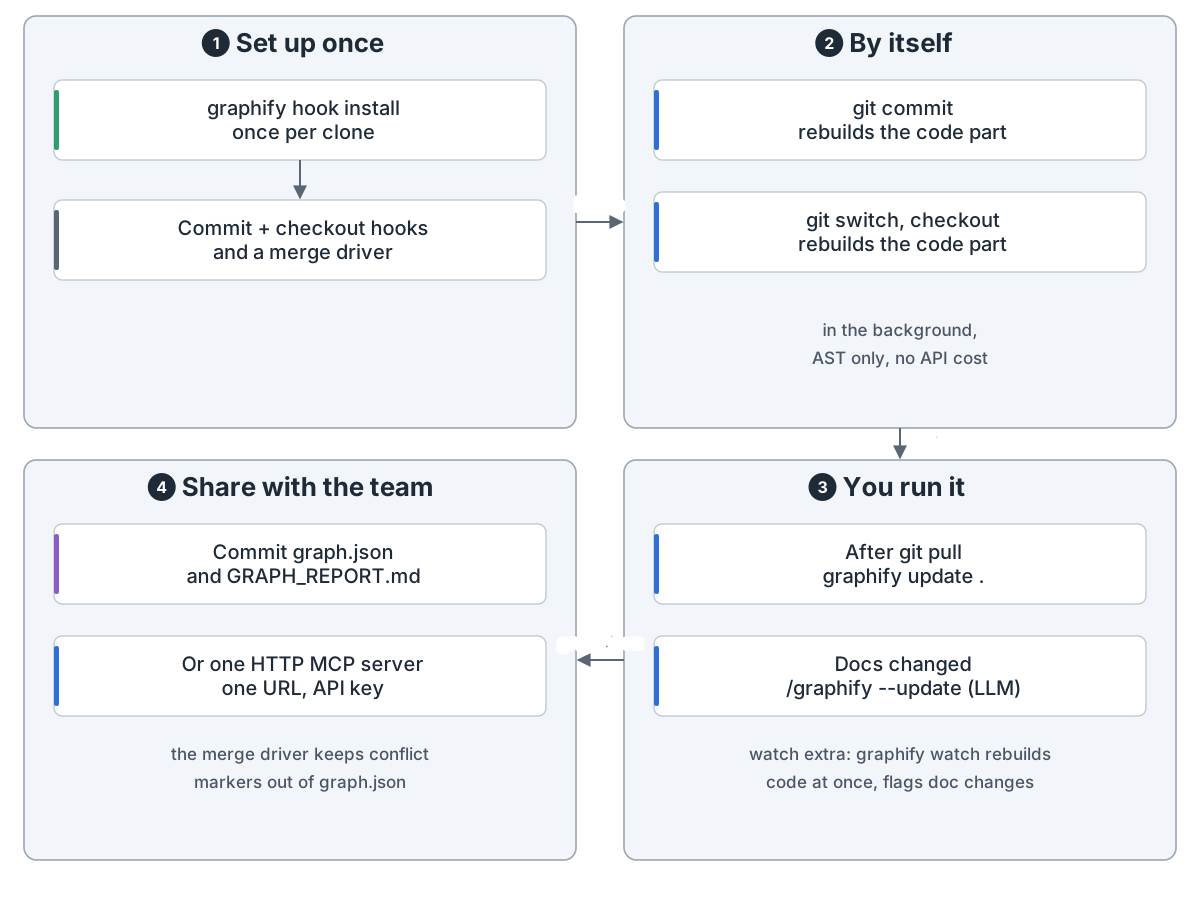
Keep it current, share it: 1 set up once: graphify hook install, once per clone, adds commit and checkout hooks and a merge driver; 2 by itself: git commit and git switch or checkout rebuild the code part in the background, AST only, no API cost; 3 you run it: after git pull, graphify update .; when docs change, /graphify --update (LLM); watch extra: graphify watch rebuilds code at once and flags doc changes; 4 share with the team: commit graph.json and GRAPH_REPORT.md, or run one HTTP MCP server with one URL and an API key; the merge driver keeps conflict markers out of graph.json
提交和切分支自动更新,拉代码后跑一条命令

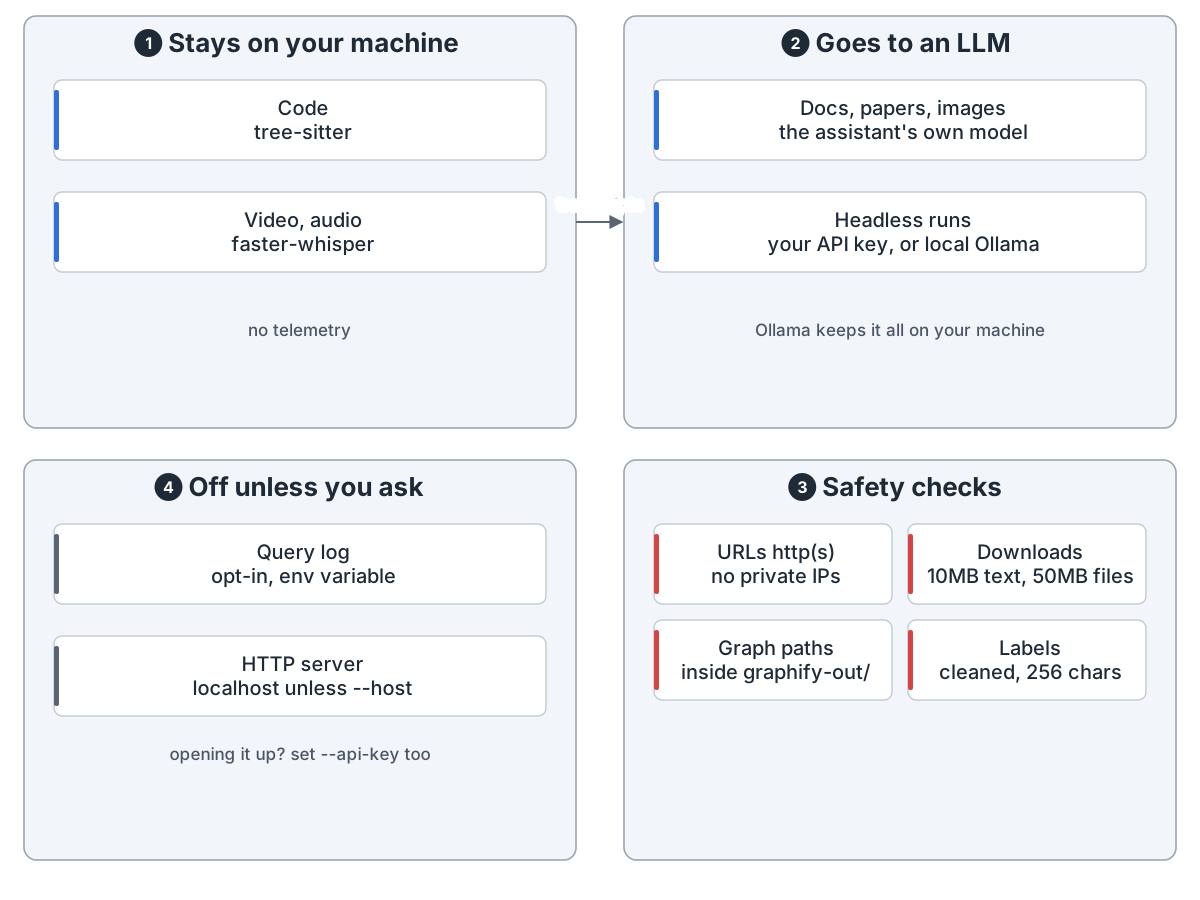
代码不出本机。文档、图片和转写稿交给你选的模型。

What leaves your machine: 1 stays on your machine: code (tree-sitter), video and audio (faster-whisper), no telemetry; 2 goes to an LLM: docs, papers and images to the assistant's own model, headless runs to your API key or a local Ollama, which keeps it all on your machine; 3 safety checks: URLs http(s) only and no private IPs, downloads capped at 10 MB for text and 50 MB for files, with a timeout, graph paths inside graphify-out, labels cleaned and capped at 256 characters; 4 off unless you ask: the query log is opt-in through an environment variable, the HTTP server listens on localhost unless --host, and opening it up needs --api-key too
代码不出本机,文档交给你选的模型

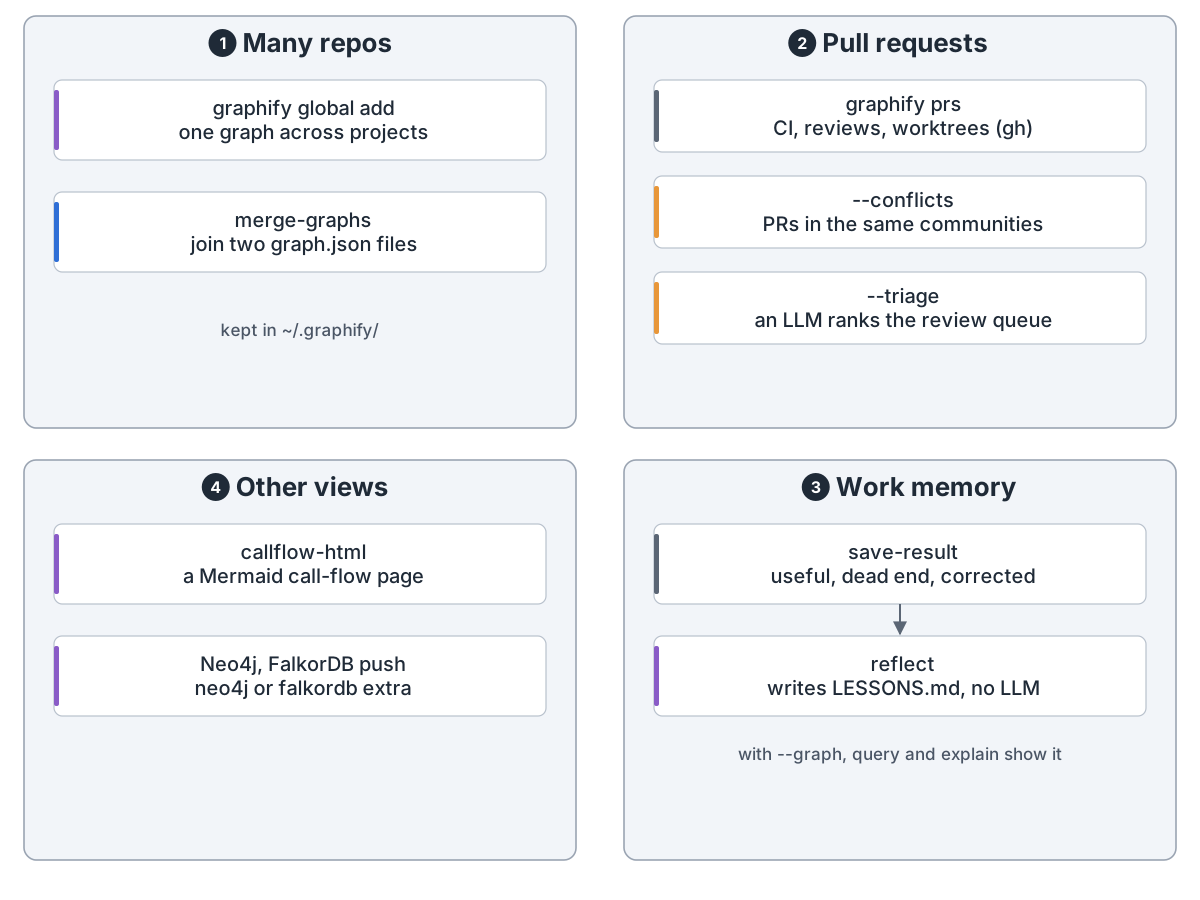
周边工具管多仓库、PR 和工作记忆。

Side tools: 1 many repos: graphify global add puts project graphs into one cross-project graph in ~/.graphify, merge-graphs joins two graph.json files; 2 pull requests: graphify prs shows CI, reviews and worktrees through gh, --conflicts finds PRs in the same communities, --triage has an LLM rank the review queue; 3 work memory: save-result records whether an answer was useful, a dead end or corrected, reflect writes LESSONS.md with no LLM, and with --graph, query and explain show the lesson; 4 other views: callflow-html draws a Mermaid call-flow page, push to Neo4j or FalkorDB (neo4j or falkordb extra)
跨仓库、看 PR、记经验

52 个混合文件上,查询比读文件省 71.5 倍 token;6 个文件时没省。

graphify turns a folder of code, docs, papers, images and video into one knowledge graph. Your AI assistant then asks the graph instead of grepping files. It is a skill (/graphify .) on top of a Python library.

1. Read the folder. detect() skips ignored files, build output and secrets, then sorts the rest by type.

Step 1, read the folder: 1 what goes in: your folder (or several, or a GitHub URL) and anything fetched with graphify add: a paper, web page, tweet or video; fetched pages are saved as Markdown, video URLs need the video extra; 2 skip: .gitignore is respected, .graphifyignore adds your rules, build output such as node_modules and dist is skipped, secret files such as .env and keys are skipped by name, listed and never read; 3 convert: Word and Excel to Markdown (office extra), Google Docs shortcuts opt-in with the gws tool, saved in graphify-out/converted; 4 sort and check: code, document, paper, image, video and audio, unknown files listed and left out; PDF text extraction (word counts, headless runs) needs the pdf extra; under 50,000 words you may not need a graph, from 500,000 words or 500 files it gets costly
Step 1: pick the files worth reading, and leave secrets alone

2. Pull out the facts. Code is parsed on your machine with tree-sitter: no LLM, no cost. A second pass links calls across files.

Step 2, code: 1 parse: tree-sitter, one grammar per language, on all CPU cores, no LLM, nothing leaves the machine, SQL, Terraform, OCaml and some others need an extra each; 2 what it finds: classes and functions, imports, calls, comments that explain why (# NOTE:, # WHY:), SQL tables and joins, package manifests; 3 link across files: a second pass resolves calls between files, an exact match is EXTRACTED 1.0, a best guess by name is INFERRED 0.85; 4 cache and hand over: a SHA256 per file so unchanged files are skipped next time, nodes and edges merged with the LLM pass; a code-only folder needs no API key
The code pass runs on your machine, for free

Video and audio are transcribed locally (video extra). Docs, papers, images and transcripts go to an LLM in parallel batches. Only this pass costs tokens. A SHA256 cache skips unchanged files.

Step 2, docs and media: 1 video and audio (video extra): a one-line topic hint from the key concepts found so far, then faster-whisper transcribes on your machine, transcripts are treated as docs; 2 batch the rest: check the cache and skip files already done, then chunks of 20 to 25 files, same folder together, each image alone; 3 read with an LLM: parallel subagents on the assistant's own model, or headless graphify extract with Claude, OpenAI, Gemini, Ollama and others, whose client libraries are extras; the only pass that costs tokens; 4 check and save: JSON per chunk with nodes, edges and group links, a schema check warns about a bad chunk and a chunk whose JSON will not parse is skipped, a cut-off reply is split and retried, results go into the cache
The only pass that costs tokens: batched, parallel, never repeated

Every edge says how sure it is: EXTRACTED (in the source), INFERRED (a scored guess) or AMBIGUOUS (for a person to check).

What the graph holds: 1 a node: id and label, a file type (code, document, paper, image, rationale, concept), source file and line; 2 an edge: source and target node, a relation such as calls, imports or uses, a confidence tag plus a score; 3 how sure: EXTRACTED is stated in the source, 1.0; INFERRED is a reasonable guess, 0.55 to 0.95; AMBIGUOUS is unsure and flagged in the report; 4 stored as graph.json in NetworkX node-link format; hyperedges link 3 or more nodes; after clustering each node gets its community
Every edge says how sure it is

3. Build the map. Everything merges into one NetworkX graph, minus duplicates. Leiden (leiden extra, else Louvain) groups it into communities by its links. No embeddings, no vector store. The report lists god nodes, surprising links and questions to ask.

Step 3, build the map: 1 one graph: merge the code pass and the LLM pass, drop the same thing under two names, --dedup-llm lets an LLM settle close calls; 2 communities: Leiden (leiden extra, else Louvain), loose groups split again, each named after its busiest node or by an LLM, no embeddings, no vector store; 3 what matters: top 10 god nodes, top 5 cross-file surprises, up to 7 suggested questions, import cycles; 4 graphify-out: graph.json, graph.html, GRAPH_REPORT.md, exports such as Obsidian, wiki and SVG only on a flag; a rebuild won't overwrite a bigger graph unless you pass --force
One graph, split into communities, with the parts worth a look

4. Use it. graphify claude install adds a CLAUDE.md section and a hook. Before the assistant searches or reads files, the hook points it to graphify query. The CLI or an MCP server (mcp extra) answers with a small subgraph, not whole files.

Step 4, the assistant asks the graph first: 1 install once: graphify claude install writes a CLAUDE.md section and a hook, other assistants get AGENTS.md or a rules file; opt-in --strict on Claude Code blocks the first raw file read of a session; 2 the hook: before Grep or Bash and before Read or Glob it nudges toward graphify query, only when a graph exists; 3 ask: query a question, path from A to B, explain one concept, or the MCP server (mcp extra), stdio for one person, HTTP for a team; 4 the answer: find matching nodes, walk out breadth- or depth-first, return a small subgraph of about 2,000 tokens by default, not whole files
The assistant asks the graph and gets a small piece back, not whole files

graphify hook install rebuilds the code part on every commit and branch switch, for free. After git pull, run graphify update ..

Keep it current, share it: 1 set up once: graphify hook install, once per clone, adds commit and checkout hooks and a merge driver; 2 by itself: git commit and git switch or checkout rebuild the code part in the background, AST only, no API cost; 3 you run it: after git pull, graphify update .; when docs change, /graphify --update (LLM); watch extra: graphify watch rebuilds code at once and flags doc changes; 4 share with the team: commit graph.json and GRAPH_REPORT.md, or run one HTTP MCP server with one URL and an API key; the merge driver keeps conflict markers out of graph.json
Commits and branch switches update it; after a pull you run one command

Code is never sent anywhere. Docs, images and transcripts go to your assistant's model or an API you choose.

What leaves your machine: 1 stays on your machine: code (tree-sitter), video and audio (faster-whisper), no telemetry; 2 goes to an LLM: docs, papers and images to the assistant's own model, headless runs to your API key or a local Ollama, which keeps it all on your machine; 3 safety checks: URLs http(s) only and no private IPs, downloads capped at 10 MB for text and 50 MB for files, with a timeout, graph paths inside graphify-out, labels cleaned and capped at 256 characters; 4 off unless you ask: the query log is opt-in through an environment variable, the HTTP server listens on localhost unless --host, and opening it up needs --api-key too
Code stays home; docs go to the model you pick

Side tools cover several repos, pull requests and work memory.

Side tools: 1 many repos: graphify global add puts project graphs into one cross-project graph in ~/.graphify, merge-graphs joins two graph.json files; 2 pull requests: graphify prs shows CI, reviews and worktrees through gh, --conflicts finds PRs in the same communities, --triage has an LLM rank the review queue; 3 work memory: save-result records whether an answer was useful, a dead end or corrected, reflect writes LESSONS.md with no LLM, and with --graph, query and explain show the lesson; 4 other views: callflow-html draws a Mermaid call-flow page, push to Neo4j or FalkorDB (neo4j or falkordb extra)
Across repos, around pull requests, and lessons kept

On 52 mixed files, a query used 71.5x fewer tokens than reading the files. On 6 files there was no saving.

来源Source: github.com

← 全部架构← All architectures