archwall 把架构画全Every architecture, drawn in full

Grafana:数据在你的系统里,图表现查现画Grafana: charts and alerts on data that lives in your systems
observabilitydashboardsalertingpluginsclient-server

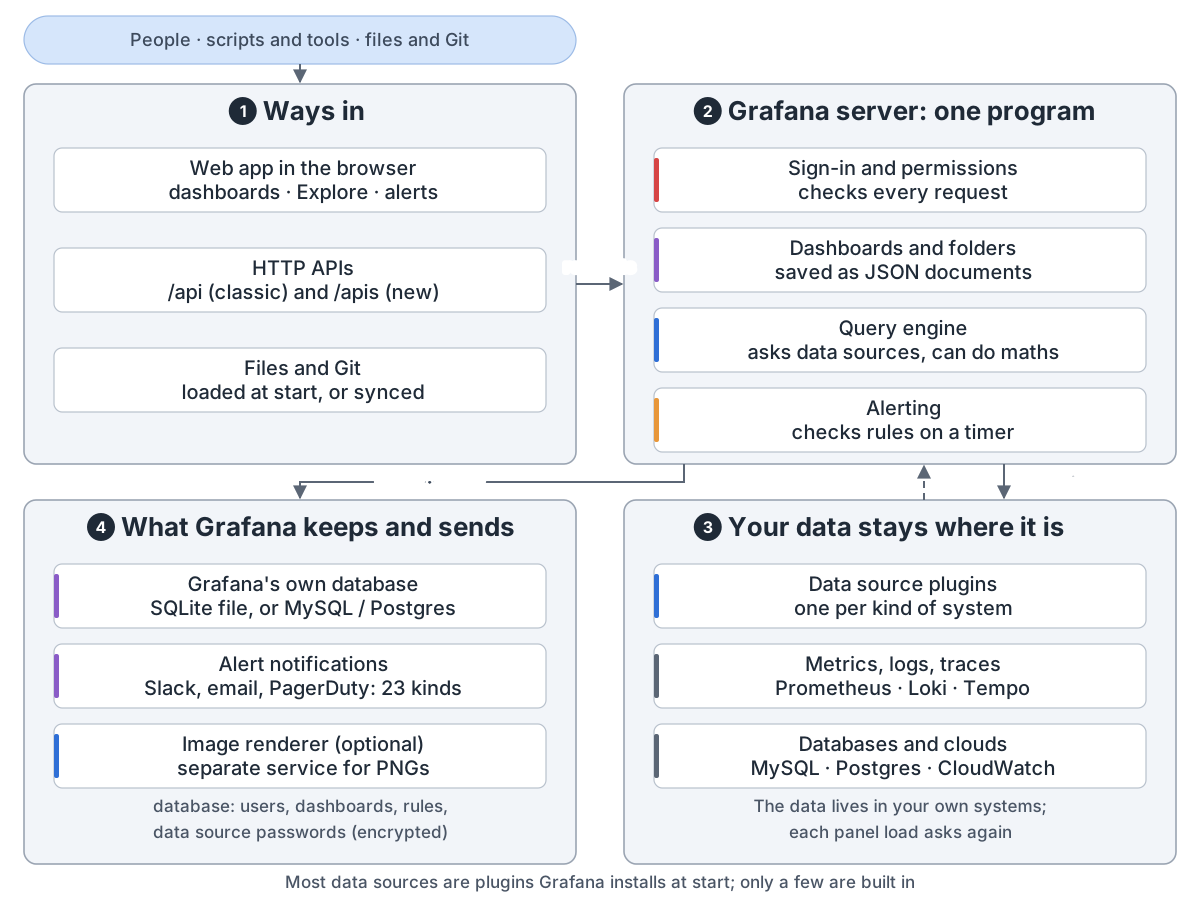
Grafana overview: people, scripts and tools, files and Git come in; 1 ways in: the web app (dashboards, Explore, alerts), the HTTP APIs (classic /api and new /apis), files loaded at start or synced from Git; 2 the Grafana server is one program: sign-in and permissions check every request, dashboards and folders are saved as JSON documents, the query engine asks data sources and can do maths, alerting checks rules on a timer; 3 your data stays where it is: data source plugins, one per kind of system, reach metrics, logs and traces (Prometheus, Loki, Tempo) and databases and clouds (MySQL, Postgres, CloudWatch); your data lives in your own systems, and each panel load asks again; 4 what Grafana keeps and sends: its own database (a SQLite file by default, or MySQL / Postgres, holding users, dashboards, rules and encrypted data source passwords), alert notifications to 23 kinds of contact point such as Slack, email and PagerDuty, and an optional image renderer that runs as a separate service; most data sources are plugins Grafana installs at start, only a few are built in

Grafana 画图、发告警,数据在你的系统里。每次打开面板,它都去问那些系统。

一个程序。 服务器提供网页和接口,检查每个请求,存仪表盘和规则,替面板查数据。

面板的数据。 服务器核对身份,按数据源拆开并行去问,结果以数据帧返回。
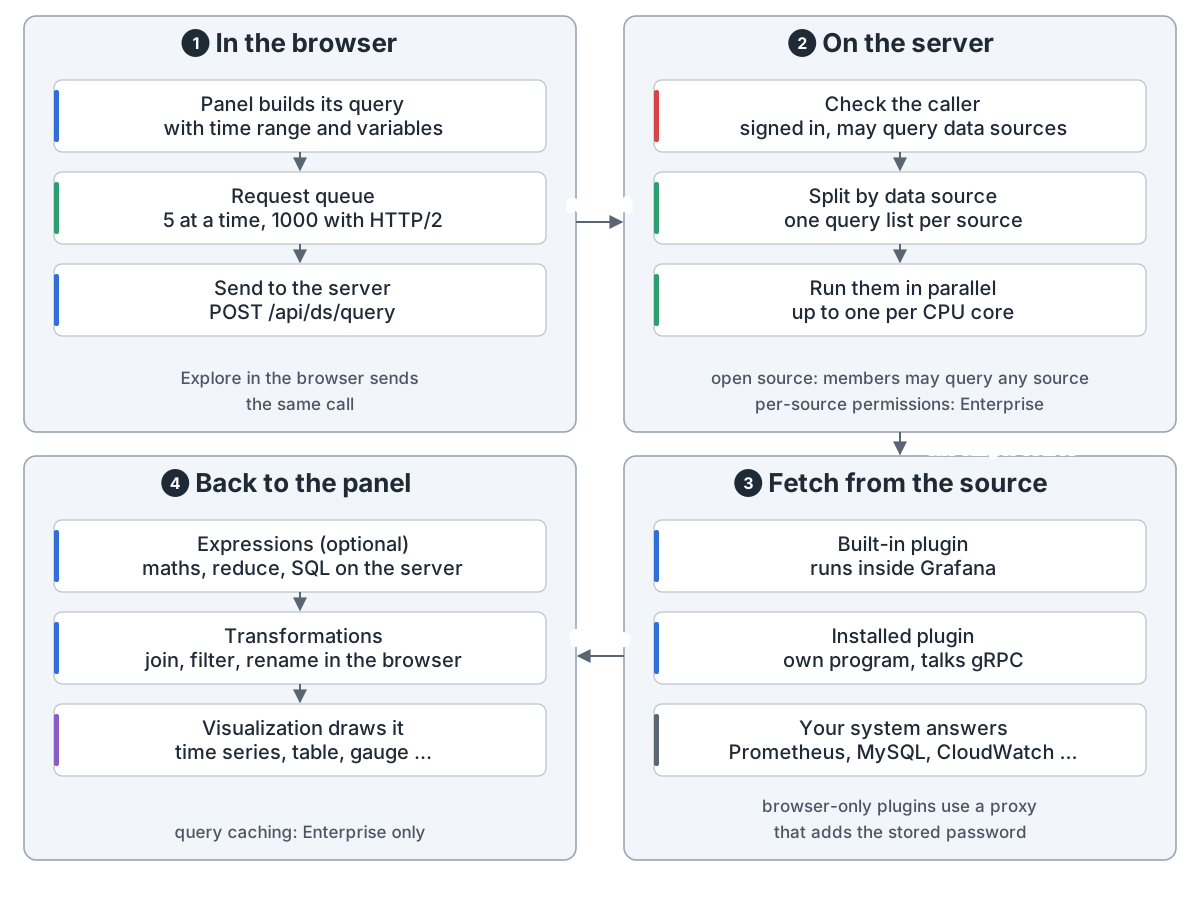
How a panel gets its data: 1 in the browser: the panel builds its query with the time range and variables, a request queue sends 5 at a time (1000 with HTTP/2), then POST /api/ds/query; Explore in the browser sends the same call; 2 on the server: check the caller is signed in and may query data sources, split by data source, run them in parallel, up to one per CPU core by default; in open source members may query any source, per-source permissions are Enterprise; 3 fetch from the source: a built-in plugin runs inside Grafana, an installed plugin is its own program that talks gRPC, and your system (Prometheus, MySQL, CloudWatch ...) answers; browser-only plugins use a proxy that adds the stored password; 4 back to the panel: data frames come back, optional expressions do maths, reduce or SQL on the server, transformations join, filter or rename in the browser, and the visualization draws it; query caching is Enterprise only
一个面板的数据:浏览器发查询,服务器按数据源拆开并行去问,结果画成图

插件。 数据源、面板、应用都是插件。大多数数据源是启动时装的,不内置。没签名的默认不加载。
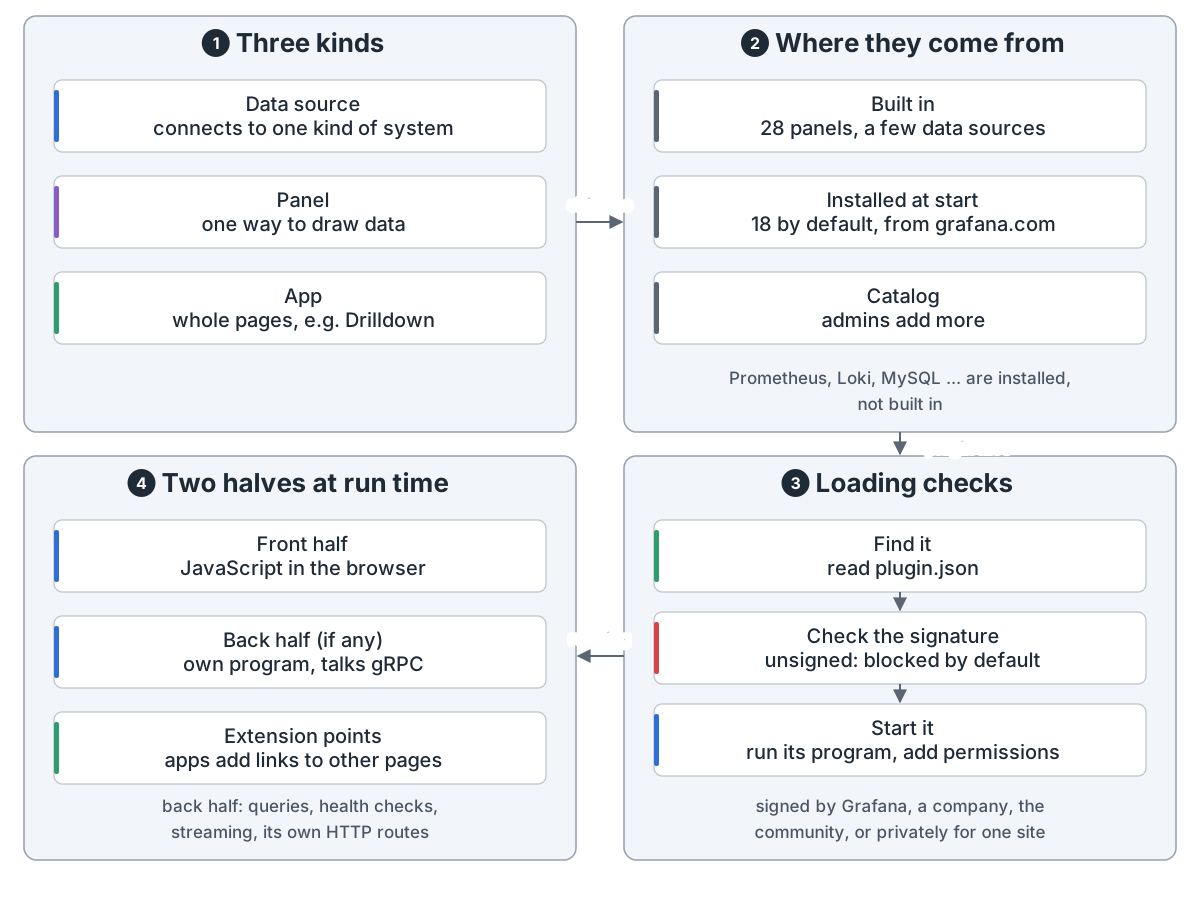
Plugins: 1 three kinds: a data source connects to one kind of system, a panel is one way to draw data, an app adds whole pages such as Drilldown; 2 where they come from: built in (28 panels, a few data sources), installed at start from grafana.com (18 by default), or added by admins from the catalog; Prometheus, Loki, MySQL ... are installed, not built in; 3 loading checks: find it and read plugin.json, check the signature (unsigned is blocked by default), start it by running its program and adding permissions; signed by Grafana, a company, the community, or privately for one site; 4 two halves at run time: the front half is JavaScript in the browser, the back half (if any) is its own program that talks gRPC and handles queries, health checks, streaming and its own HTTP routes; extension points let apps add links to other pages
插件:大多数数据源都是插件,先验签名再加载,前端一半、后端一半

仪表盘是一份 JSON,可以在网页里画,也可以从文件或 Git 加载。

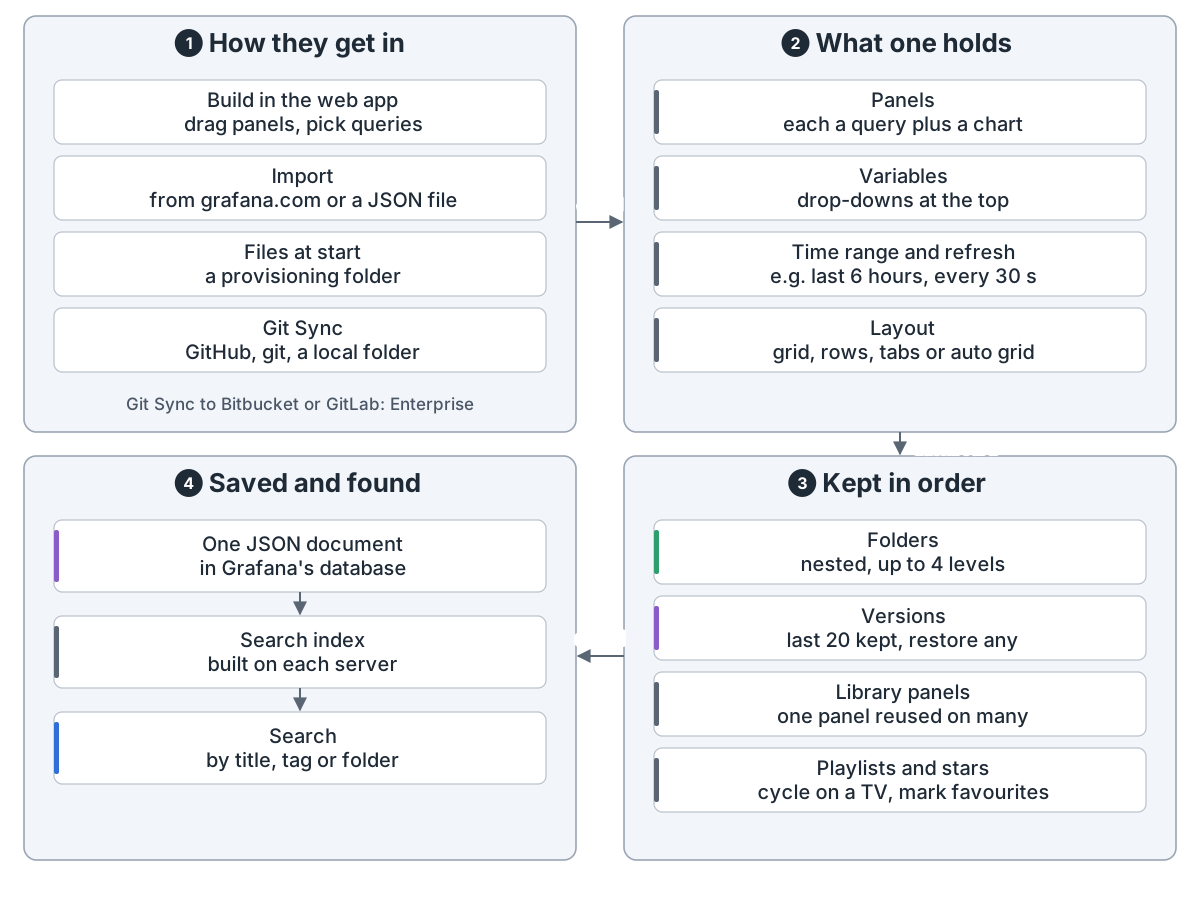
Dashboards: 1 how they get in: build in the web app by dragging panels and picking queries, import from grafana.com or a JSON file, load from a provisioning folder at start, or Git Sync with GitHub, git or a local folder; Git Sync to Bitbucket or GitLab is Enterprise; 2 what one holds: panels (each a query plus a chart), variables (drop-downs at the top), time range and refresh (e.g. last 6 hours, every 30 s), layout (grid, rows, tabs or auto grid); 3 kept in order: folders nested up to 4 levels, the last 20 versions kept with restore, library panels reused on many dashboards, playlists and stars; 4 saved and found: one JSON document in Grafana's database, a search index built on each server, search by title, tag or folder
仪表盘:一份 JSON 文档,可以手画、导入、从文件或 Git 来

存储。 自己的库默认是 SQLite 文件,也可用 MySQL 或 Postgres。仪表盘已改用库里带版本号的新存储。
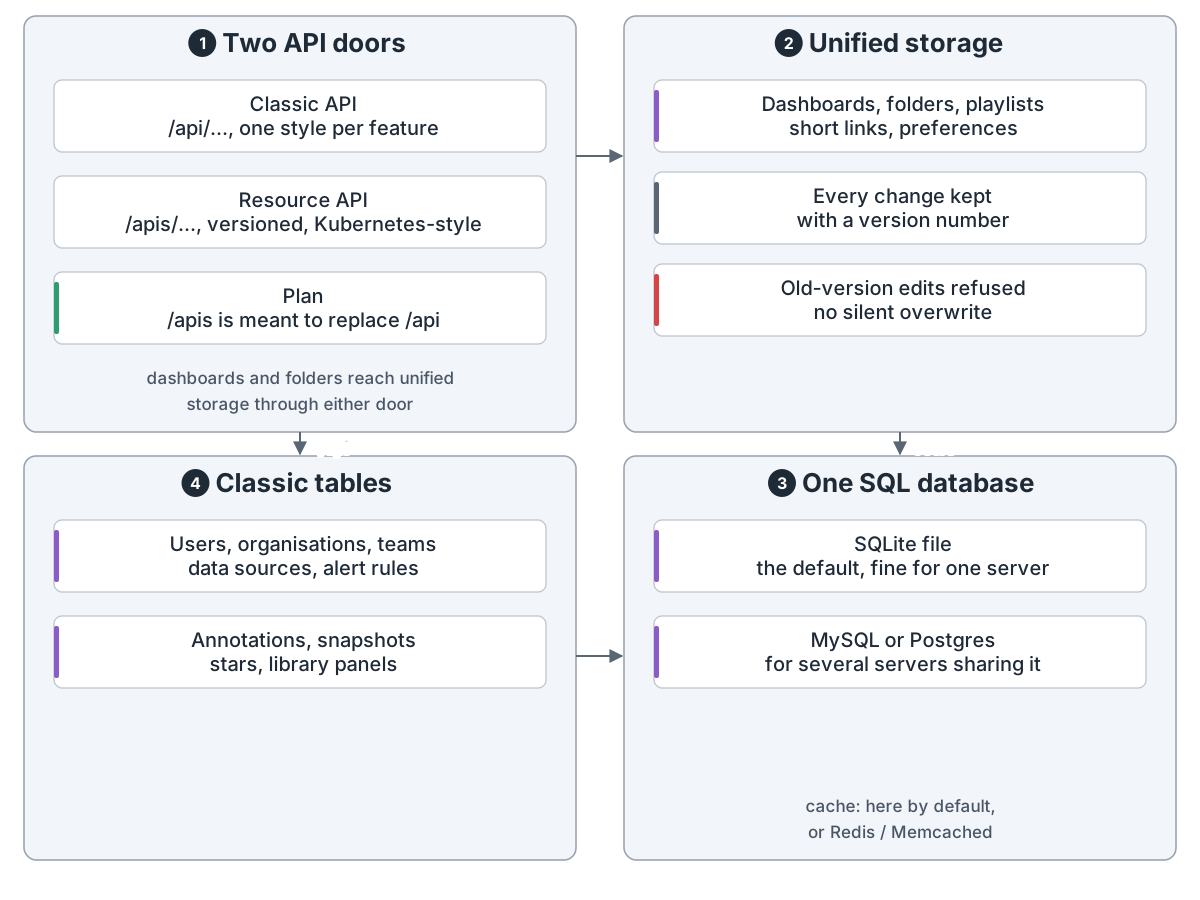
What Grafana keeps: 1 two API doors: the classic /api with one style per feature, and the resource API /apis, versioned and Kubernetes-style; /apis is meant to replace /api; dashboards and folders reach unified storage through either door; 2 unified storage: dashboards, folders, playlists, short links and preferences, every change kept with a version number, and an edit made from an old version is refused, so nothing is overwritten silently; 4 classic tables: users, organisations, teams, data sources, alert rules, annotations, snapshots, stars, library panels; 3 all in one SQL database: a SQLite file by default, fine for one server, or MySQL or Postgres for several servers sharing it; the cache lives here by default, or in Redis / Memcached
存储:一个 SQL 数据库,新旧两套存法正在合一

告警。 调度器每 10 秒跑到点的规则,触发的告警交给内置 Alertmanager。
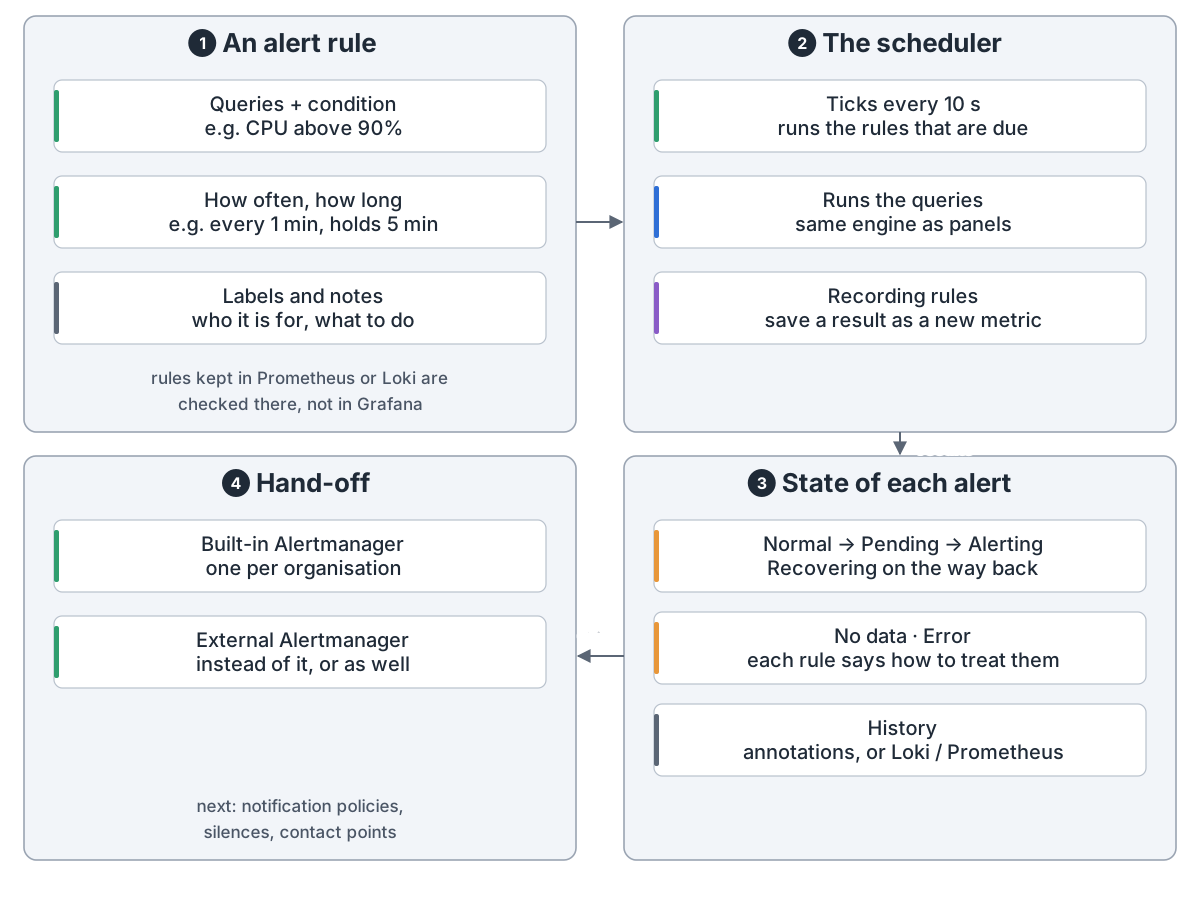
Alert rules: 1 an alert rule: queries plus a condition (e.g. CPU above 90%), how often and how long (e.g. every 1 min, holds 5 min), labels and notes on who it is for and what to do; rules kept in Prometheus or Loki are checked there, not in Grafana; 2 the scheduler ticks every 10 s and runs the rules that are due, using the same engine as panels; recording rules save a result as a new metric; 3 state of each alert: Normal → Pending → Alerting, Recovering on the way back; No data and Error are treated as each rule says; history goes to annotations, or Loki / Prometheus; 4 hand-off: the built-in Alertmanager, one per organisation, or an external Alertmanager instead or as well; next come notification policies, silences and contact points
告警规则:调度器定时跑查询,判断每条告警处在什么状态

它分组、静默,再发到 23 种联系点。

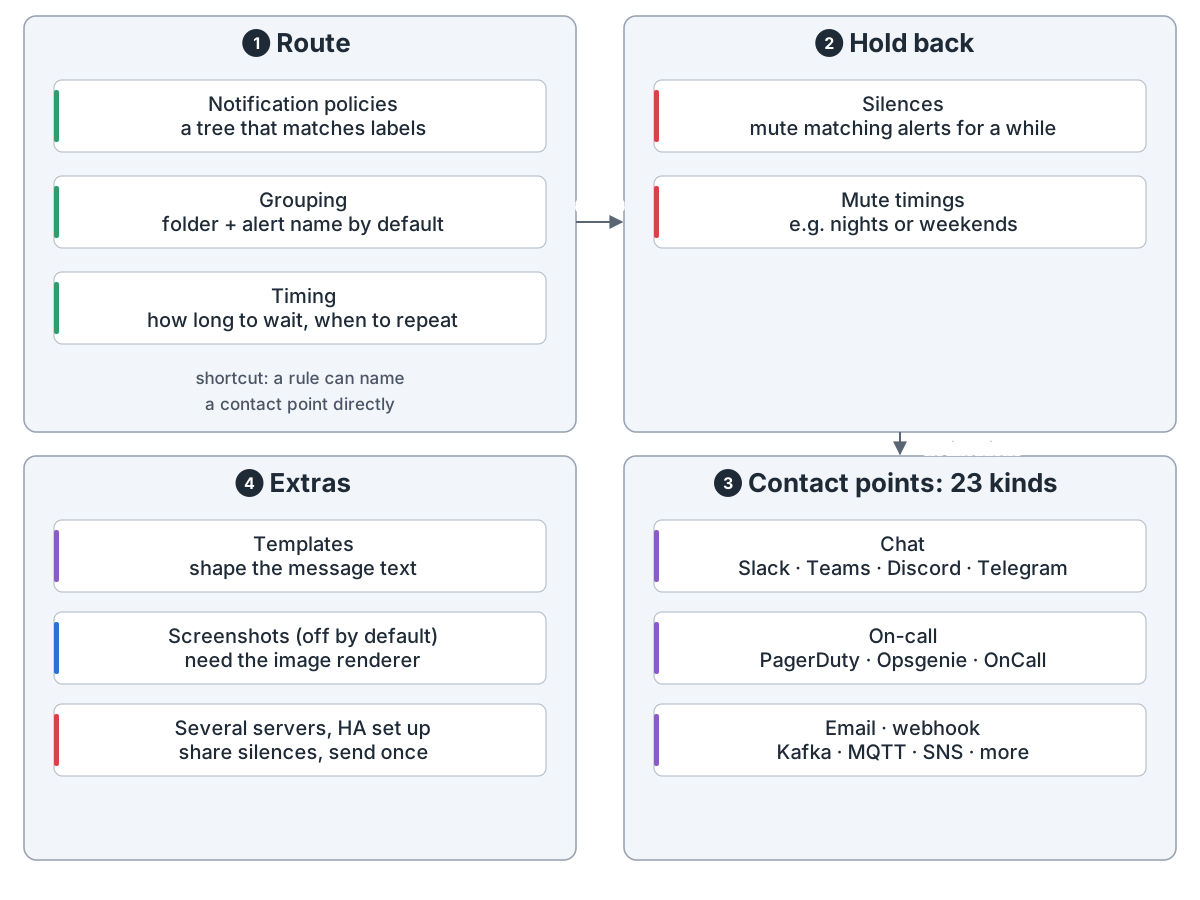
Notifications: 1 route: notification policies are a tree that matches labels, grouping is by folder and alert name by default, timing says how long to wait and when to repeat; a rule can also name a contact point directly; 2 hold back: silences mute matching alerts for a while, mute timings mute them at set times such as nights or weekends; 3 contact points, 23 kinds: chat (Slack, Teams, Discord, Telegram), on-call (PagerDuty, Opsgenie, OnCall), email, webhook, Kafka, MQTT, SNS and more; 4 extras: templates shape the message text, screenshots are off by default and need the image renderer, and several servers with alerting HA set up share silences and send each notification once
通知:分组、静默,再发到 23 种联系点

访问。 用密码、LDAP 或单点登录进来,每个组织一个角色。SAML 和自定义角色是企业版。
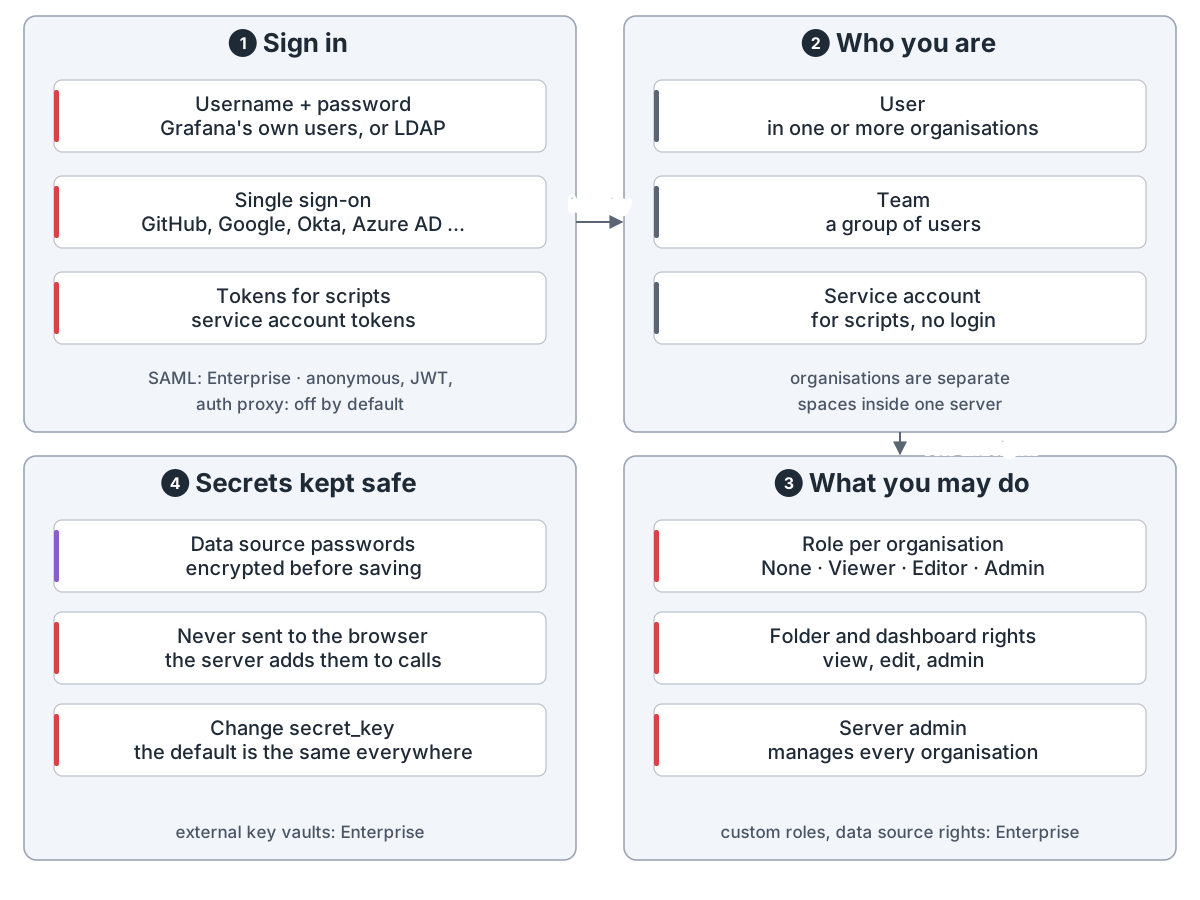
Who gets in and what they may do: 1 sign in: username and password (Grafana's own users, or LDAP), single sign-on (GitHub, Google, Okta, Azure AD ...), tokens for scripts from service accounts; SAML is Enterprise; anonymous, JWT and auth proxy are off by default; 2 who you are: a user in one or more organisations, a team is a group of users, a service account is for scripts and has no login; organisations are separate spaces inside one server; 3 what you may do: a role per organisation (None, Viewer, Editor, Admin), folder and dashboard rights (view, edit, admin), and a server admin who manages every organisation; custom roles and data source rights are Enterprise; 4 secrets kept safe: data source passwords are encrypted before saving and never sent to the browser, the server adds them to calls; change secret_key, the default is the same everywhere; external key vaults are Enterprise
访问控制:先认人,再按组织里的角色和文件夹权限放行

分享。 链接要登录,快照是数据副本,公开仪表盘有链接就能看,只跑存好的查询。
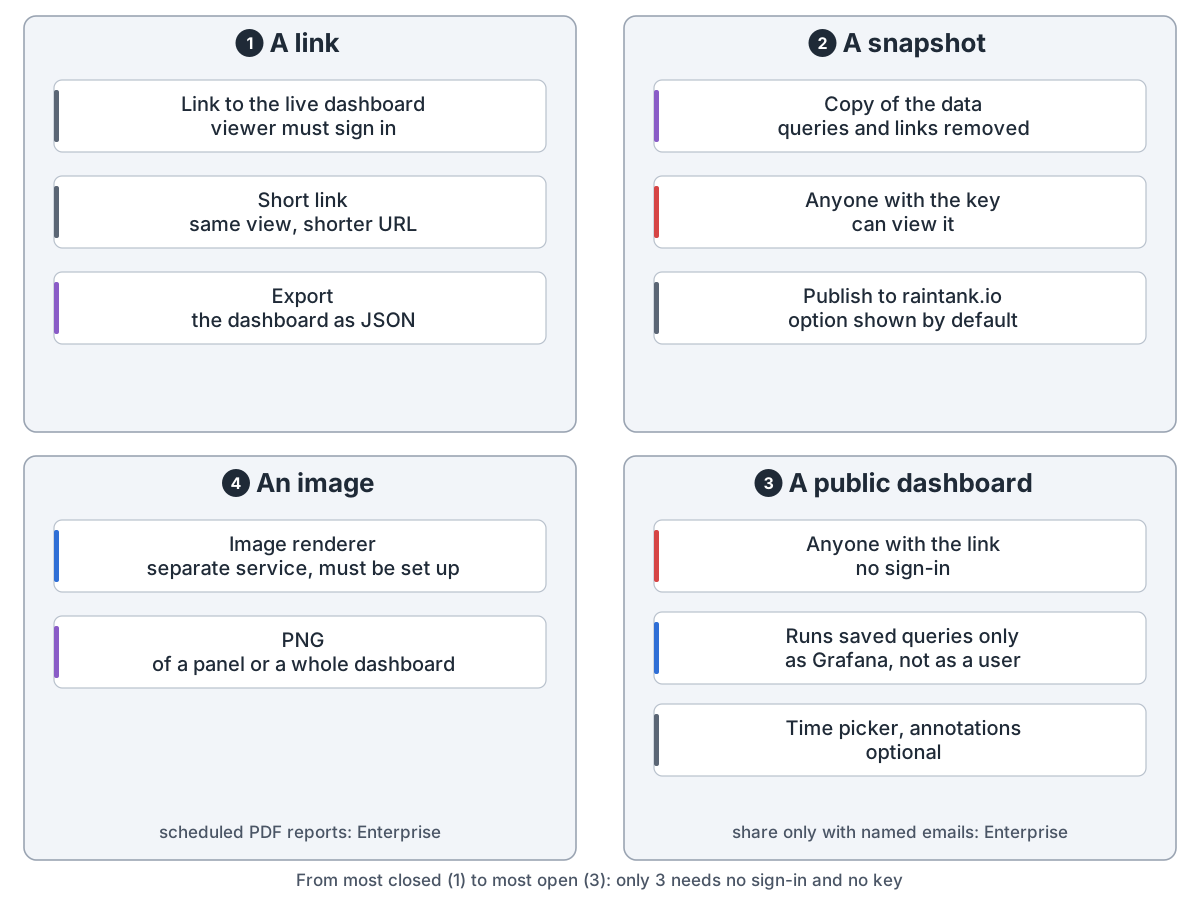
Sharing outside the team: 1 a link: to the live dashboard, the viewer must sign in, it can be a short link, and the dashboard can be exported as JSON; 2 a snapshot: a copy of the data with queries and links removed, anyone with the key can view it, and an option to publish to raintank.io is shown by default; 3 a public dashboard: anyone with the link, no sign-in, runs saved queries only, as Grafana and not as a user, time picker and annotations optional; sharing only with named emails is Enterprise; 4 an image: the image renderer is a separate service that must be set up, and makes a PNG of a panel or a whole dashboard; scheduled PDF reports are Enterprise; from most closed (1) to most open (3): only 3 needs no sign-in and no key
分享:链接要登录,快照靠钥匙,公开仪表盘谁都能看

运行。 一台起步;扩容就在负载均衡后多跑几台,共享 MySQL 或 Postgres。
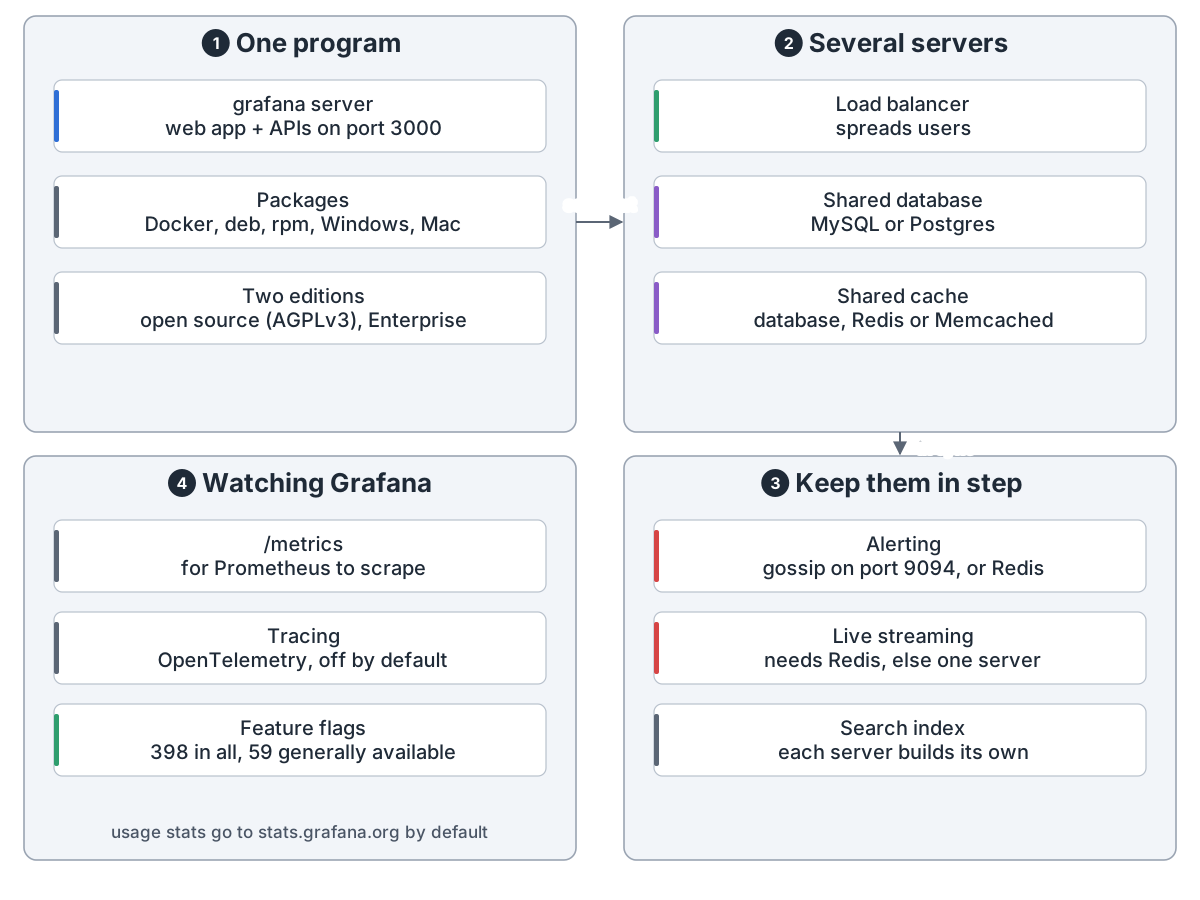
Running Grafana: 1 one program: grafana server serves the web app and APIs on port 3000, packaged for Docker, deb, rpm, Windows and Mac, in two editions: open source (AGPLv3) and Enterprise; 2 several servers: a load balancer spreads users, a shared MySQL or Postgres database, a shared cache (database, Redis or Memcached); 3 keep them in step: alerting gossips on port 9094 or uses Redis, live streaming needs Redis or works on one server only, each server builds its own search index; 4 watching Grafana: /metrics for Prometheus to scrape, OpenTelemetry tracing off by default, 398 feature flags of which 59 are generally available; usage stats go to stats.grafana.org by default
运行:一台起步,多台时共享数据库,再让告警和实时推送互相同步

Grafana draws charts and sends alerts on data that lives in your own systems. Each time a panel loads, it asks the system that holds the data.

One program. The server serves the web app and the APIs, checks every request, keeps dashboards and rules, and runs the queries.

A panel's data. The server checks the caller, splits the query by data source and asks them in parallel. Answers come back as data frames.

How a panel gets its data: 1 in the browser: the panel builds its query with the time range and variables, a request queue sends 5 at a time (1000 with HTTP/2), then POST /api/ds/query; Explore in the browser sends the same call; 2 on the server: check the caller is signed in and may query data sources, split by data source, run them in parallel, up to one per CPU core by default; in open source members may query any source, per-source permissions are Enterprise; 3 fetch from the source: a built-in plugin runs inside Grafana, an installed plugin is its own program that talks gRPC, and your system (Prometheus, MySQL, CloudWatch ...) answers; browser-only plugins use a proxy that adds the stored password; 4 back to the panel: data frames come back, optional expressions do maths, reduce or SQL on the server, transformations join, filter or rename in the browser, and the visualization draws it; query caching is Enterprise only
A panel's data: the browser sends the query, the server asks each data source in parallel, the answer is drawn

Plugins. Data sources, panels and apps are plugins. Most data sources are installed at start, not built in. Unsigned plugins are blocked by default.

Plugins: 1 three kinds: a data source connects to one kind of system, a panel is one way to draw data, an app adds whole pages such as Drilldown; 2 where they come from: built in (28 panels, a few data sources), installed at start from grafana.com (18 by default), or added by admins from the catalog; Prometheus, Loki, MySQL ... are installed, not built in; 3 loading checks: find it and read plugin.json, check the signature (unsigned is blocked by default), start it by running its program and adding permissions; signed by Grafana, a company, the community, or privately for one site; 4 two halves at run time: the front half is JavaScript in the browser, the back half (if any) is its own program that talks gRPC and handles queries, health checks, streaming and its own HTTP routes; extension points let apps add links to other pages
Plugins: most data sources are plugins, checked for a signature before loading, with a browser half and a server half

Dashboards are JSON, built in the web app or loaded from files or Git.

Dashboards: 1 how they get in: build in the web app by dragging panels and picking queries, import from grafana.com or a JSON file, load from a provisioning folder at start, or Git Sync with GitHub, git or a local folder; Git Sync to Bitbucket or GitLab is Enterprise; 2 what one holds: panels (each a query plus a chart), variables (drop-downs at the top), time range and refresh (e.g. last 6 hours, every 30 s), layout (grid, rows, tabs or auto grid); 3 kept in order: folders nested up to 4 levels, the last 20 versions kept with restore, library panels reused on many dashboards, playlists and stars; 4 saved and found: one JSON document in Grafana's database, a search index built on each server, search by title, tag or folder
Dashboards: one JSON document, drawn by hand, imported, or loaded from files or Git

Storage. Grafana's own database is a SQLite file by default, or MySQL or Postgres. Dashboards now sit in a newer, versioned store in that same database.

What Grafana keeps: 1 two API doors: the classic /api with one style per feature, and the resource API /apis, versioned and Kubernetes-style; /apis is meant to replace /api; dashboards and folders reach unified storage through either door; 2 unified storage: dashboards, folders, playlists, short links and preferences, every change kept with a version number, and an edit made from an old version is refused, so nothing is overwritten silently; 4 classic tables: users, organisations, teams, data sources, alert rules, annotations, snapshots, stars, library panels; 3 all in one SQL database: a SQLite file by default, fine for one server, or MySQL or Postgres for several servers sharing it; the cache lives here by default, or in Redis / Memcached
Storage: one SQL database, with an old and a new way of storing being merged into one

Alerts. A scheduler ticks every 10 seconds and runs due rules. Firing alerts go to the built-in Alertmanager.

Alert rules: 1 an alert rule: queries plus a condition (e.g. CPU above 90%), how often and how long (e.g. every 1 min, holds 5 min), labels and notes on who it is for and what to do; rules kept in Prometheus or Loki are checked there, not in Grafana; 2 the scheduler ticks every 10 s and runs the rules that are due, using the same engine as panels; recording rules save a result as a new metric; 3 state of each alert: Normal → Pending → Alerting, Recovering on the way back; No data and Error are treated as each rule says; history goes to annotations, or Loki / Prometheus; 4 hand-off: the built-in Alertmanager, one per organisation, or an external Alertmanager instead or as well; next come notification policies, silences and contact points
Alert rules: a scheduler runs the queries on a timer and decides each alert's state

It groups them, holds back silenced ones, and sends the rest to 23 kinds of contact point.

Notifications: 1 route: notification policies are a tree that matches labels, grouping is by folder and alert name by default, timing says how long to wait and when to repeat; a rule can also name a contact point directly; 2 hold back: silences mute matching alerts for a while, mute timings mute them at set times such as nights or weekends; 3 contact points, 23 kinds: chat (Slack, Teams, Discord, Telegram), on-call (PagerDuty, Opsgenie, OnCall), email, webhook, Kafka, MQTT, SNS and more; 4 extras: templates shape the message text, screenshots are off by default and need the image renderer, and several servers with alerting HA set up share silences and send each notification once
Notifications: group, silence, then send to 23 kinds of contact point

Access. People sign in with a password, LDAP or single sign-on, and get a role in each organisation. SAML and custom roles are Enterprise.

Who gets in and what they may do: 1 sign in: username and password (Grafana's own users, or LDAP), single sign-on (GitHub, Google, Okta, Azure AD ...), tokens for scripts from service accounts; SAML is Enterprise; anonymous, JWT and auth proxy are off by default; 2 who you are: a user in one or more organisations, a team is a group of users, a service account is for scripts and has no login; organisations are separate spaces inside one server; 3 what you may do: a role per organisation (None, Viewer, Editor, Admin), folder and dashboard rights (view, edit, admin), and a server admin who manages every organisation; custom roles and data source rights are Enterprise; 4 secrets kept safe: data source passwords are encrypted before saving and never sent to the browser, the server adds them to calls; change secret_key, the default is the same everywhere; external key vaults are Enterprise
Access: first who you are, then your role in the organisation and your folder rights

Sharing. A link needs sign-in. A snapshot is a copy of the data. Anyone with a public dashboard's link can view it; it runs only its saved queries.

Sharing outside the team: 1 a link: to the live dashboard, the viewer must sign in, it can be a short link, and the dashboard can be exported as JSON; 2 a snapshot: a copy of the data with queries and links removed, anyone with the key can view it, and an option to publish to raintank.io is shown by default; 3 a public dashboard: anyone with the link, no sign-in, runs saved queries only, as Grafana and not as a user, time picker and annotations optional; sharing only with named emails is Enterprise; 4 an image: the image renderer is a separate service that must be set up, and makes a PNG of a panel or a whole dashboard; scheduled PDF reports are Enterprise; from most closed (1) to most open (3): only 3 needs no sign-in and no key
Sharing: a link needs sign-in, a snapshot needs its key, a public dashboard is open to anyone with the link

Running it. Start with one server. To grow, run more behind a load balancer, sharing a MySQL or Postgres database.

Running Grafana: 1 one program: grafana server serves the web app and APIs on port 3000, packaged for Docker, deb, rpm, Windows and Mac, in two editions: open source (AGPLv3) and Enterprise; 2 several servers: a load balancer spreads users, a shared MySQL or Postgres database, a shared cache (database, Redis or Memcached); 3 keep them in step: alerting gossips on port 9094 or uses Redis, live streaming needs Redis or works on one server only, each server builds its own search index; 4 watching Grafana: /metrics for Prometheus to scrape, OpenTelemetry tracing off by default, 398 feature flags of which 59 are generally available; usage stats go to stats.grafana.org by default
Running it: start with one server; for more, share the database and keep alerting and live streaming in step

来源Source: github.com

← 全部架构← All architectures