archwall 把架构画全Every architecture, drawn in full

pi:一个可以自己改造的极简编程智能体pi: a minimal coding agent you make your own
agentscoding-agentclillm

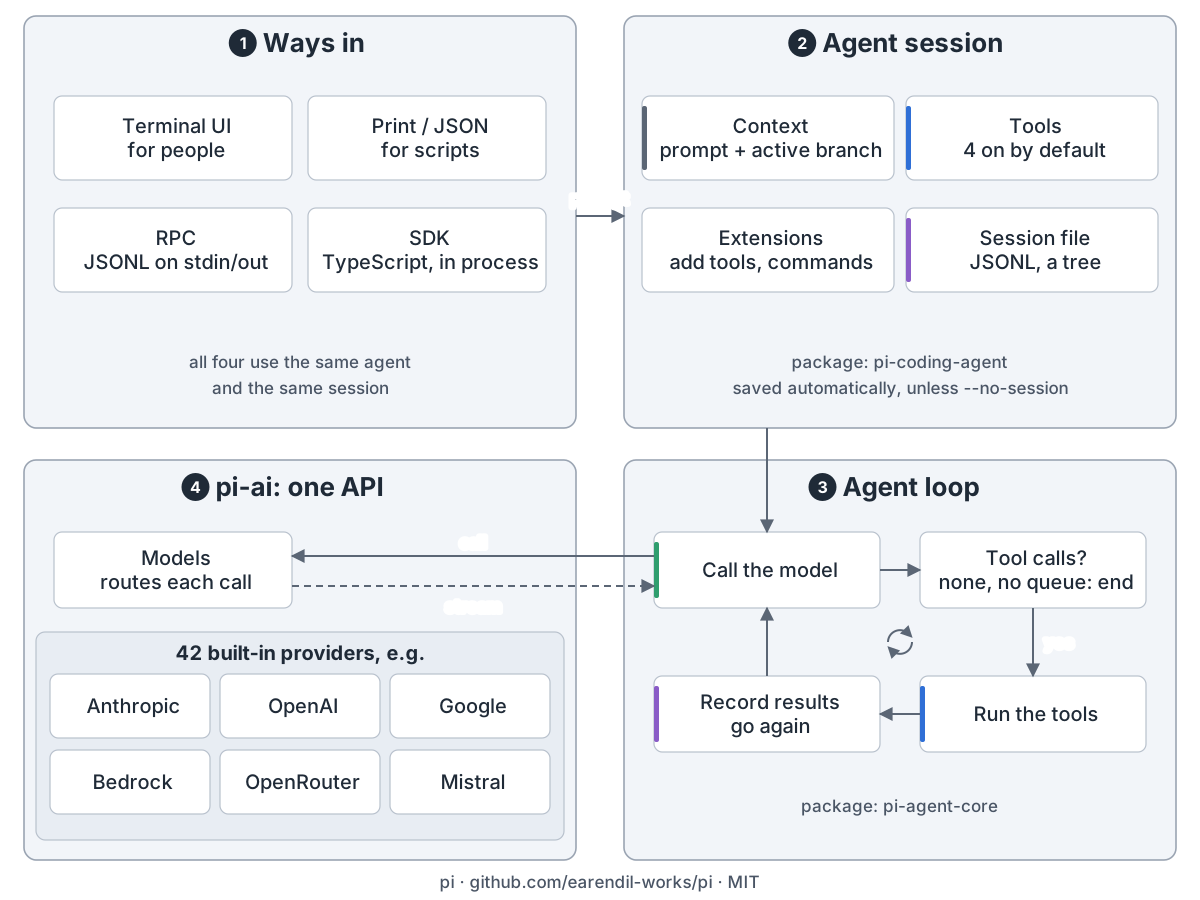
Pi overview: 1 four ways in (terminal UI, print/JSON, RPC, SDK) share one agent and session; 2 the agent session (pi-coding-agent): context from the prompt and active branch, 4 tools on by default, extensions add tools and commands, the session saved as a JSONL tree; 3 the loop (pi-agent-core): call the model, run any tool calls, record the results and go again, or end when nothing is queued; 4 pi-ai routes each call to one of 42 built-in providers and streams the answer back

pi 是终端里的小型开源编程智能体。缺什么功能,自己加。

总览。 四种入口:终端界面、打印或 JSON 模式、RPC、SDK,共用一个会话。pi 拼请求,循环调模型和工具,保存对话。pi-ai 内置 42 家模型厂商。
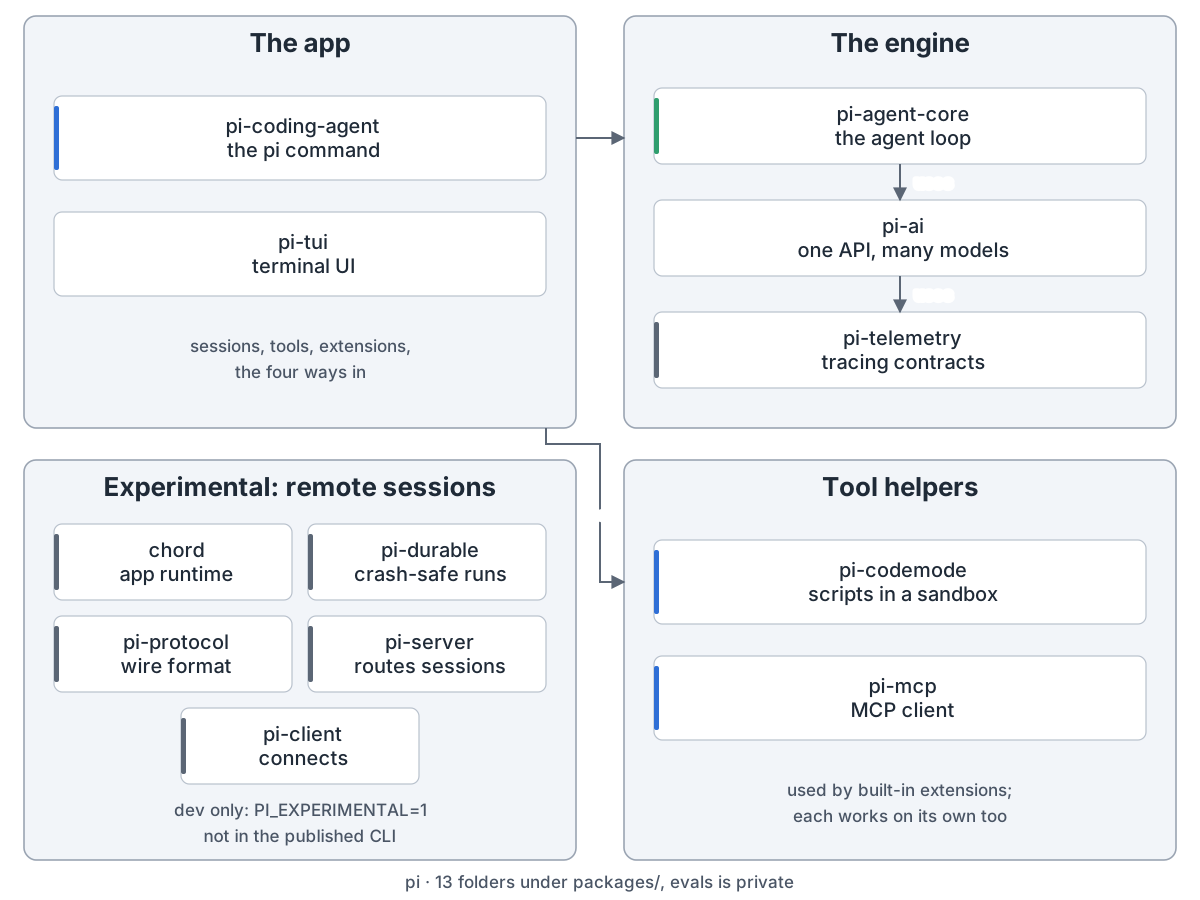
Pi packages: the app is pi-coding-agent (the pi command) and pi-tui (terminal UI); it uses the engine, pi-agent-core (the agent loop) on pi-ai (one API, many models) on pi-telemetry (tracing contracts), and the tool helpers pi-codemode (sandboxed scripts) and pi-mcp (MCP client) through built-in extensions; the experimental remote-session packages chord, pi-durable, pi-protocol, pi-server and pi-client run only in dev mode with PI_EXPERIMENTAL=1 and are not in the published CLI
包结构:一个应用、一套引擎、两个工具助手,外加实验中的远程会话

pi 命令在 pi-coding-agent 里,基于 pi-agent-core 和 pi-ai。远程会话的包仍是实验版。
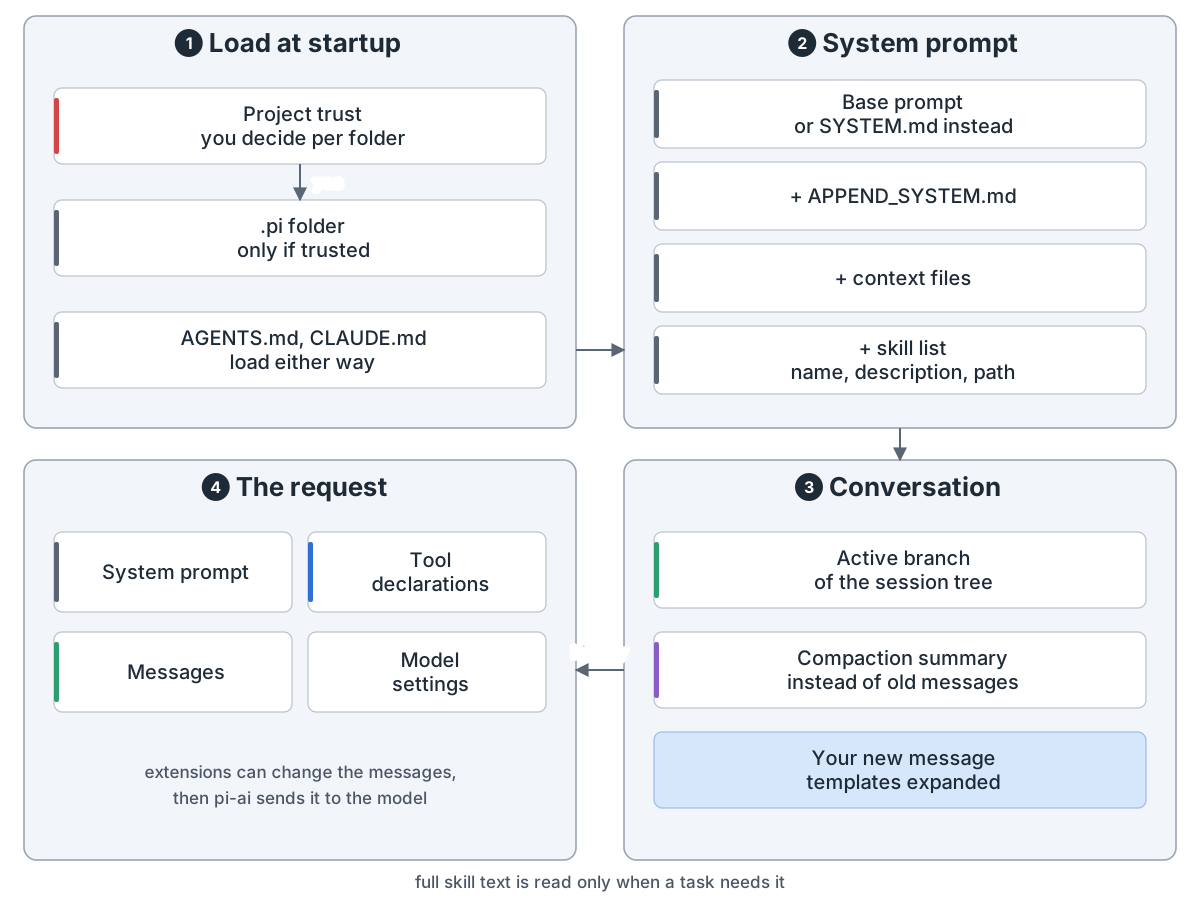
What goes into a request: 1 at startup you decide whether to trust the project; only then does its .pi folder load, while AGENTS.md and CLAUDE.md load either way; 2 system prompt: the base prompt or SYSTEM.md, plus APPEND_SYSTEM.md, context files and a skill list with names, descriptions and paths; 3 conversation: the active branch of the session tree, a compaction summary in place of old messages, and the new message with templates expanded; 4 the request: system prompt, tool declarations, messages and model settings, which extensions can change before pi-ai sends it
一次请求:提示词、工具、对话,技能用到才读全文

请求带系统提示词、工具列表和对话。项目的 .pi 目录要先信任才加载。技能用到才读全文。
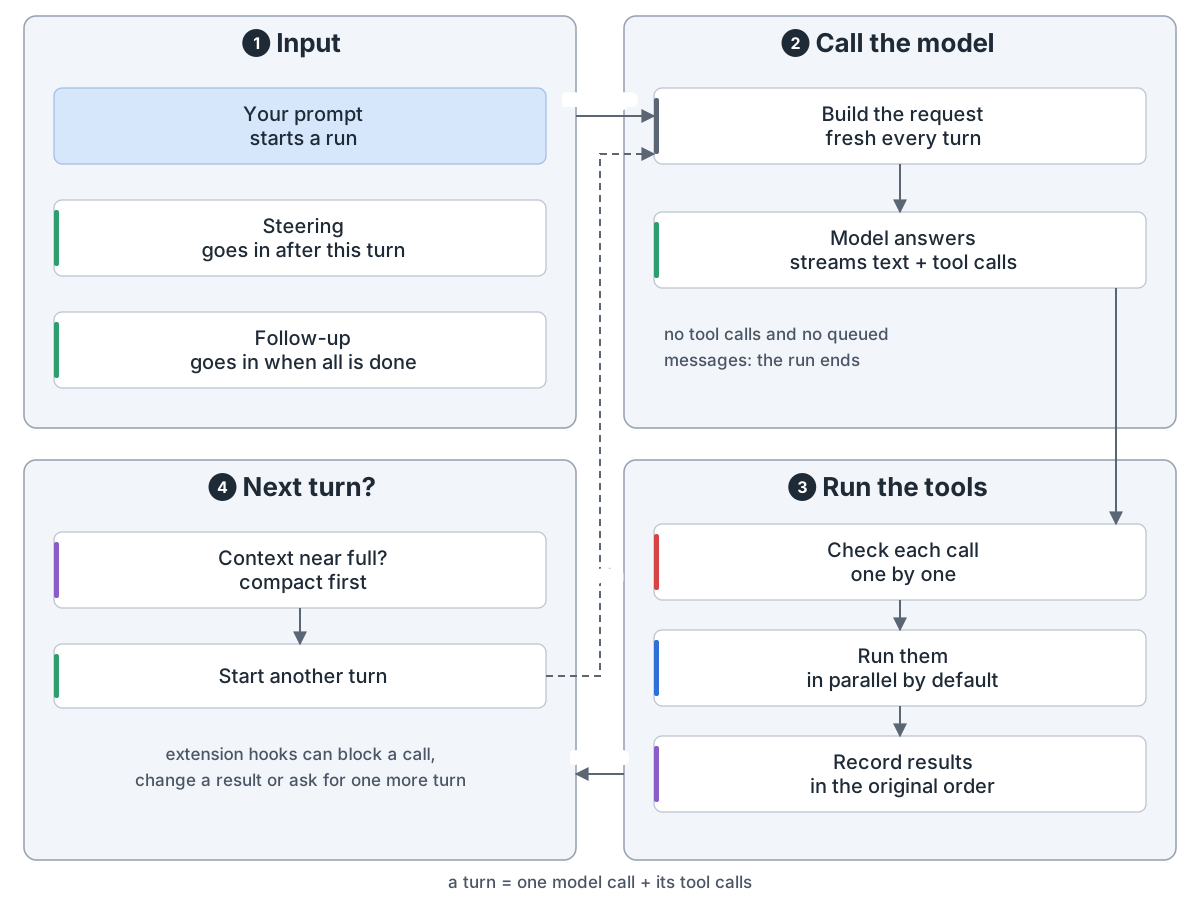
Agent loop: 1 input: your prompt starts a run, a steering message goes in after the current turn, a follow-up when all is done; 2 call the model: the request is rebuilt every turn and the model streams text and tool calls, and with no tool calls and nothing queued the run ends; 3 run the tools: each call checked one by one where extension hooks can block it, run in parallel by default, results recorded in the original order; 4 next turn: compact first if the context is near full, then go again
一轮 = 一次模型调用加它要的工具调用

模型回文字和工具调用。pi 逐个检查,默认并行执行,记下结果,再来一轮。中途可以插话。
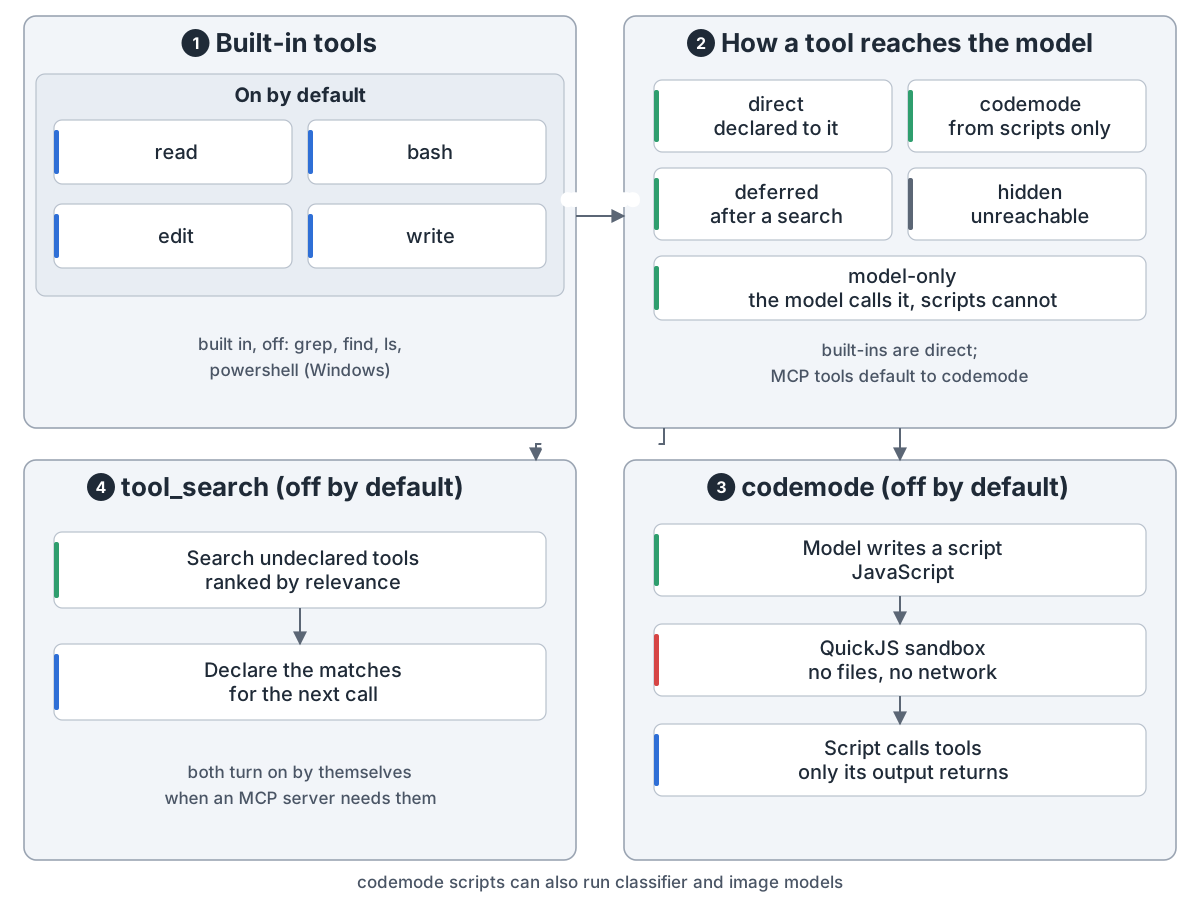
Tools: 1 read, bash, edit and write on by default, with grep, find, ls and powershell (Windows) built in but off; 2 how a tool reaches the model: direct is declared, model-only the model calls but scripts cannot, codemode only from scripts, deferred after a search, hidden unreachable, and MCP tools default to codemode; 3 codemode (off by default): the model writes JavaScript that runs in a QuickJS sandbox with no files or network, calls tools, and only its output returns; 4 tool_search (off by default): search undeclared tools and declare the matches for the next call; both turn on when an MCP server needs them
四个默认工具,另有两个内置扩展去够模型看不到的工具

默认开四个工具:read、bash、edit、write。codemode 和 tool-search 是内置扩展,工具默认关,MCP 需要时自动开。
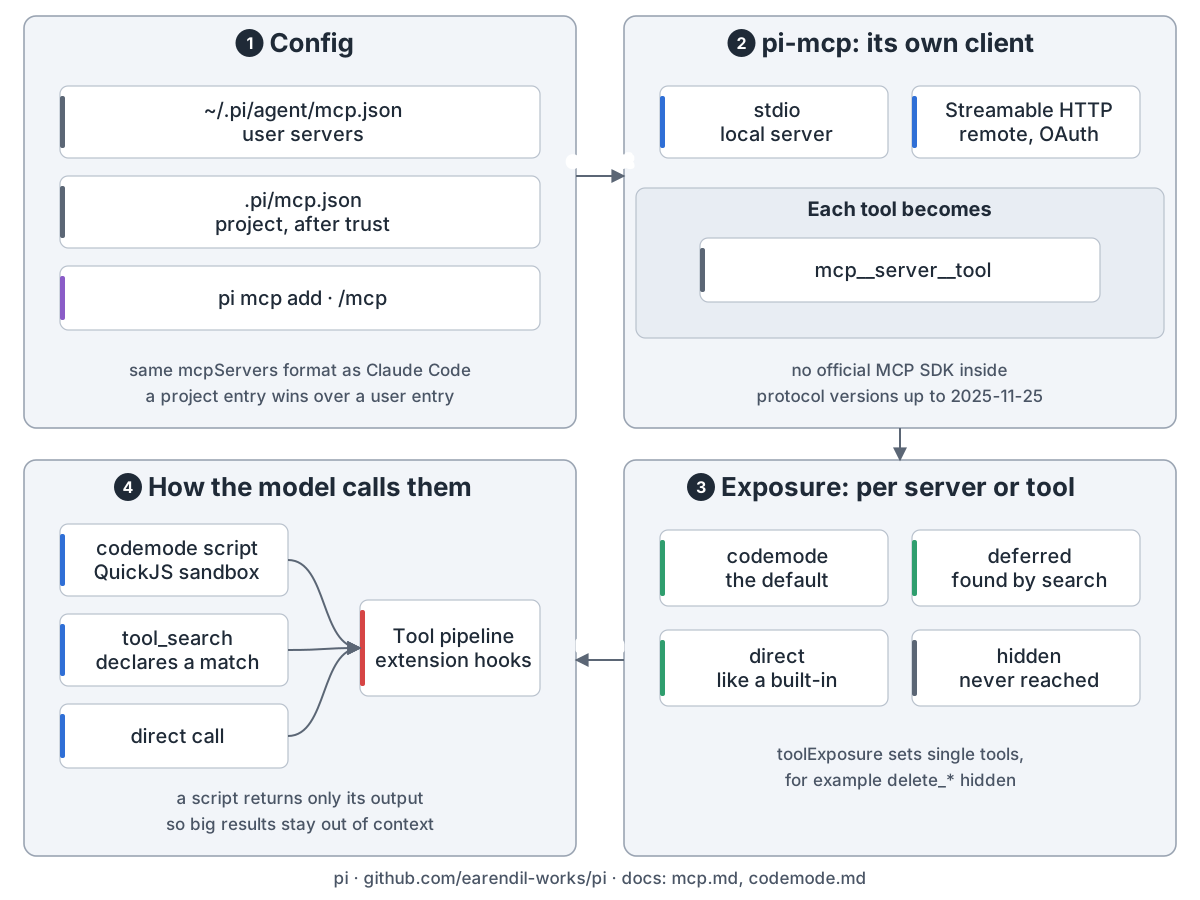
Pi MCP support: 1 config in ~/.pi/agent/mcp.json and, once trusted, .pi/mcp.json; 2 pi-mcp is pi's own client over stdio or Streamable HTTP, naming each tool mcp__server__tool; 3 exposure per server or tool: codemode (default), deferred, direct, hidden; 4 the model reaches tools through a sandboxed script, tool_search or a direct call, all through the same tool pipeline where installed extension hooks apply
MCP 工具默认不直接给模型,由脚本去调

MCP 服务端写在 mcp.json。默认模型看不到 MCP 工具,而是写沙箱脚本去调,只拿回输出。
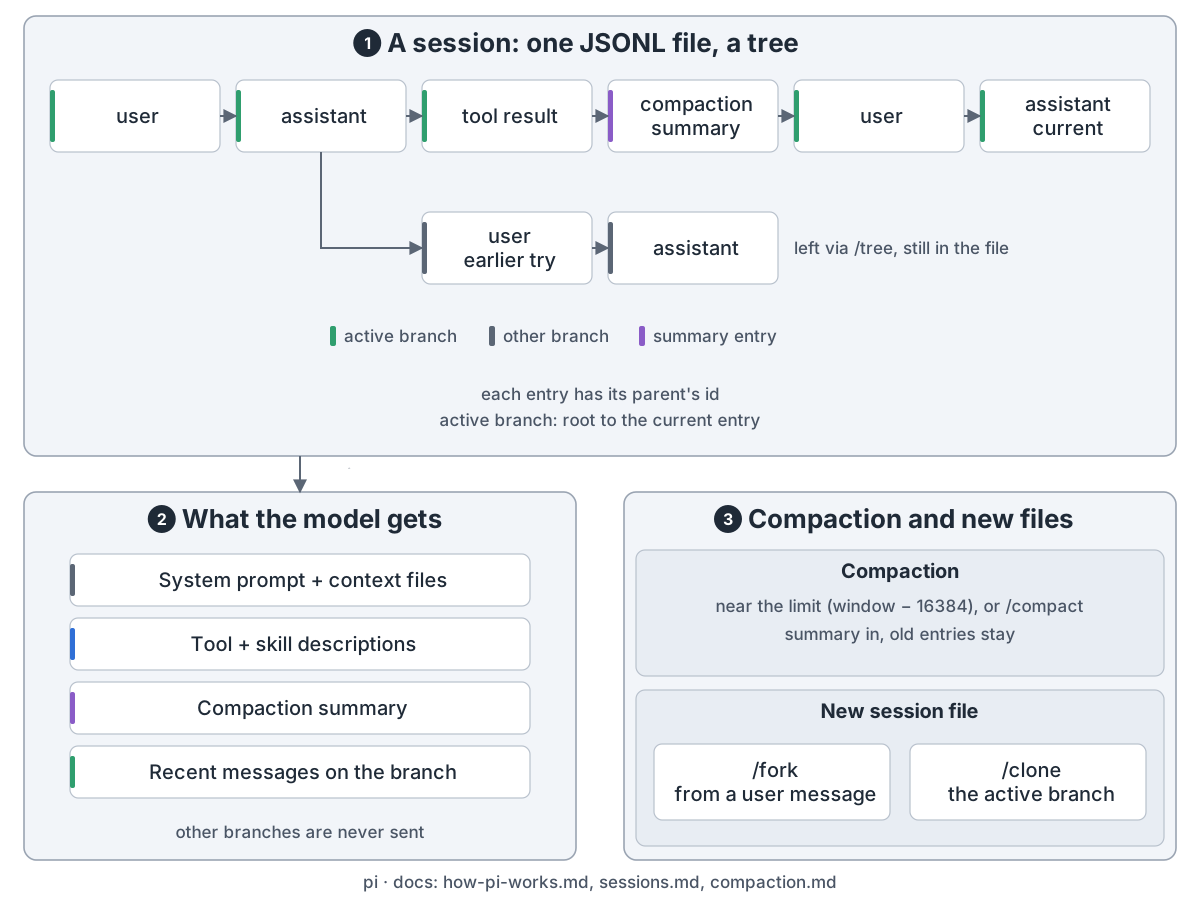
Pi session: a tree in one JSONL file, each entry pointing to its parent; the active branch runs from the root to the current entry and old branches stay; the model gets the system prompt, tool and skill descriptions, the compaction summary and recent messages on the active branch; compaction runs when context fills up, /fork and /clone start new files
会话是一棵树,模型只看当前分支

会话是 JSONL 文件里的一棵树,只有当前分支发给模型。快满时用摘要替掉旧消息。
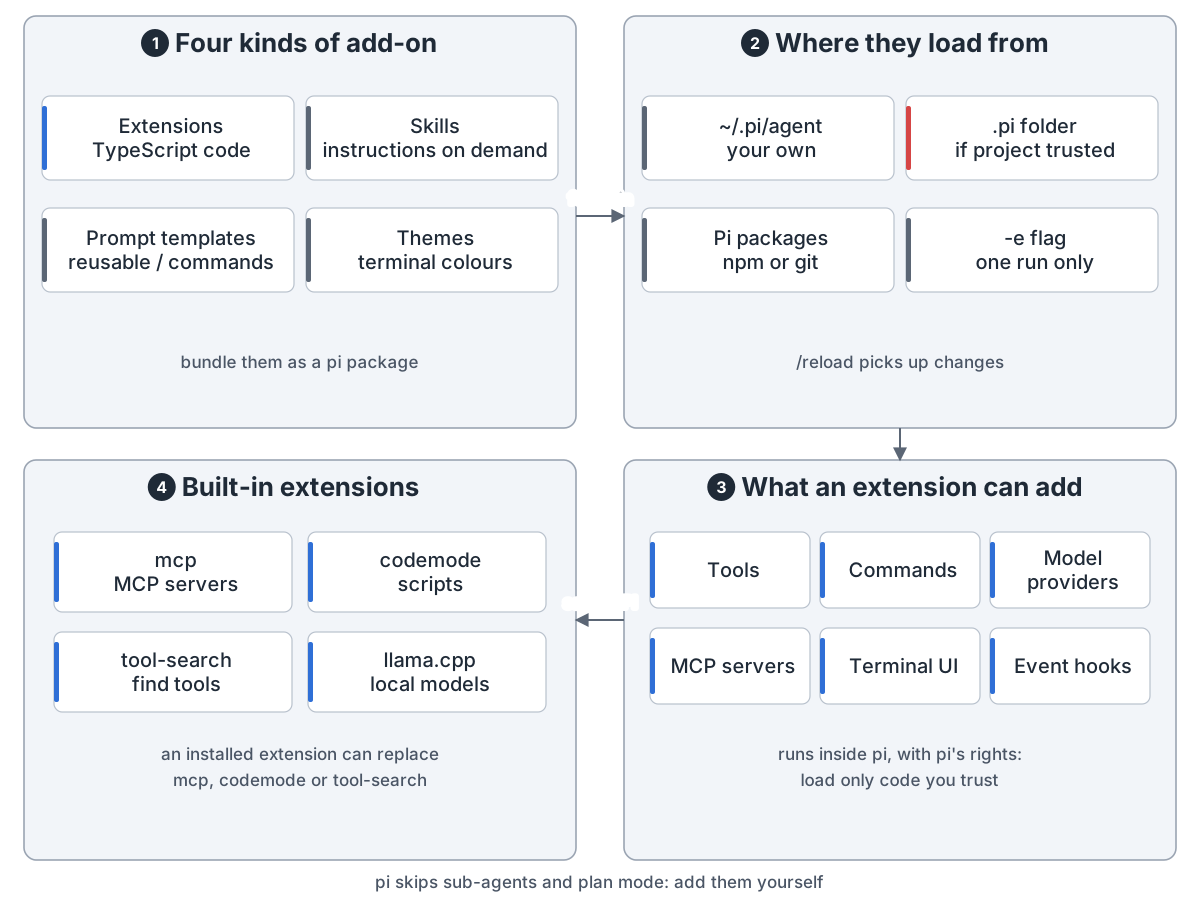
Extensions and add-ons: 1 four kinds: extensions (TypeScript code), skills (instructions read on demand), prompt templates (reusable slash commands), themes (terminal colours), bundled as pi packages; 2 where from: ~/.pi/agent, the .pi folder once trusted, pi packages from npm or git, or the -e flag for one run; 3 an extension can add tools, commands, model providers, MCP servers, terminal UI and event hooks, running inside pi with pi's rights; 4 built-in extensions use the same API: mcp, codemode, tool-search and llama.cpp, and an installed extension can replace the first three
pi 自己的 MCP 和 codemode 也是扩展,和你写的用同一套接口

扩展是 pi 进程里的 TypeScript,能加工具、命令、厂商和界面。技能、模板和主题不用写代码。
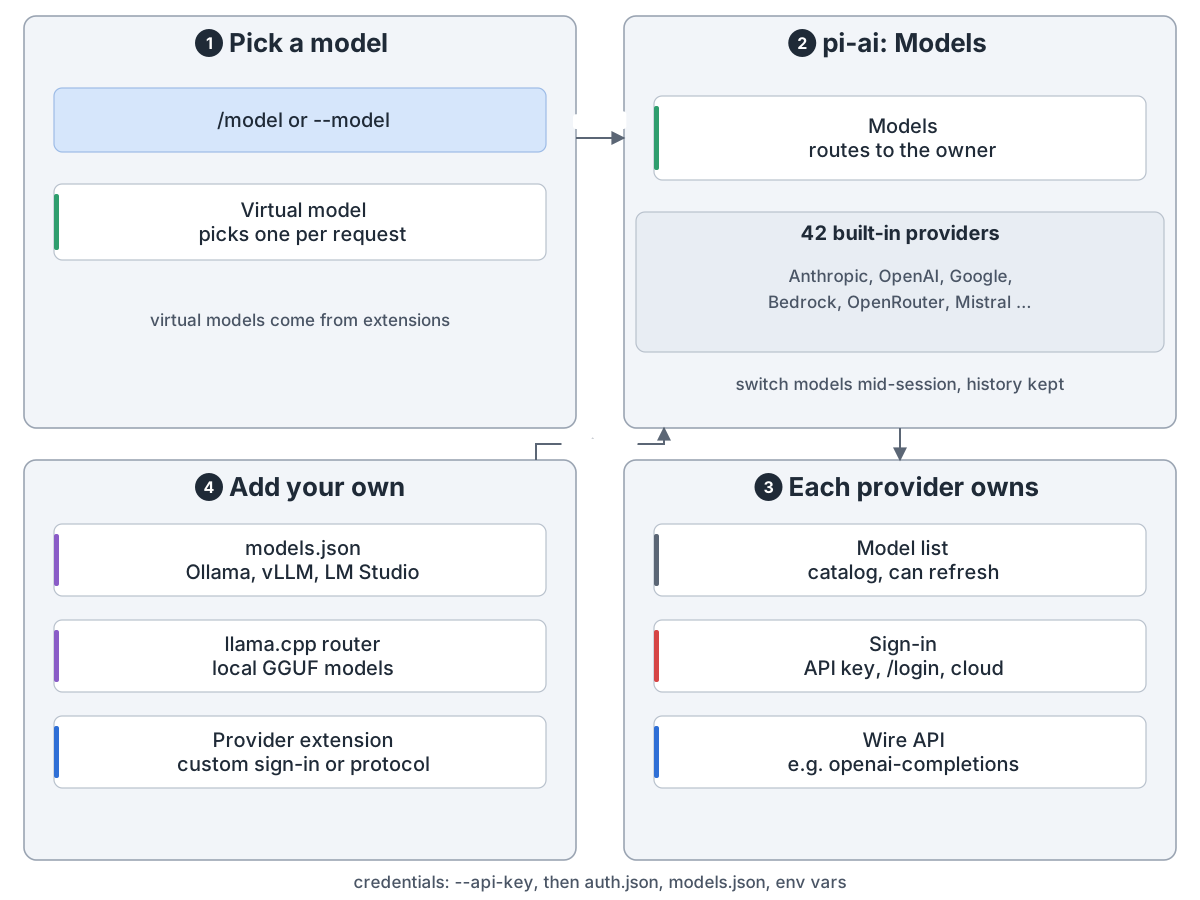
Model providers: 1 pick a model with /model or --model, and a virtual model from an extension can pick a real one per request; 2 pi-ai's Models hands each request to the provider that owns the model, 42 built in, and you can switch models mid-session with history kept; 3 each provider owns its model list, its sign-in (API key, /login, cloud credentials) and its wire API, such as openai-completions; 4 add your own: models.json for Ollama, vLLM or LM Studio, llama.cpp for local GGUF models, or a provider extension; credentials in order: --api-key, auth.json, models.json, env vars
一套接口,42 家内置厂商,也能接自己的模型

用 /login 或 API key 登录。本地模型走 llama.cpp 或 models.json。
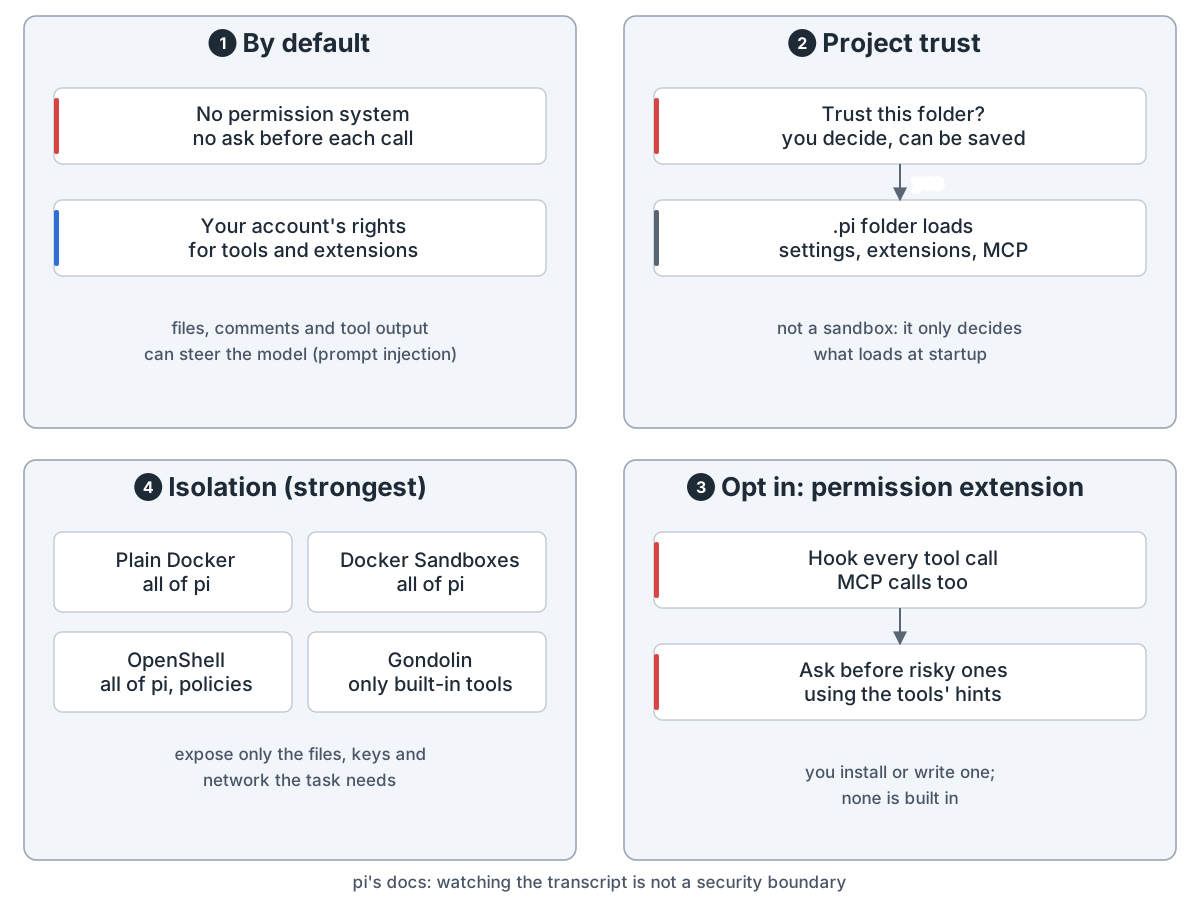
Safety: 1 by default there is no permission system and no ask before each call, tools and extensions run with your account's rights, and files or tool output can steer the model (prompt injection); 2 project trust decides whether a .pi folder's settings, extensions and MCP servers load, but it is not a sandbox; 3 opt in: a permission extension hooks every tool call, MCP included, and asks before risky ones using the tools' hints, none built in; 4 isolation is strongest: plain Docker, Docker Sandboxes or OpenShell around all of pi, or Gondolin for the built-in tools only
pi 不替你设防,要隔离得自己放进容器

pi 没有内置权限系统,工具用你账号的权限跑。要隔离就用容器。

Pi is a small, open coding agent for the terminal. Missing a feature? You add it yourself.

Overview. Four ways in: the terminal UI, print or JSON mode, RPC and the SDK. All four share one session. Pi builds the request, loops over model calls and tool calls, and saves the conversation. pi-ai talks to 42 built-in model providers.

Pi packages: the app is pi-coding-agent (the pi command) and pi-tui (terminal UI); it uses the engine, pi-agent-core (the agent loop) on pi-ai (one API, many models) on pi-telemetry (tracing contracts), and the tool helpers pi-codemode (sandboxed scripts) and pi-mcp (MCP client) through built-in extensions; the experimental remote-session packages chord, pi-durable, pi-protocol, pi-server and pi-client run only in dev mode with PI_EXPERIMENTAL=1 and are not in the published CLI
Packages: one app, one engine, two tool helpers, plus experimental remote sessions

The pi command lives in pi-coding-agent, on top of pi-agent-core and pi-ai. The remote-session packages are still experimental.

What goes into a request: 1 at startup you decide whether to trust the project; only then does its .pi folder load, while AGENTS.md and CLAUDE.md load either way; 2 system prompt: the base prompt or SYSTEM.md, plus APPEND_SYSTEM.md, context files and a skill list with names, descriptions and paths; 3 conversation: the active branch of the session tree, a compaction summary in place of old messages, and the new message with templates expanded; 4 the request: system prompt, tool declarations, messages and model settings, which extensions can change before pi-ai sends it
A request: prompt, tools and conversation; full skills load only when needed

A request carries the system prompt, the tool list and the conversation. A project's .pi folder loads only once you trust it. A skill is read in full only when needed.

Agent loop: 1 input: your prompt starts a run, a steering message goes in after the current turn, a follow-up when all is done; 2 call the model: the request is rebuilt every turn and the model streams text and tool calls, and with no tool calls and nothing queued the run ends; 3 run the tools: each call checked one by one where extension hooks can block it, run in parallel by default, results recorded in the original order; 4 next turn: compact first if the context is near full, then go again
A turn is one model call plus the tool calls it asks for

The model answers with text and tool calls. Pi checks each call, runs them in parallel by default, records the results and goes again. You can steer it mid-run.

Tools: 1 read, bash, edit and write on by default, with grep, find, ls and powershell (Windows) built in but off; 2 how a tool reaches the model: direct is declared, model-only the model calls but scripts cannot, codemode only from scripts, deferred after a search, hidden unreachable, and MCP tools default to codemode; 3 codemode (off by default): the model writes JavaScript that runs in a QuickJS sandbox with no files or network, calls tools, and only its output returns; 4 tool_search (off by default): search undeclared tools and declare the matches for the next call; both turn on when an MCP server needs them
Four default tools, plus two built-in extensions that reach tools the model can't see

Four tools are on by default: read, bash, edit, write. codemode and tool-search are built-in extensions whose tools are off by default; an MCP server turns them on when it needs them.

Pi MCP support: 1 config in ~/.pi/agent/mcp.json and, once trusted, .pi/mcp.json; 2 pi-mcp is pi's own client over stdio or Streamable HTTP, naming each tool mcp__server__tool; 3 exposure per server or tool: codemode (default), deferred, direct, hidden; 4 the model reaches tools through a sandboxed script, tool_search or a direct call, all through the same tool pipeline where installed extension hooks apply
By default MCP tools reach the model through a script

MCP servers go in mcp.json. By default the model doesn't see MCP tools. It writes a sandboxed script that calls them and gets back only the output.

Pi session: a tree in one JSONL file, each entry pointing to its parent; the active branch runs from the root to the current entry and old branches stay; the model gets the system prompt, tool and skill descriptions, the compaction summary and recent messages on the active branch; compaction runs when context fills up, /fork and /clone start new files
A session is a tree; the model only sees the active branch

A session is a tree in one JSONL file. Only the active branch goes to the model. Near the limit, a summary replaces older messages.

Extensions and add-ons: 1 four kinds: extensions (TypeScript code), skills (instructions read on demand), prompt templates (reusable slash commands), themes (terminal colours), bundled as pi packages; 2 where from: ~/.pi/agent, the .pi folder once trusted, pi packages from npm or git, or the -e flag for one run; 3 an extension can add tools, commands, model providers, MCP servers, terminal UI and event hooks, running inside pi with pi's rights; 4 built-in extensions use the same API: mcp, codemode, tool-search and llama.cpp, and an installed extension can replace the first three
Pi's own MCP and codemode are extensions too, on the same API as yours

Extensions are TypeScript inside the pi process. They can add tools, commands, providers and UI. Skills, templates and themes need no code.

Model providers: 1 pick a model with /model or --model, and a virtual model from an extension can pick a real one per request; 2 pi-ai's Models hands each request to the provider that owns the model, 42 built in, and you can switch models mid-session with history kept; 3 each provider owns its model list, its sign-in (API key, /login, cloud credentials) and its wire API, such as openai-completions; 4 add your own: models.json for Ollama, vLLM or LM Studio, llama.cpp for local GGUF models, or a provider extension; credentials in order: --api-key, auth.json, models.json, env vars
One API, 42 built-in providers, and room for your own models

Sign in with /login or an API key. Local models work through llama.cpp or models.json.

Safety: 1 by default there is no permission system and no ask before each call, tools and extensions run with your account's rights, and files or tool output can steer the model (prompt injection); 2 project trust decides whether a .pi folder's settings, extensions and MCP servers load, but it is not a sandbox; 3 opt in: a permission extension hooks every tool call, MCP included, and asks before risky ones using the tools' hints, none built in; 4 isolation is strongest: plain Docker, Docker Sandboxes or OpenShell around all of pi, or Gondolin for the built-in tools only
Pi does not fence itself in; isolation is up to you

Pi has no built-in permission system: tools run with your account's rights. To isolate it, use a container.

来源Source: github.com

← 全部架构← All architectures