archwall 把架构画全Every architecture, drawn in full

midPoint:开源身份治理系统怎么管谁能用什么midPoint: how an open-source identity governance system manages who gets what
igaidentitygovernanceprovisioningrbac

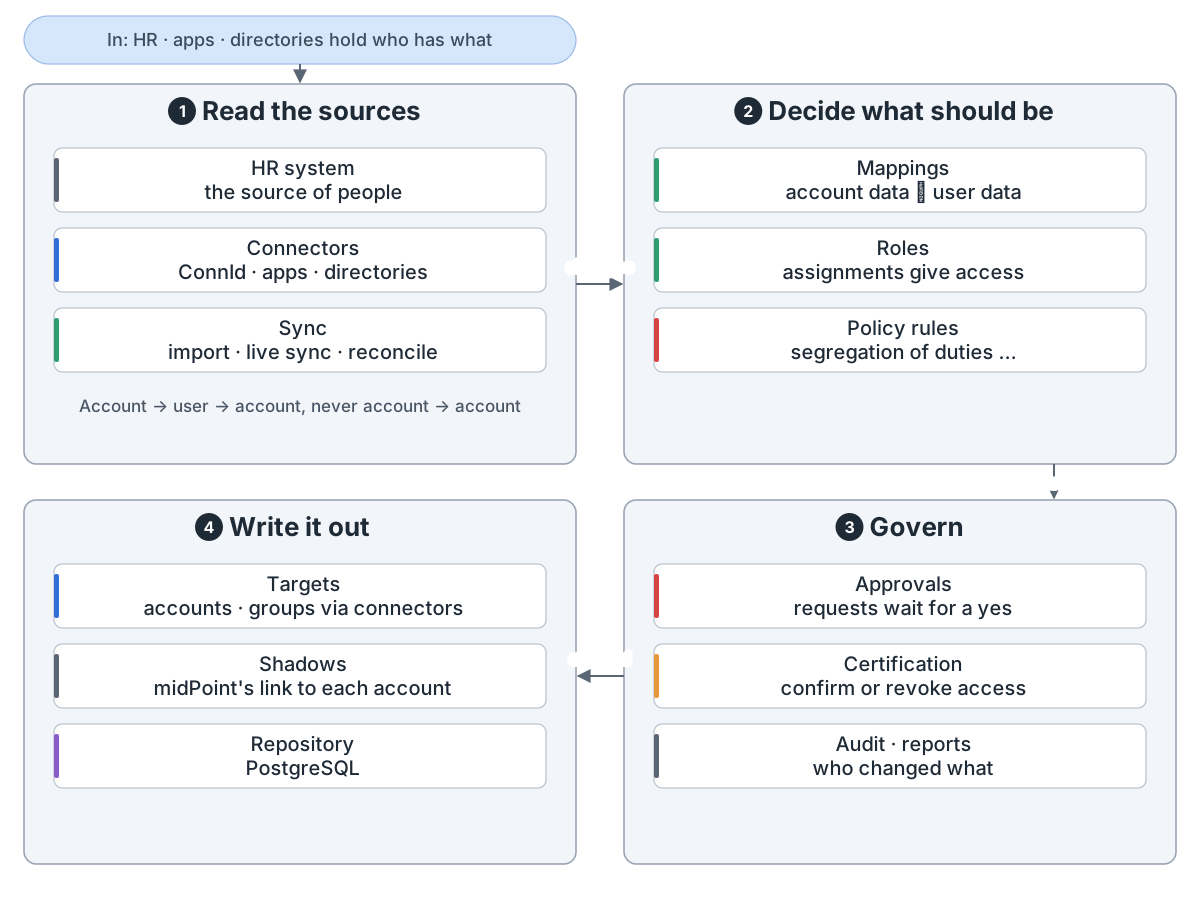
midPoint overview: In: HR, apps and directories each hold part of who works here and what they may use. 1 Read the sources: connectors read the HR system, apps and directories; import, live sync and reconciliation bring changes in. Every account is linked to a user, never account to account. 2 Decide what should be: mappings turn account data into user data and back, roles give access, policy rules such as segregation of duties check it. 3 Govern: requests wait for approval, certification campaigns ask people to confirm or revoke access, and the audit trail and reports record it all. 4 Write it out: connectors create, change and delete accounts and groups on the targets; midPoint keeps a shadow that links to each account and stores its objects in a PostgreSQL repository.

midPoint 是开源的身份治理系统(IGA)。它从 HR 读出谁在职,算出每人该有什么,让各系统账号跟上。

组成。 界面、REST API 和自写代码都调用 Model API。改动都过模型,数据存 PostgreSQL。
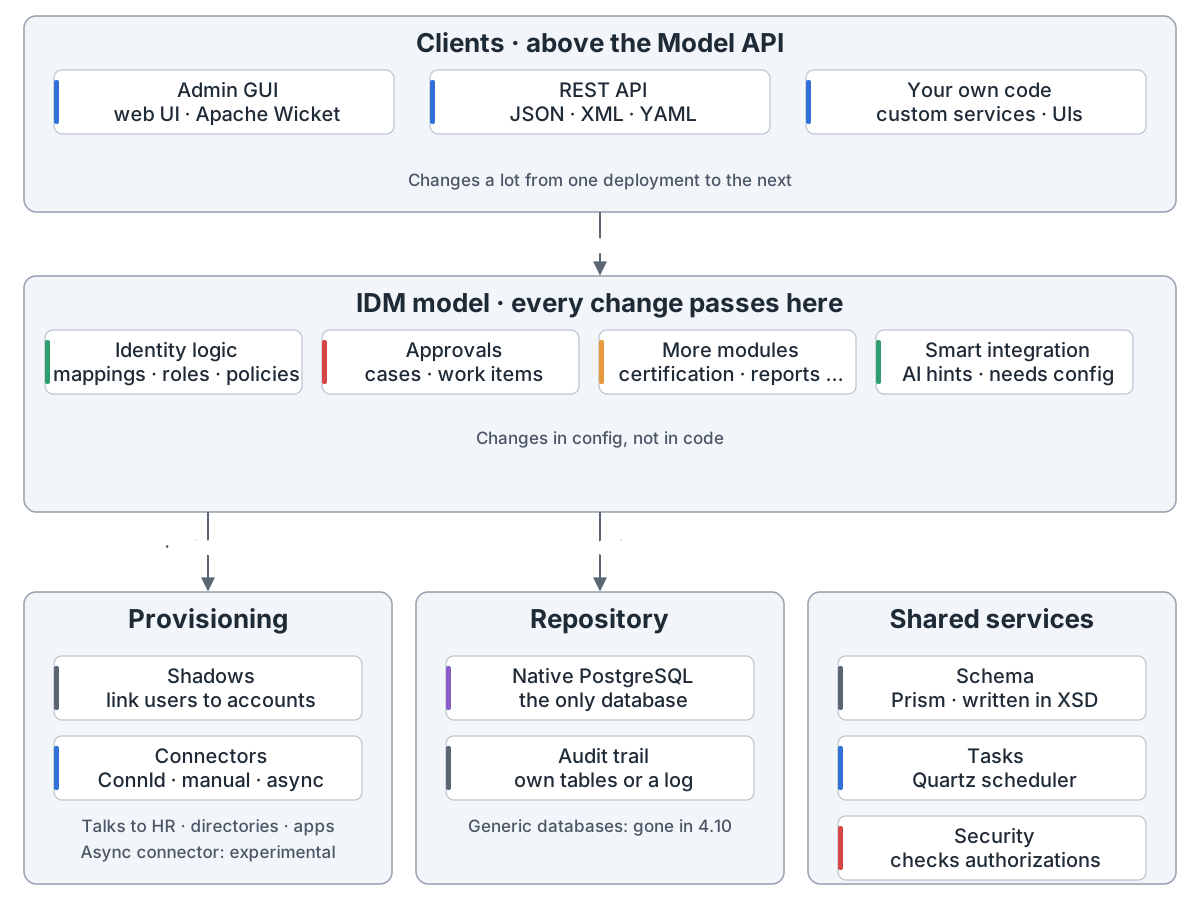
midPoint's parts: Clients, above the Model API, change most from one deployment to the next: the admin GUI, a web UI built with Apache Wicket; the REST API, the Model API over the network, in JSON, XML or YAML; and your own code. They call the IDM model through the Model API. The IDM model is where every change passes and policies are enforced: mappings, roles and policy rules; approvals and cases; certification, reports and notifications; and smart integration, AI suggestions for mappings and correlation from an outside service, which needs the smartIntegration setting. The model reads and writes accounts through provisioning and stores objects in the repository. Provisioning keeps shadows that link users to accounts and talks to apps through ConnId connectors, or built-in manual and asynchronous ones (the asynchronous connector is experimental); it stores the shadows in the repository. The repository is native PostgreSQL, the only database since midPoint 4.10; the audit trail goes to its own tables or to a log. Shared services: the schema (Prism, written in XSD), tasks run by the Quartz scheduler, and security, which checks authorizations.
midPoint 的组成:客户端、IDM 模型、provisioning、存储库、共享服务

同步。 实时同步、对账和导入带进变化。midPoint 给账号找主人再反应,拿不准由人定。
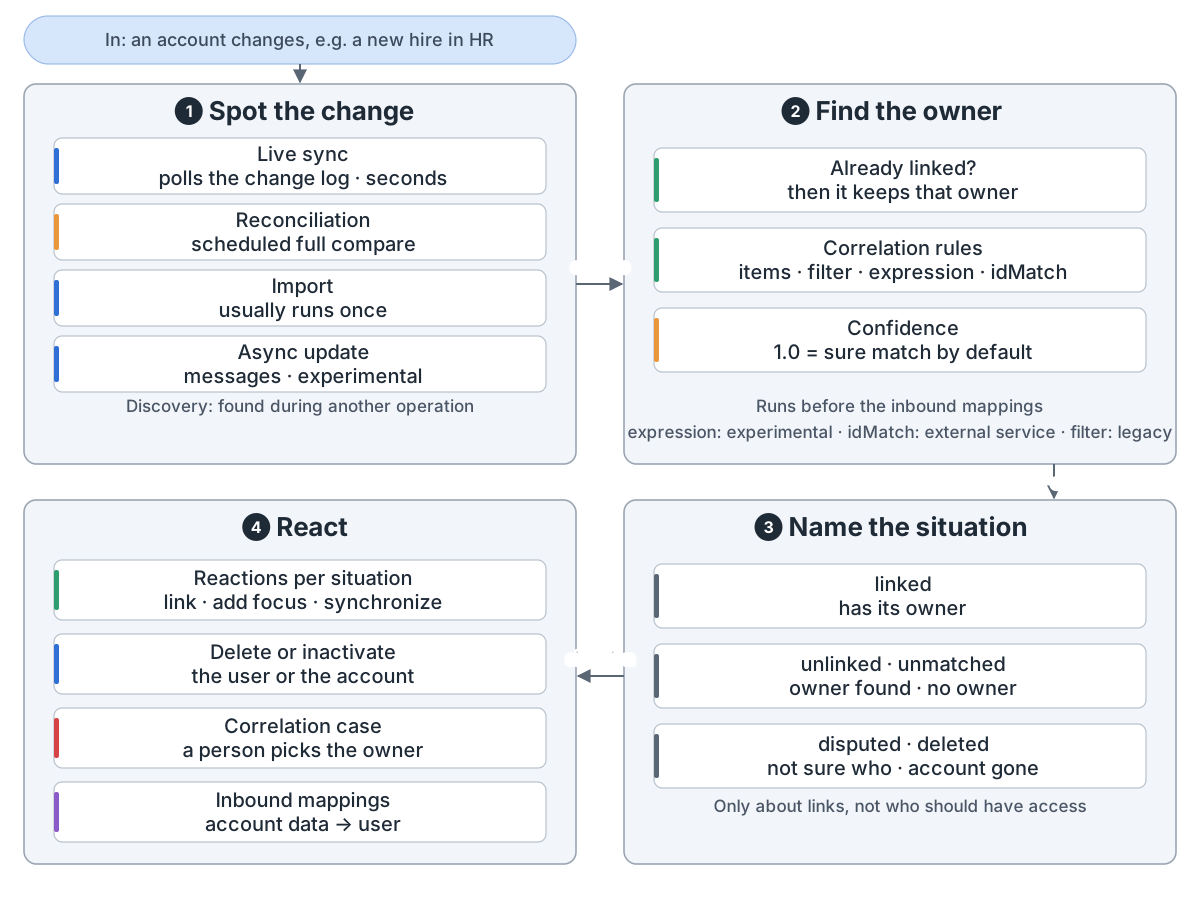
How a change gets into midPoint: In: an account changes on a resource, for example a new hire in the HR system. 1 Spot the change: live sync polls the resource's change log every few seconds; reconciliation is a scheduled full compare, the safety net; import usually runs once; asynchronous update takes messages and is experimental. Discovery is a change found during an unrelated operation. 2 Find the owner: an account already linked to a user keeps that owner; otherwise correlation rules (items, filter, expression, idMatch) look for a user and give a confidence; 1.0 means a sure match by default. The expression correlator is experimental, filter is the legacy kind, and idMatch uses an external ID Match service. Correlation runs before the inbound mappings. 3 Name the situation, one of five: linked (has its owner), unlinked (owner found, not yet linked), unmatched (no owner), disputed (not sure who), deleted (the account is gone). Situations are only about links, not about whether the person should have the account. 4 React: each situation has its reactions, such as link, add focus or synchronize; delete or inactivate the user or the account; create a correlation case so a person picks the owner. Then inbound mappings copy account data into the user.
同步:发现变化、找主人、判定情形、反应

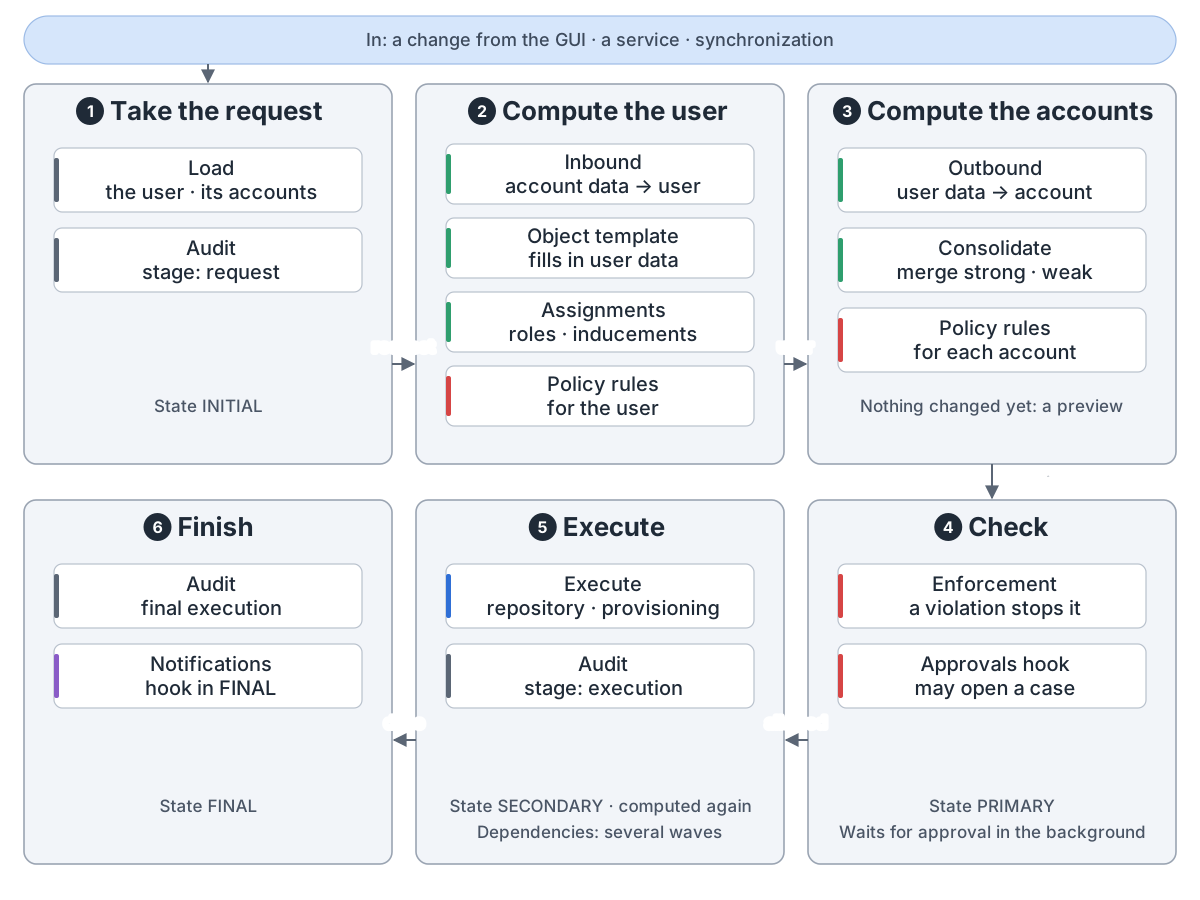
一次修改。 clockwork 先算出用户和账号的样子,查过才写出去。

One change through the model: In: a change from the GUI, from a service or found by synchronization. 1 Take the request, state INITIAL: the clockwork loads the user and its accounts and audits the request. 2 Compute the user, in the projector: inbound mappings bring account data into the user, the object template fills in user data, assignments are evaluated with the roles' inducements, and the user's policy rules are evaluated. 3 Compute the accounts, one by one: outbound mappings turn user data into account data, the values are consolidated, strong and weak mappings merged, and the account's policy rules are evaluated. Nothing is changed yet; the result is a preview. 4 Check, state PRIMARY: rules with the enforcement action stop the change; the approvals hook may take the change into an approval case and continue in the background. 5 Execute, state SECONDARY: the model is computed again, then the changes are written to the repository and through provisioning to the accounts, and audited; with provisioning dependencies this runs in several waves. 6 Finish, state FINAL: the final execution is audited and the notifications hook sends notifications.
一次修改经过模型:接下、算用户、算账号、检查、执行、收尾

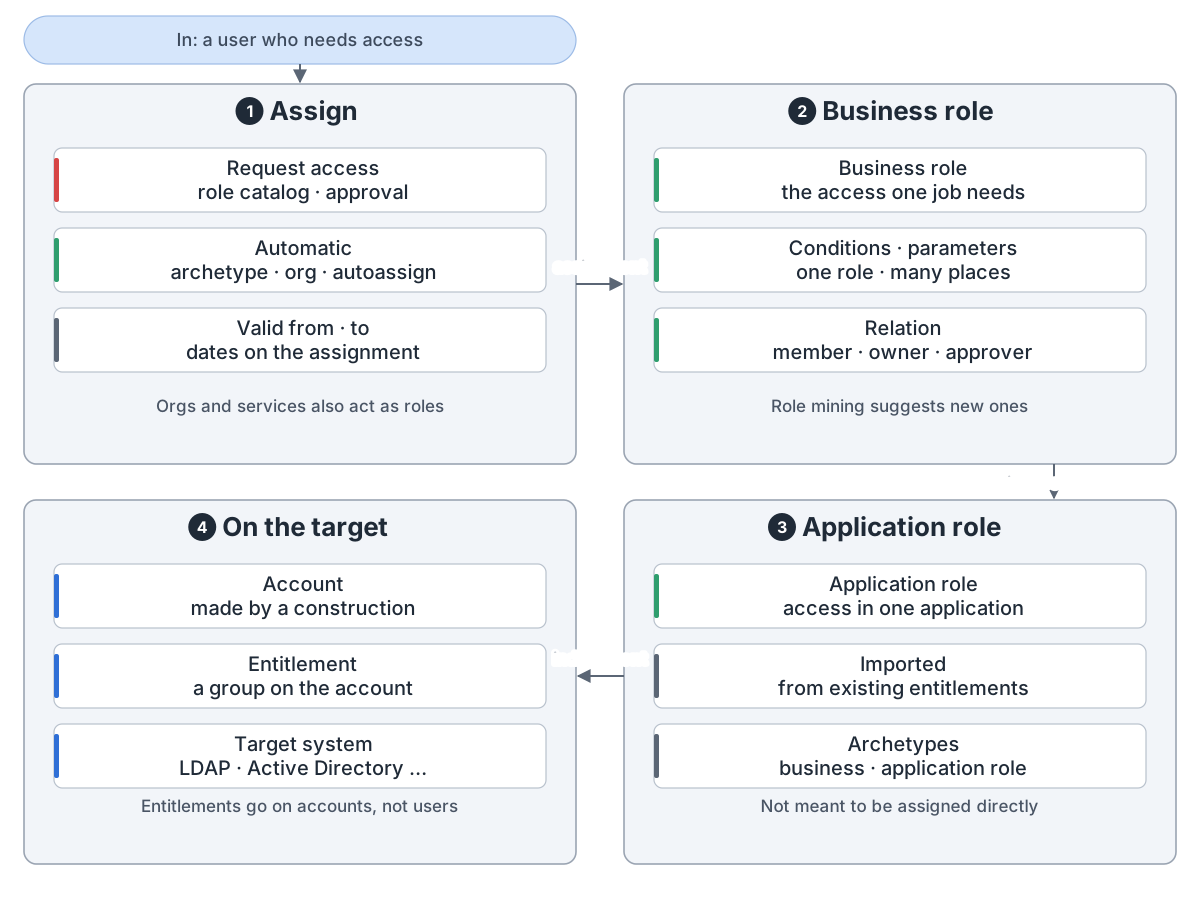
角色。 用户申请或按规则拿到角色。业务角色引入应用角色,再建出账号和组。

How midPoint gives access: In: a user who needs access. 1 Assign: the user asks for a role in the role catalog and an approval follows, or midPoint assigns it on its own through an archetype, the org structure or an autoassign rule; an assignment can carry valid-from and valid-to dates. Orgs and services also act as roles. 2 Business role: groups the access one job needs; conditions and parameters let one role serve many places, and the relation (member, owner, approver) changes what it gives. Role mining suggests new business roles from existing access. 3 Application role: the access in one application, induced by business roles and not meant to be assigned directly; existing entitlements can be imported as application roles. Business role and application role are archetypes that ship with midPoint. 4 On the target: an inducement makes the account and puts an entitlement, such as a group, on it, in LDAP, Active Directory and other systems. Entitlements belong to accounts, not users.
怎么给权限:分配、业务角色、应用角色、目标系统上的账号和组

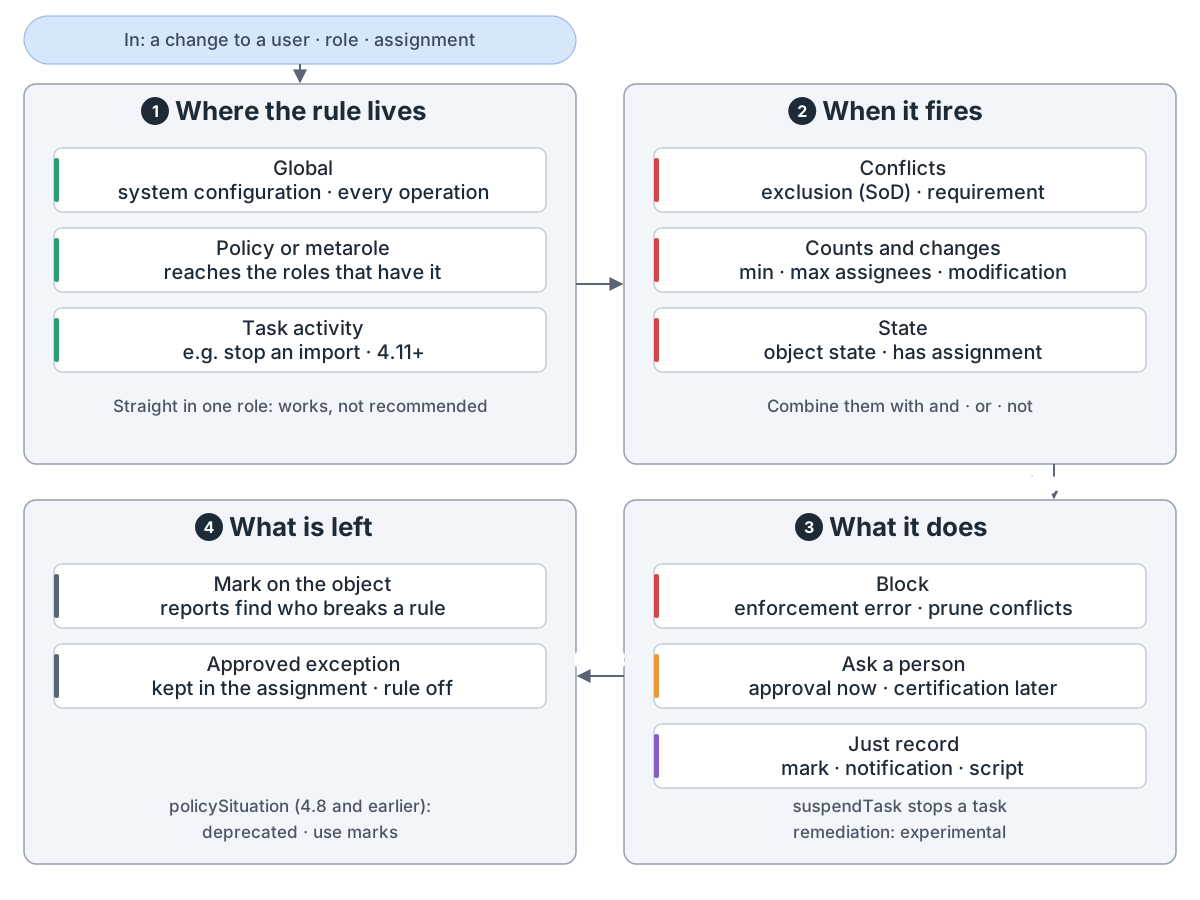
策略规则把条件(比如两个角色不能兼得)配上动作:拦下、审批或打标记。

midPoint policy rules: In: a change to a user, a role or an assignment. 1 Where the rule lives: global rules in the system configuration are checked on every operation; rules in a policy or metarole reach every role that has it assigned, through an inducement; since midPoint 4.11 rules can sit in a task activity too, for example to stop an import after a number of changes. A rule written straight into one role works but is not recommended. 2 When it fires, the constraints: conflicts, where exclusion keeps two roles apart (segregation of duties) and requirement needs them together; counts and changes, such as too few or too many assignees, or a change or new assignment; state, such as an object state or having an assignment. Constraints combine with and, or and not. 3 What it does, the actions: block, where enforcement ends the change in an error and prune removes the conflicting assignments; ask a person, an approval now or a certification campaign later; just record, with a mark, a notification or a script. suspendTask stops a task; remediation is experimental. 4 What is left: a mark on the object, so reports can find the objects that break a rule; an approved exception stored in the assignment, which turns the rule off for that user and that assignment; policySituation, used up to midPoint 4.8, is deprecated in favour of marks.
策略规则:放在哪、何时触发、做什么、留下什么

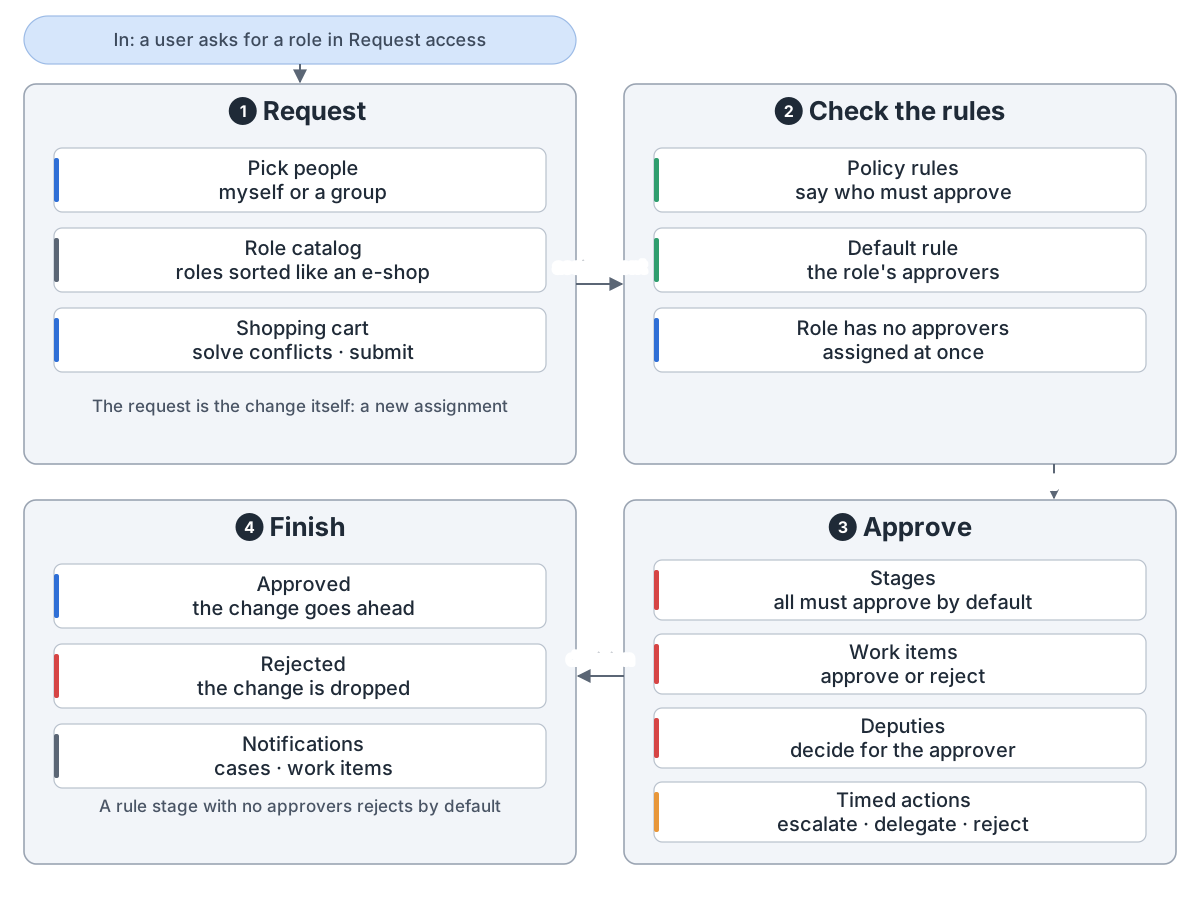
审批。 申请就是修改本身。规则定谁审,分阶段。代理人可代审,到期可升级。

Access requests and approvals: In: a user asks for a role in Request access. 1 Request: pick the people, myself or a group, pick roles from a role catalog sorted like an e-shop, and submit the shopping cart after solving conflicts. The request is just the change itself: adding an assignment. 2 Check the rules: policy rules say who must approve; with no such rule the default rule asks the role's approvers; a role with no approvers is assigned at once. 3 Approve: approval runs in stages, one after another; all approvers in a stage must approve by default, or the first one decides; each approver gets a work item to approve or reject; deputies can decide for the approver; timed actions at a deadline escalate, delegate or complete the work item, for example reject it. 4 Finish: approved, the change goes ahead; rejected, it is dropped; notifications go out as cases and work items open and close. A configured stage that finds no approvers rejects by default.
访问申请:申请、查规则、分阶段审批、结束

认证请经理或角色所有者确认或撤销权限。修复设为自动才收回。

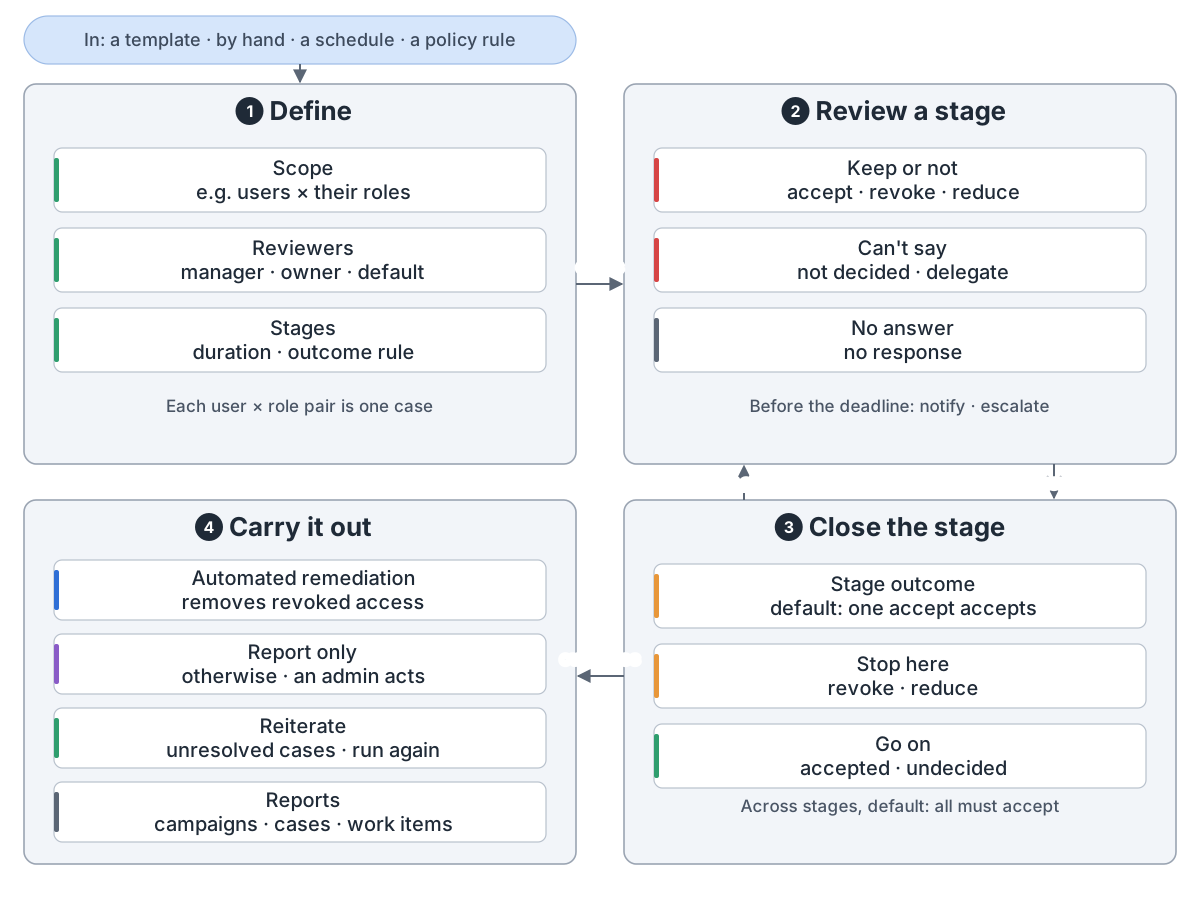
Access certification in midPoint: In: a campaign template, started by hand, by a scheduled task, or by a policy rule for an ad-hoc campaign. 1 Define: the scope picks the objects and what to certify on them, such as users and their roles, with a filter; each pair is one case. Reviewers are the object's manager, the target's owner and the like, with a default reviewer as fallback. Each stage has a duration and an outcome rule. 2 Review a stage: reviewers decide each case: accept, revoke or reduce, or not decided or delegate; a case with no decision is no response. Before the deadline midPoint can notify and escalate. 3 Close the stage: the stage outcome by default is one accept accepts. Revoke and reduce stop the review; accepted and undecided cases go on to the next stage. Across stages the default is all must accept. 4 Carry it out: with automated remediation midPoint removes revoked access; otherwise it is report only and an admin acts. Unresolved cases can be reiterated, run again by hand unless a delay is set. Reports cover definitions, campaigns, cases and work items.
访问认证:定义、逐阶段审核、关闭阶段、执行决定

预配经连接器写出,或给人开工单。做不成的改动存在影子里重试。

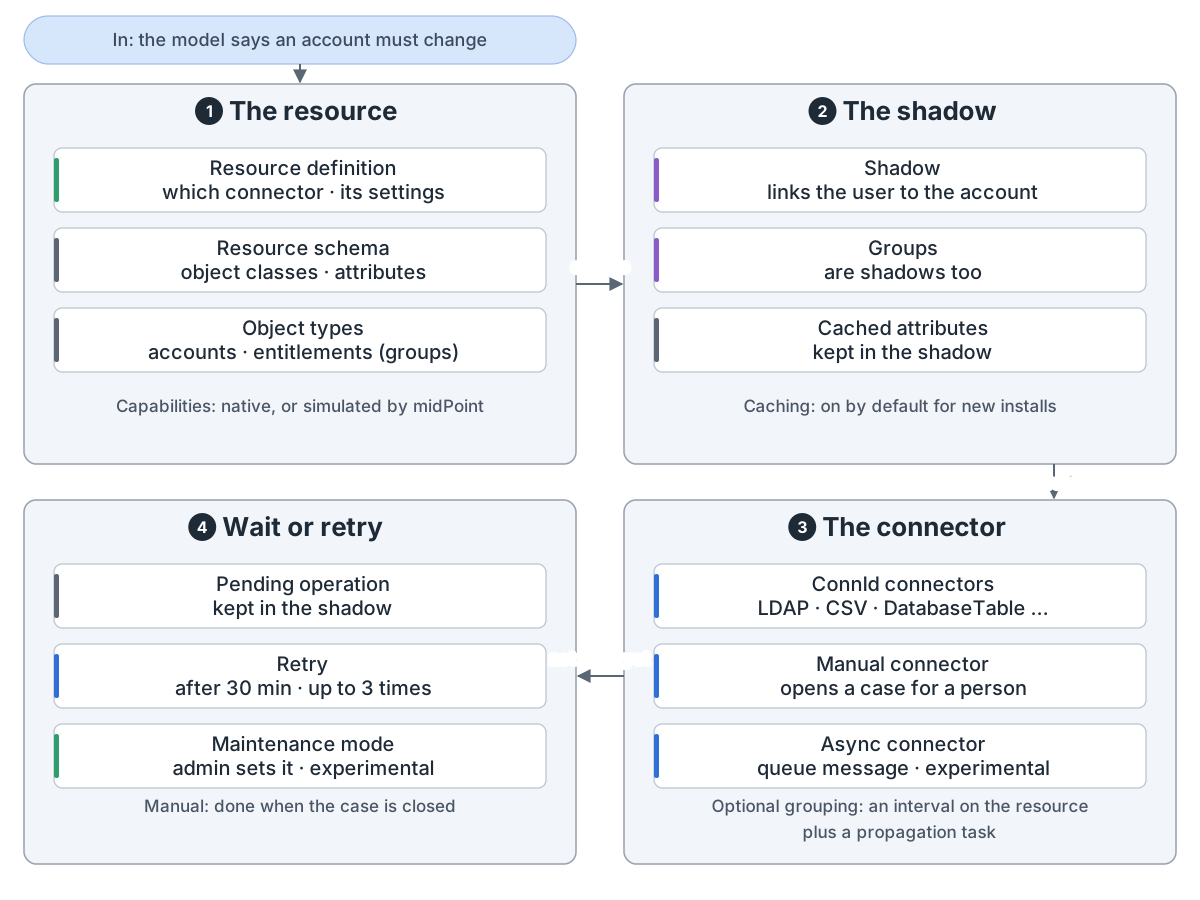
How midPoint writes to a target system: In: the model decides that an account on a target system must be created, changed or deleted. 1 The resource: a resource definition names the connector and its settings; the resource schema lists the object classes and attributes the connector reads from the system; object types say which objects are accounts and which are entitlements such as groups. Capabilities are native to the resource or simulated by midPoint. 2 The shadow: midPoint keeps a shadow in its repository that links the user to the real account, groups are shadows too, and attributes are cached in the shadow (passive caching, on by default for new installations). 3 The connector does the work, one of three kinds: ConnId connectors such as the bundled LDAP, CSV and DatabaseTable connectors; the built-in manual connector, which opens a case for a person; or the built-in asynchronous connector (experimental), which sends a message to a queue. Changes can be grouped and sent together with operation grouping: a grouping interval on the resource and a propagation task. 4 Wait or retry: an operation that is not done yet, because the resource is down, a person still has to do it, or the resource is in maintenance mode (experimental) set by an admin, is kept in the shadow as a pending operation; a failed one is retried after 30 minutes, up to 3 times by default.
写到目标系统:资源、影子、连接器、等待或重试

安全。 按通道走认证模块。没允许就拒绝。改动都进审计。

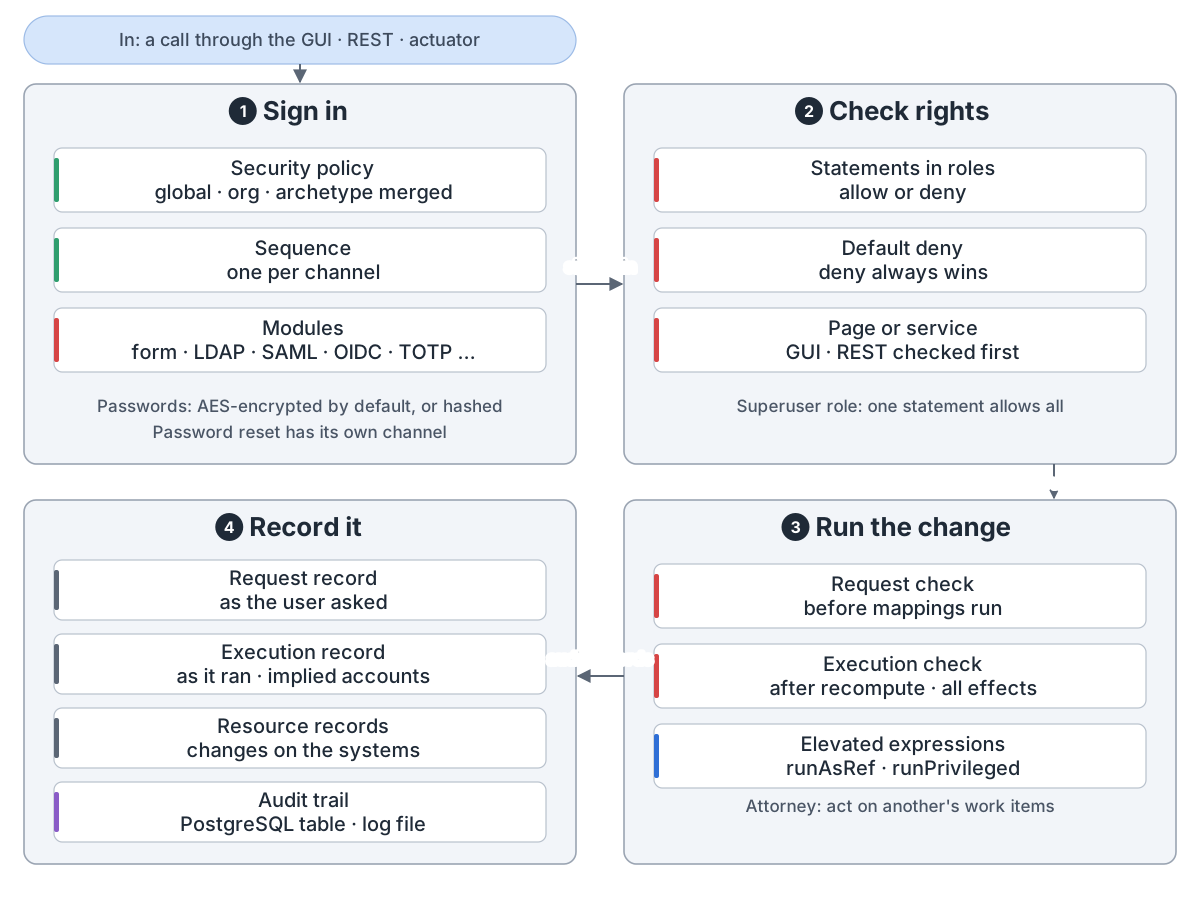
midPoint's own security: In: a person or a client calls midPoint through the web GUI, REST or the actuator endpoints. 1 Sign in: the security policy, global and from the user's organization and archetype merged, picks an authentication sequence for each channel; the sequence runs modules such as login form, LDAP, SAML, OIDC and TOTP. Passwords are encrypted with AES by default, or hashed; password reset has its own channel. 2 Check rights: authorization statements in roles allow or deny; what is not allowed is denied, and deny always wins. The GUI page or the service is checked first. A Superuser role holds one statement that allows everything. 3 Run the change: a request check runs before mappings and policies, an execution check after recompute, with all its effects. Expressions can run as another user or with full privileges. An attorney can act on another user's approval work items. 4 Record it: the audit trail writes a request record, an execution record and resource records; the shipped config.xml sends it to a PostgreSQL table and to the log file.
midPoint 自身的安全:登录、检查权限、执行、记录

模拟先用 preview 模式试配置,再启用。

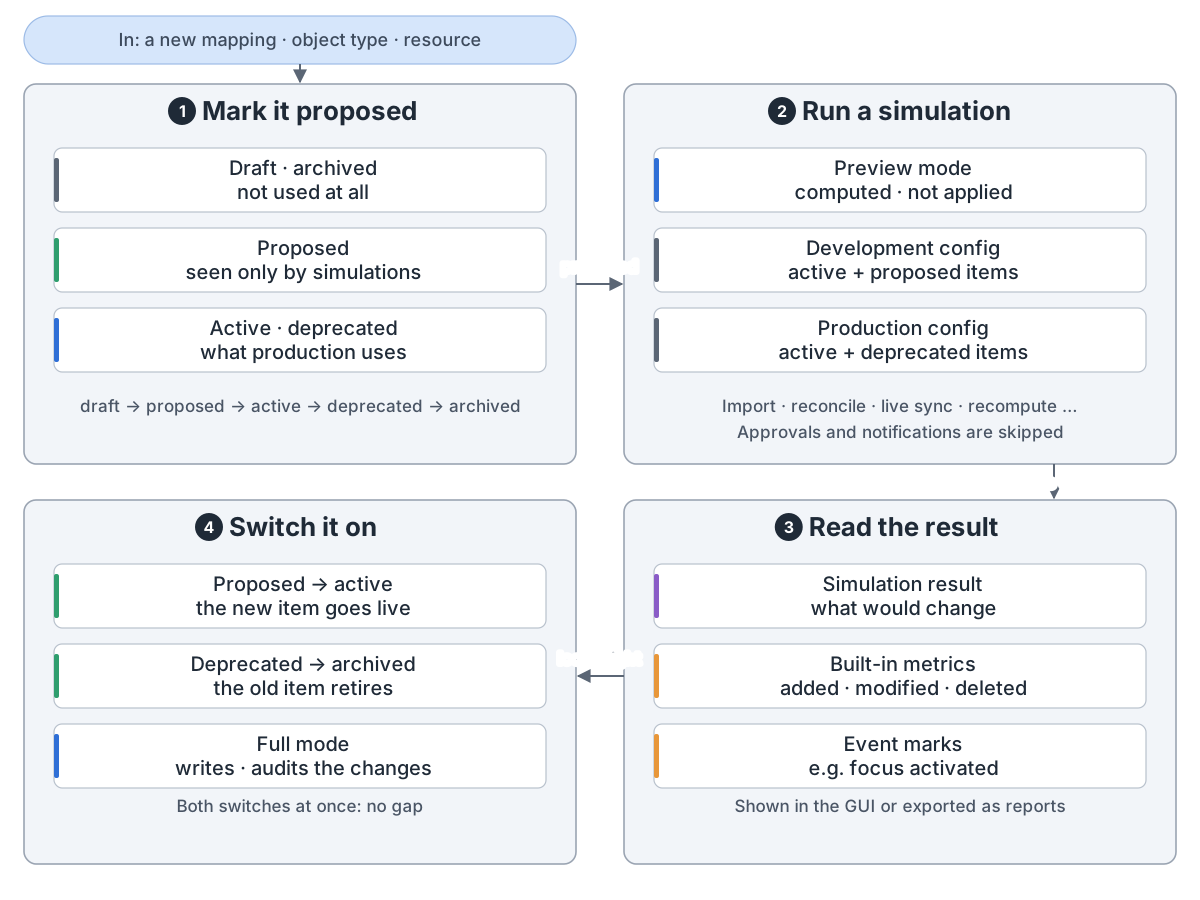
Simulations: try a change first: In: a new or changed piece of config, such as a mapping, an object type or a whole resource. 1 Mark it proposed: each config item has a lifecycle state, in the order draft, proposed, active, deprecated, archived. Draft and archived items are not used at all; proposed items are seen only by simulations; active and deprecated items are what production uses. 2 Run a simulation: a task such as import, reconciliation, live sync or recompute runs in preview mode, where changes are computed but not applied. It uses the development config (active plus proposed items) or the production config (active plus deprecated items). The development config never runs in full mode, and approvals and notifications are skipped. 3 Read the result: the simulation result lists what would change, with built-in metrics (added, modified, deleted) and event marks such as focus activated; it is shown in the GUI or exported as reports. 4 Switch it on: set the new item from proposed to active and the old one from deprecated to archived, both at once for a seamless switch; from then on full mode writes the changes to the repository and the resources and records them in the audit log.
模拟:标成 proposed、预演、看结果、启用

运行。 一个 Java 服务,8080 端口。设 clustered 为 true,多节点共用仓库。
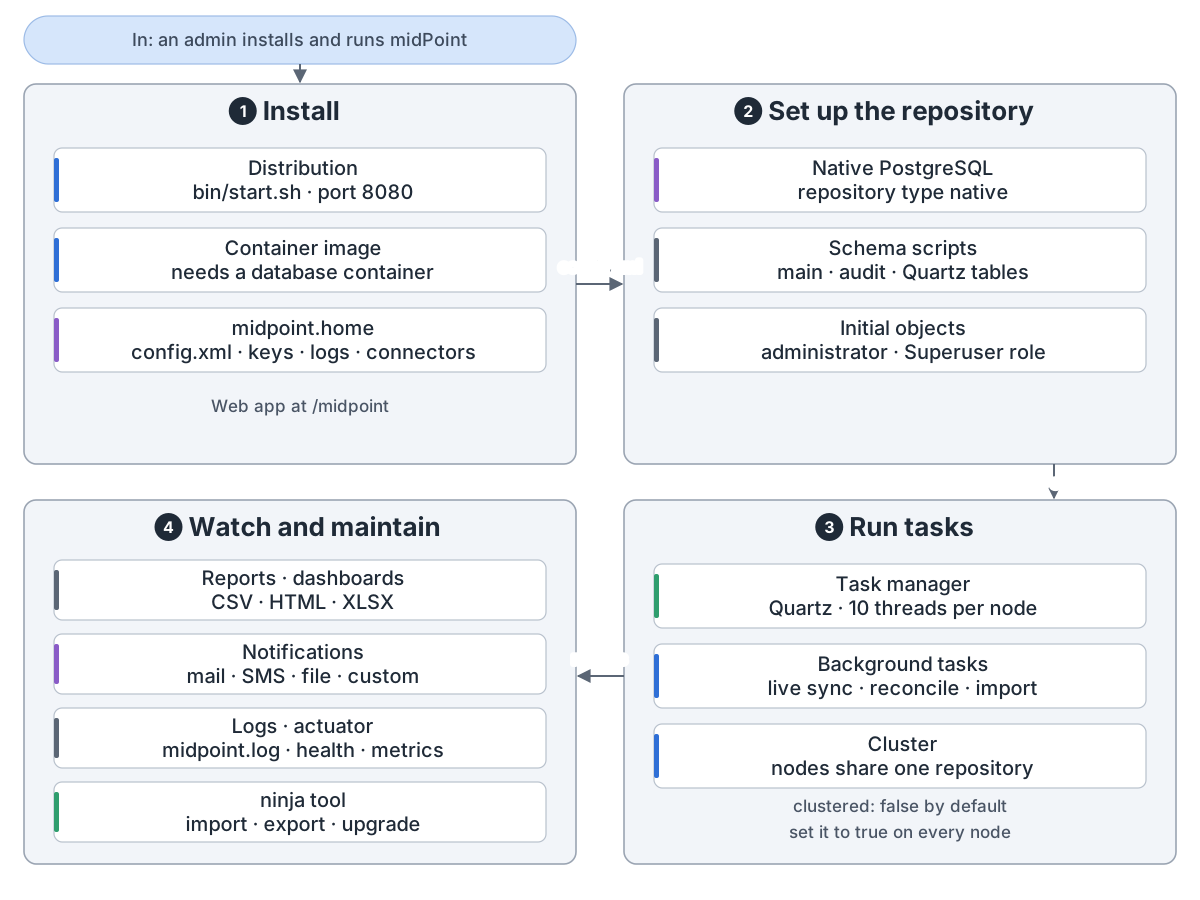
Running midPoint: In: an admin installs and runs midPoint. 1 Install: the distribution starts with bin/start.sh and listens on port 8080, the web app at /midpoint; the container image needs a database container next to it. The midpoint.home directory holds config.xml, keys, logs and connector files. 2 Set up the repository: config.xml points to a native PostgreSQL repository; the schema scripts create the main, audit and Quartz tables; when installed midPoint loads initial objects such as the administrator user and the Superuser role. 3 Run tasks: the task manager uses the Quartz scheduler with 10 worker threads per node by default; background tasks run live sync, reconciliation and import. In a cluster several nodes share one repository and take tasks first come, first served; clustered is false by default and must be set to true on every node. 4 Watch and maintain: reports in CSV, HTML or XLSX and dashboards; notifications by mail, SMS, file or a custom transport; midpoint.log and Spring Boot actuator endpoints such as health and metrics; and the ninja command-line tool to import, export and upgrade.
运行 midPoint:安装、仓库、后台任务、监看

midPoint is an open-source identity governance and administration (IGA) system. It reads who works here from HR, works out what each person should have, and keeps every account in line.

Parts. The GUI, the REST API and your own code all call one Model API. Every change goes through the model. Data lives in PostgreSQL.

midPoint's parts: Clients, above the Model API, change most from one deployment to the next: the admin GUI, a web UI built with Apache Wicket; the REST API, the Model API over the network, in JSON, XML or YAML; and your own code. They call the IDM model through the Model API. The IDM model is where every change passes and policies are enforced: mappings, roles and policy rules; approvals and cases; certification, reports and notifications; and smart integration, AI suggestions for mappings and correlation from an outside service, which needs the smartIntegration setting. The model reads and writes accounts through provisioning and stores objects in the repository. Provisioning keeps shadows that link users to accounts and talks to apps through ConnId connectors, or built-in manual and asynchronous ones (the asynchronous connector is experimental); it stores the shadows in the repository. The repository is native PostgreSQL, the only database since midPoint 4.10; the audit trail goes to its own tables or to a log. Shared services: the schema (Prism, written in XSD), tasks run by the Quartz scheduler, and security, which checks authorizations.
midPoint's parts: clients, the IDM model, provisioning, the repository, shared services

Sync. Live sync, reconciliation and import bring account changes in. midPoint finds each account's owner, names the situation and reacts. When it can't tell, a person decides.

How a change gets into midPoint: In: an account changes on a resource, for example a new hire in the HR system. 1 Spot the change: live sync polls the resource's change log every few seconds; reconciliation is a scheduled full compare, the safety net; import usually runs once; asynchronous update takes messages and is experimental. Discovery is a change found during an unrelated operation. 2 Find the owner: an account already linked to a user keeps that owner; otherwise correlation rules (items, filter, expression, idMatch) look for a user and give a confidence; 1.0 means a sure match by default. The expression correlator is experimental, filter is the legacy kind, and idMatch uses an external ID Match service. Correlation runs before the inbound mappings. 3 Name the situation, one of five: linked (has its owner), unlinked (owner found, not yet linked), unmatched (no owner), disputed (not sure who), deleted (the account is gone). Situations are only about links, not about whether the person should have the account. 4 React: each situation has its reactions, such as link, add focus or synchronize; delete or inactivate the user or the account; create a correlation case so a person picks the owner. Then inbound mappings copy account data into the user.
Sync: spot the change, find the owner, name the situation, react

One change. The clockwork first works out what the user and each account should look like. Rules and approvals check that, and only then is it written out.

One change through the model: In: a change from the GUI, from a service or found by synchronization. 1 Take the request, state INITIAL: the clockwork loads the user and its accounts and audits the request. 2 Compute the user, in the projector: inbound mappings bring account data into the user, the object template fills in user data, assignments are evaluated with the roles' inducements, and the user's policy rules are evaluated. 3 Compute the accounts, one by one: outbound mappings turn user data into account data, the values are consolidated, strong and weak mappings merged, and the account's policy rules are evaluated. Nothing is changed yet; the result is a preview. 4 Check, state PRIMARY: rules with the enforcement action stop the change; the approvals hook may take the change into an approval case and continue in the background. 5 Execute, state SECONDARY: the model is computed again, then the changes are written to the repository and through provisioning to the accounts, and audited; with provisioning dependencies this runs in several waves. 6 Finish, state FINAL: the final execution is audited and the notifications hook sends notifications.
One change through the model: take it, compute the user and accounts, check, execute, finish

Roles. A user asks for a role or gets one by rule. A business role pulls in application roles, and those make the accounts and groups.

How midPoint gives access: In: a user who needs access. 1 Assign: the user asks for a role in the role catalog and an approval follows, or midPoint assigns it on its own through an archetype, the org structure or an autoassign rule; an assignment can carry valid-from and valid-to dates. Orgs and services also act as roles. 2 Business role: groups the access one job needs; conditions and parameters let one role serve many places, and the relation (member, owner, approver) changes what it gives. Role mining suggests new business roles from existing access. 3 Application role: the access in one application, induced by business roles and not meant to be assigned directly; existing entitlements can be imported as application roles. Business role and application role are archetypes that ship with midPoint. 4 On the target: an inducement makes the account and puts an entitlement, such as a group, on it, in LDAP, Active Directory and other systems. Entitlements belong to accounts, not users.
Giving access: assign, business role, application role, account and group on the target

Policy rules pair a condition, such as two roles that must not go together, with an action: block, ask for approval, or mark it for a report.

midPoint policy rules: In: a change to a user, a role or an assignment. 1 Where the rule lives: global rules in the system configuration are checked on every operation; rules in a policy or metarole reach every role that has it assigned, through an inducement; since midPoint 4.11 rules can sit in a task activity too, for example to stop an import after a number of changes. A rule written straight into one role works but is not recommended. 2 When it fires, the constraints: conflicts, where exclusion keeps two roles apart (segregation of duties) and requirement needs them together; counts and changes, such as too few or too many assignees, or a change or new assignment; state, such as an object state or having an assignment. Constraints combine with and, or and not. 3 What it does, the actions: block, where enforcement ends the change in an error and prune removes the conflicting assignments; ask a person, an approval now or a certification campaign later; just record, with a mark, a notification or a script. suspendTask stops a task; remediation is experimental. 4 What is left: a mark on the object, so reports can find the objects that break a rule; an approved exception stored in the assignment, which turns the rule off for that user and that assignment; policySituation, used up to midPoint 4.8, is deprecated in favour of marks.
Policy rules: where they live, when they fire, what they do, what they leave

Approvals. A request is just the change itself. Rules decide who approves, in stages. Deputies can stand in, and a deadline can escalate.

Access requests and approvals: In: a user asks for a role in Request access. 1 Request: pick the people, myself or a group, pick roles from a role catalog sorted like an e-shop, and submit the shopping cart after solving conflicts. The request is just the change itself: adding an assignment. 2 Check the rules: policy rules say who must approve; with no such rule the default rule asks the role's approvers; a role with no approvers is assigned at once. 3 Approve: approval runs in stages, one after another; all approvers in a stage must approve by default, or the first one decides; each approver gets a work item to approve or reject; deputies can decide for the approver; timed actions at a deadline escalate, delegate or complete the work item, for example reject it. 4 Finish: approved, the change goes ahead; rejected, it is dropped; notifications go out as cases and work items open and close. A configured stage that finds no approvers rejects by default.
Access requests: ask, check the rules, approve in stages, finish

Certification asks managers or role owners to confirm or revoke access. Revoked access is removed only if remediation is set to automated.

Access certification in midPoint: In: a campaign template, started by hand, by a scheduled task, or by a policy rule for an ad-hoc campaign. 1 Define: the scope picks the objects and what to certify on them, such as users and their roles, with a filter; each pair is one case. Reviewers are the object's manager, the target's owner and the like, with a default reviewer as fallback. Each stage has a duration and an outcome rule. 2 Review a stage: reviewers decide each case: accept, revoke or reduce, or not decided or delegate; a case with no decision is no response. Before the deadline midPoint can notify and escalate. 3 Close the stage: the stage outcome by default is one accept accepts. Revoke and reduce stop the review; accepted and undecided cases go on to the next stage. Across stages the default is all must accept. 4 Carry it out: with automated remediation midPoint removes revoked access; otherwise it is report only and an admin acts. Unresolved cases can be reiterated, run again by hand unless a delay is set. Reports cover definitions, campaigns, cases and work items.
Access certification: define, review each stage, close it, carry it out

Provisioning writes through a connector, or opens a case for a person. A change that can't go through waits in the shadow and is retried.

How midPoint writes to a target system: In: the model decides that an account on a target system must be created, changed or deleted. 1 The resource: a resource definition names the connector and its settings; the resource schema lists the object classes and attributes the connector reads from the system; object types say which objects are accounts and which are entitlements such as groups. Capabilities are native to the resource or simulated by midPoint. 2 The shadow: midPoint keeps a shadow in its repository that links the user to the real account, groups are shadows too, and attributes are cached in the shadow (passive caching, on by default for new installations). 3 The connector does the work, one of three kinds: ConnId connectors such as the bundled LDAP, CSV and DatabaseTable connectors; the built-in manual connector, which opens a case for a person; or the built-in asynchronous connector (experimental), which sends a message to a queue. Changes can be grouped and sent together with operation grouping: a grouping interval on the resource and a propagation task. 4 Wait or retry: an operation that is not done yet, because the resource is down, a person still has to do it, or the resource is in maintenance mode (experimental) set by an admin, is kept in the shadow as a pending operation; a failed one is retried after 30 minutes, up to 3 times by default.
Writing to a target: resource, shadow, connector, wait or retry

Security. You sign in through modules picked per channel. Anything not allowed is denied. Every change lands in the audit trail.

midPoint's own security: In: a person or a client calls midPoint through the web GUI, REST or the actuator endpoints. 1 Sign in: the security policy, global and from the user's organization and archetype merged, picks an authentication sequence for each channel; the sequence runs modules such as login form, LDAP, SAML, OIDC and TOTP. Passwords are encrypted with AES by default, or hashed; password reset has its own channel. 2 Check rights: authorization statements in roles allow or deny; what is not allowed is denied, and deny always wins. The GUI page or the service is checked first. A Superuser role holds one statement that allows everything. 3 Run the change: a request check runs before mappings and policies, an execution check after recompute, with all its effects. Expressions can run as another user or with full privileges. An attorney can act on another user's approval work items. 4 Record it: the audit trail writes a request record, an execution record and resource records; the shipped config.xml sends it to a PostgreSQL table and to the log file.
midPoint's own security: sign in, check rights, run the change, record it

Simulations let you try a config change in preview mode before you switch it on.

Simulations: try a change first: In: a new or changed piece of config, such as a mapping, an object type or a whole resource. 1 Mark it proposed: each config item has a lifecycle state, in the order draft, proposed, active, deprecated, archived. Draft and archived items are not used at all; proposed items are seen only by simulations; active and deprecated items are what production uses. 2 Run a simulation: a task such as import, reconciliation, live sync or recompute runs in preview mode, where changes are computed but not applied. It uses the development config (active plus proposed items) or the production config (active plus deprecated items). The development config never runs in full mode, and approvals and notifications are skipped. 3 Read the result: the simulation result lists what would change, with built-in metrics (added, modified, deleted) and event marks such as focus activated; it is shown in the GUI or exported as reports. 4 Switch it on: set the new item from proposed to active and the old one from deprecated to archived, both at once for a seamless switch; from then on full mode writes the changes to the repository and the resources and records them in the audit log.
Simulations: mark it proposed, preview, read the result, switch it on

Running it. One Java server on port 8080. Set clustered to true and several nodes share one repository.

Running midPoint: In: an admin installs and runs midPoint. 1 Install: the distribution starts with bin/start.sh and listens on port 8080, the web app at /midpoint; the container image needs a database container next to it. The midpoint.home directory holds config.xml, keys, logs and connector files. 2 Set up the repository: config.xml points to a native PostgreSQL repository; the schema scripts create the main, audit and Quartz tables; when installed midPoint loads initial objects such as the administrator user and the Superuser role. 3 Run tasks: the task manager uses the Quartz scheduler with 10 worker threads per node by default; background tasks run live sync, reconciliation and import. In a cluster several nodes share one repository and take tasks first come, first served; clustered is false by default and must be set to true on every node. 4 Watch and maintain: reports in CSV, HTML or XLSX and dashboards; notifications by mail, SMS, file or a custom transport; midpoint.log and Spring Boot actuator endpoints such as health and metrics; and the ninja command-line tool to import, export and upgrade.
Running midPoint: install, repository, background tasks, watch

来源Source: github.com

← 全部架构← All architectures